How to Combine MobileProxy.Space Proxies and CAPTCHA Solving for Stable Automation Workflows
Most automation projects don't fail because of bad code. They fail because of two things that have nothing to do with your parser logic: IP reputation and CAPTCHA.
You write a clean scraper, test it locally, everything works. Then you scale to 20 threads and suddenly you get 403s, endless "verify you are human" screens, and empty result sets. The classic reaction is to buy more proxies. The second reaction is to buy a CAPTCHA solver. But the real fix is making both work as one system.
This tutorial shows how to wire mobile proxies from MobileProxy.Space together with an automated CAPTCHA solving API so your workflow survives long runs — with code samples, retry logic, and a checklist of mistakes that quietly kill success rates.mobile proxies from MobileProxy.Space together with an automated CAPTCHA solving API so your workflow survives long runs — with code samples, retry logic, and a checklist of mistakes that quietly kill success rates.
Why Proxies Alone Aren't Enough
Mobile proxies are the strongest option available for automation, because mobile IPs are shared by hundreds of real users through carrier NAT. Blocking one aggressively hurts real customers, so anti-bot systems treat mobile ranges with more tolerance.
But tolerance is not immunity. Even with a perfect mobile IP you will still hit CAPTCHA when:
- you send requests faster than a human could;
- your browser fingerprint looks automated;
- the target site shows CAPTCHA to everyone on specific routes (login, checkout, search);
- your session cookies are missing or inconsistent.
Why a CAPTCHA Solver Alone Isn't Enough Either
Now flip it. Suppose you only use a solving service from a datacenter IP. What happens?
- reCAPTCHA v3 returns a low score, and the site rejects the token even though it's "valid";
- you get a new CAPTCHA immediately after solving the previous one;
- token validation fails because the IP that requested the CAPTCHA and the IP that submitted it don't match.
Key principle: proxies reduce how often CAPTCHA appears. A solver handles the cases that appear anyway. You need both, and they must share the same session context.
The Architecture
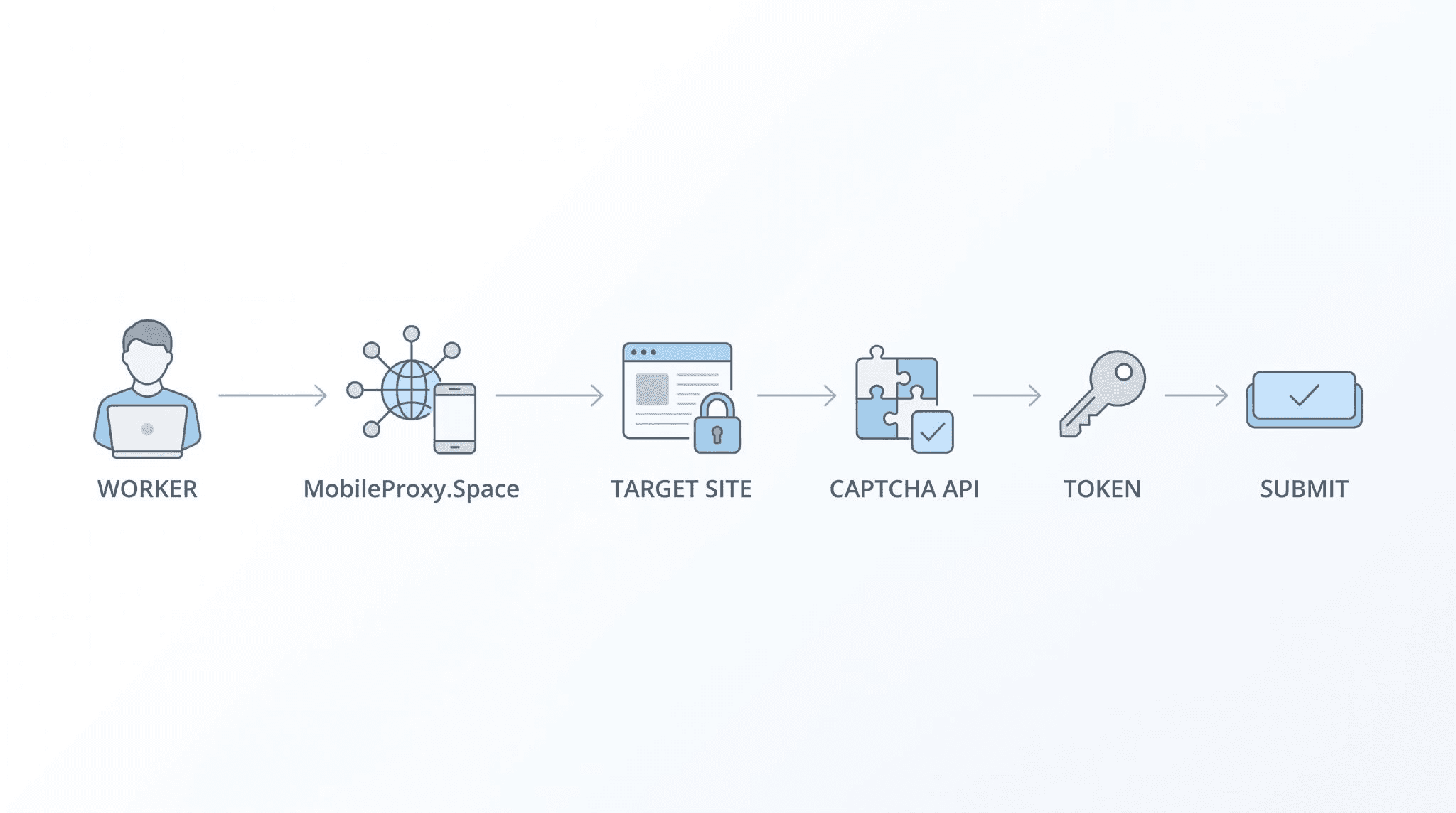
Here's the loop that a stable workflow follows:
┌──────────────┐
│  Task queue  │
└──────┬───────┘
       │
       ▼
┌────────────────────┐     ┌──────────────────────┐
│  Worker (session)  │────▶│ MobileProxy.Space    │
│  cookies + UA      │     │ mobile IP + rotation │
└──────┬─────────────┘     └──────────────────────┘
       │
       │ CAPTCHA detected?
       ▼
┌────────────────────────┐
│  CAPTCHA solving API   │──▶ token
└──────┬─────────────────┘
       │
       ▼
┌────────────────────┐
│ Submit + validate  │──▶ success / rotate IP / retry
└────────────────────┘
Step 1. Prepare the Mobile Proxy
In your MobileProxy.Space dashboard you get a proxy with:
- host and port (separate ports for HTTP/HTTPS and SOCKS5);
- login and password for authorization;
- an IP rotation link — a URL you call to force a new mobile IP;
- optional auto-rotation interval (e.g. every 5–15 minutes);
- geo selection, so you can match the proxy country to the target audience of the site.
Two settings matter most for automation:
1. Rotation mode. Use manual rotation by link for logic-driven workflows (rotate only when you get blocked). Use timer rotation for wide, stateless crawling.
2. Rotation interval. If you rotate every 60 seconds while a login flow is in progress, you will break your own session. Keep the interval longer than your longest single task.
Quick sanity check before writing any logic:
curl -x http://LOGIN:PASSWORD@proxy.host:PORT https://api.ipify.org
# → returns the current mobile IP

curl "https://mobileproxy.space/api.html?command=reboot&proxy_key=YOUR_KEY"
# → forces IP rotation (use your actual rotation link from the dashboard)

curl -x http://LOGIN:PASSWORD@proxy.host:PORT https://api.ipify.org
# → should return a different IP
If the IP doesn't change, fix that before debugging anything else.
Step 2. Bind Your Client to One Session Identity
One session = one proxy + one cookie jar + one User-Agent + one set of headers. Never mix.
Python requests
import requests

PROXY = "http://LOGIN:PASSWORD@proxy.host:PORT"

session = requests.Session()
session.proxies = {"http": PROXY, "https": PROXY}
session.headers.update({
    "User-Agent": ("Mozilla/5.0 (Linux; Android 13; SM-S918B) "
                   "AppleWebKit/537.36 (KHTML, like Gecko) "
                   "Chrome/121.0.0.0 Mobile Safari/537.36"),
    "Accept-Language": "en-US,en;q=0.9",
})
Small but important detail: if you use a mobile proxy, use a mobile User-Agent and mobile viewport. A desktop Chrome UA on a carrier IP is an inconsistency that fingerprinting systems notice.
Playwright
from playwright.sync_api import sync_playwright

with sync_playwright() as p:
    browser = p.chromium.launch(
        proxy={
            "server": "http://proxy.host:PORT",
            "username": "LOGIN",
            "password": "PASSWORD",
        }
    )
    context = browser.new_context(
        user_agent=("Mozilla/5.0 (Linux; Android 13; SM-S918B) "
                    "AppleWebKit/537.36 (KHTML, like Gecko) "
                    "Chrome/121.0.0.0 Mobile Safari/537.36"),
        viewport={"width": 412, "height": 915},
        is_mobile=True,
        has_touch=True,
        locale="en-US",
    )
    page = context.new_page()
    page.goto("https://example.com")
Step 3. Add Automated CAPTCHA Solving
When a CAPTCHA appears, your worker needs a token, not a human. This is where an API-based solver comes in: you send the CAPTCHA parameters, you get back a token or text, and you submit it as part of the same request flow.
For this tutorial I'll use CapMonster Cloud — an AI CAPTCHA solver that handles reCAPTCHA v2/v3, Cloudflare Turnstile, image CAPTCHAs and other common types through a simple two-call API. The important part for us is that it supports proxy-bound tasks, which is exactly what you need when working with mobile IPs.
Understanding the two task modes
Rule of thumb: if the site cares about scores or sessions, pass your MobileProxy.Space credentials into the task.
Extracting the sitekey
Before you can solve anything, grab the sitekey from the page:
import re

html = session.get("https://target-site.com/login").text
match = re.search(r'data-sitekey="([^"]+)"', html)
sitekey = match.group(1) if match else None
In Playwright:
sitekey = page.get_attribute("[data-sitekey]", "data-sitekey")
Creating and polling the task
import time, requests

API = "https://api.capmonster.cloud"
CLIENT_KEY = "YOUR_CLIENT_KEY"

def solve_recaptcha_v2(website_url, sitekey, proxy=None):
    if proxy:
        task = {
            "type": "RecaptchaV2Task",
            "websiteURL": website_url,
            "websiteKey": sitekey,
            "proxyType": "http",
            "proxyAddress": proxy["host"],
            "proxyPort": proxy["port"],
            "proxyLogin": proxy["login"],
            "proxyPassword": proxy["password"],
        }
    else:
        task = {
            "type": "RecaptchaV2TaskProxyless",
            "websiteURL": website_url,
            "websiteKey": sitekey,
        }

    r = requests.post(f"{API}/createTask",
                      json={"clientKey": CLIENT_KEY, "task": task},
                      timeout=30).json()
    if r.get("errorId"):
        raise RuntimeError(r.get("errorCode"))

    task_id = r["taskId"]

    for _ in range(40):                    # ~2 minutes max
        time.sleep(3)
        res = requests.post(f"{API}/getTaskResult",
                            json={"clientKey": CLIENT_KEY, "taskId": task_id},
                            timeout=30).json()
        if res.get("status") == "ready":
            return res["solution"]["gRecaptchaResponse"]
        if res.get("errorId"):
            raise RuntimeError(res.get("errorCode"))

    raise TimeoutError("CAPTCHA task timed out")
Then inject the token into the form and submit it through the same session and the same proxy:
token = solve_recaptcha_v2("https://target-site.com/login", sitekey, PROXY_CFG)

resp = session.post("https://target-site.com/login", data={
    "username": "user",
    "password": "pass",
    "g-recaptcha-response": token,
})
For browser automation, set the token into the DOM and trigger the site's callback:
page.evaluate("""(token) => {
    document.querySelector('[name="g-recaptcha-response"]').value = token;
}""", token)
page.click("button[type=submit]")
If you prefer not to write polling logic yourself, there are official SDKs and integration guides in the CapMonster documentation for Python, Node.js, C# and browser extensions.
Step 4. The Glue Logic: When to Rotate, When to Solve
This is where stability actually comes from. Treat each response as a signal and react accordingly.
def handle(response, ctx):
    if response.status_code == 200 and not has_captcha(response.text):
        return "OK"

    if has_captcha(response.text):
        ctx["captcha_count"] += 1
        # solve first, rotate only if solving keeps failing
        if ctx["captcha_count"] <= 2:
            return "SOLVE"
        return "ROTATE_AND_RETRY"

    if response.status_code in (403, 429):
        return "ROTATE_AND_RETRY"

    if response.status_code >= 500:
        return "BACKOFF_RETRY"

    return "FAIL"
Rotation rules that work in practice
- Never rotate mid-flow. Rotating between "load CAPTCHA" and "submit token" invalidates the token.
- Rotate after N consecutive blocks, not after every single error.
- Reset the session on rotation. New IP → new cookie jar → new UA. A returning cookie on a brand-new mobile IP looks strange.
- Add jitter. Sleep random.uniform(1.5, 4.0) between requests instead of a fixed delay.
- Cap concurrency per IP. One mobile IP running 50 parallel threads is a fingerprint on its own. 3–8 concurrent requests per proxy is a sane starting range.
import random, time

def rotate(ctx):
    requests.get(ROTATION_LINK, timeout=60)
    time.sleep(random.uniform(8, 15))   # let the carrier assign a new IP
    ctx["session"] = new_session()      # fresh cookies + headers
    ctx["captcha_count"] = 0
Step 5. Measure What Matters
Log these four metrics per run — they tell you exactly which layer is failing:
A useful diagnostic: if CAPTCHA rate is high but solve success is also high, your proxies and pacing need work. If CAPTCHA rate is low but solve success is poor, your token submission logic or proxy binding is wrong.
Common Pitfalls Checklist
- ❌ Desktop User-Agent on a mobile proxy
- ❌ Sending websiteURL as the API endpoint instead of the page URL
- ❌ Solving CAPTCHA from one IP and submitting from another
- ❌ Reusing a token (they're single-use and short-lived)
- ❌ No timeout on the polling loop → hung workers
- ❌ Rotating IP on every error, burning through IPs and sessions
- ❌ Ignoring Accept-Language / timezone vs. proxy geo mismatch
- ❌ Hardcoding sitekeys that the site rotates
Mini Case: Stabilizing a Price Monitoring Job
A team scraping ~35,000 product pages per day had a 61% success rate. Their setup: datacenter proxies, fixed 1-second delay, proxyless CAPTCHA solving.
What changed:
- Moved to mobile proxies with manual rotation triggered by block signals instead of a timer.
- Matched mobile UA + viewport + is_mobile to the proxy type.
- Switched score-sensitive endpoints to proxy-bound solving tasks.
- Added randomized 1.5–4 s delays and capped concurrency at 6 per IP.
- Added retry with exponential backoff on 5xx.
Result after one week: success rate 94%, CAPTCHA rate dropped from 23% to 6%, and solver spend went down — because fewer CAPTCHAs appeared in the first place.
That's the whole point: proxies and CAPTCHA solving aren't competing line items. Better proxies reduce your solver bill, and a reliable solver keeps your proxies from being wasted on dead-end retries.
Final Deployment Checklist
- Proxy verified via curl + rotation link tested
- Rotation interval longer than the longest single task
- One session = one proxy + one cookie jar + one fingerprint
- Mobile UA and viewport for mobile IPs
- Sitekey extracted dynamically, not hardcoded
- Proxy-bound solving tasks for score-sensitive flows
- Timeout + retry cap on every solving call
- Structured logging of the four core metrics
- Graceful degradation: queue the task back instead of dropping it
Build the loop once, log everything, and tune with data rather than guesses. That's how a fragile script becomes an automation workflow you can leave running overnight.