Start in a few minutes with a ready-made prompt.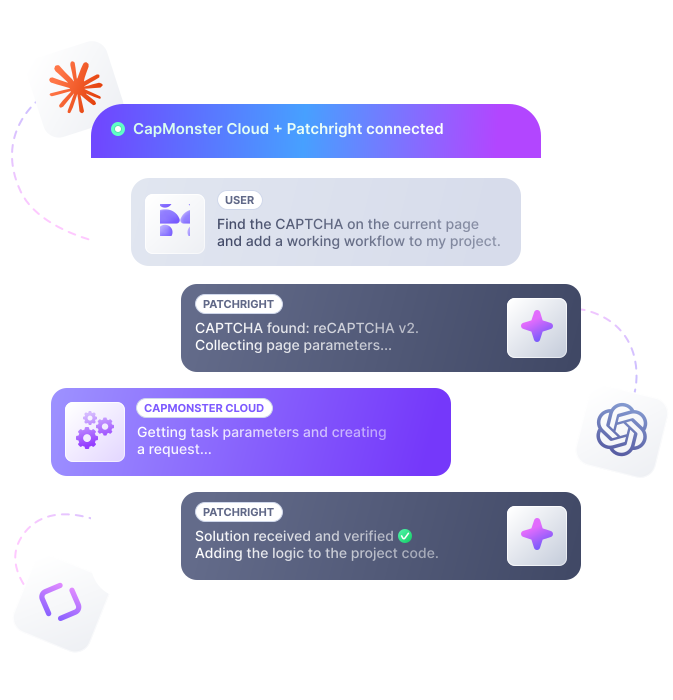

Claude MCP Server Setup (Terminal)
Start setup in Claude Code from the terminal.
 MCP for AI agents
Connect CapMonster Cloud to an AI agent and automate CAPTCHA solving, from collecting parameters to checking the result. The agent can hand the working logic back to your project.
Start in a few minutes with a ready-made prompt.
It will help you install and configure CapMonster Cloud MCP in your AI client. Open it in Claude Code or Codex, or copy it for another MCP-compatible client.
Start setup in Claude Code from the terminal.
Start setup in the Claude Code extension for VS Code.
Open the setup prompt in Codex, then send it to start.
Choose an npm or PyPI prompt and paste it into your AI client. PyPI needs Python 3.11+ and uv. Browser automation still uses Node.js. If automatic setup is unavailable, use Manual setup.

Create a CapMonster Cloud account and copy your API key.
Open the prompt in Claude Code or Codex, or copy it for another MCP client.
The agent asks for the API key and stores it in CM_API_KEY.
Ask the agent to verify the setup, or run the /mcp command.
Give the page URL, the action that triggers CAPTCHA, and any extra access conditions.

From page to working integration — in one MCP session: the agent identifies the CAPTCHA, collects parameters, calls CapMonster Cloud, verifies the result, and prepares working code.
The AI agent opens the page through Patchright, finds the challenge, and determines the CAPTCHA type.
Starting: opening the page through patchright and checking the CapMonster Cloud balance.
Used 2 tools >
Balance available, browser started. Opening the page with CAPTCHA.
Patchright: navigate to page >
Need to find the sitekey and reCAPTCHA parameters on the page.
Analyzes the page and extracts the CAPTCHA type, sitekey, URL, and other widget data for CapMonster Cloud.
Result
CAPTCHA type and parameters:
reCAPTCHA v2 (checkbox, "I'm not a robot"), protection level: high
data-sitekey = 6Lcg7CHUAAAAANphynKgn9YAgA4tQ2KI_iqRyTwd
websiteURL = https://lessons.zennolab.com/captchas/recaptcha/v2_simple.php?level=high
Widget in iframe google.com/recaptcha/api2/anchor – standard reCAPTCHA v2 (not Enterprise or invisible)
Sends the parameters to CapMonster Cloud, creates a task, and waits for the response. The agent receives the token automatically.
Creating a task in CapMonster Cloud: RecaptchaV2Task, no proxy — the site is publicly accessible.
Capmonster: create task >
Task created (ID 643066485). Waiting for the solution for up to 1 min.
Capmonster: wait for task result >
Token received. Injecting into g-recaptcha-response , calling the callback and submitting the form.
Applies the token on the page, confirms the challenge passed, and saves a code sample for the project.
Token injected. Checking the value and clicking "Submit".
Patchright: run code on the page >
Value set correctly. Submitting the form.
CAPTCHA passed: the server returned "success": true . Closing the browser and preparing a code sample.
Two MCP servers cover one workflow. capmonster talks to the API. patchright talks to the page.
Work with CapMonster Cloud
Work with the page in the browser
How an AI agent helps with real CAPTCHA work.
Show the agent a page — it will help identify the CAPTCHA type and the required parameters.
The agent will send the task, get the result, and check it right on the page.
After a successful check, the agent will help turn the working logic into code.
It will check parameters, the User-Agent, cookies, headers, and other session data.
CapMonster Cloud supports many popular protection and verification systems.
The same steps — finding parameters, choosing a task, waiting for the result, and preparing the integration — go through MCP tools instead of manual work.
Finding parameters
Studies DevTools, requests, and page code.
Choosing the task type
Learns CAPTCHA types and studies the documentation.
Waiting for the result
Implements result polling and response handling.
Integrating into the project
Assembles working code for the site and environment.
Getting parameters
Gets the required parameters through the browser MCP and DevTools.
Choosing the task type
Picks the task type from the get_supported_tasks list.
Getting the result
get_task_result_wait automatically waits for the finished answer.
Preparing the integration
After a successful check, prepares code for your project.

Fast setup, less manual work, and CAPTCHA automation in your projects and AI clients.
No need to look up parameters separately, check every step against the documentation, or write result polling just for the first check.
Automate API integration: the agent calls CapMonster Cloud tools, gets the list of supported tasks, creates a task, and waits for the result.
Use MCP in compatible AI clients without a separate integration for each interface.
The agent only needs CM_API_KEY to access CapMonster Cloud. When browser work is needed, it connects through a separate MCP server.

| CAPTCHA | Price (USD) | |
|---|---|---|
$ 0.04* 1000 images$ 0.60 1000 tokens | ||
$ 0.90 1000 tokens | ||
$ 0.04* 1000 images$ 1.00 1000 tokens | ||
$ 1.50 1000 tokens | ||
$ 1.30 1000 tokens | ||
$ 1.30 1000 tokens | ||
$ 1.40 1000 tokens | ||
$ 1.60 1000 tokens | ||
$ 1.20 1000 tokens | ||
$ 1.00 1000 tokens | ||
$ 0.30 1000 tokens | ||

Learn more – in the official CapMonster Cloud documentation.
Guides, documentation, and product pages for getting started with CapMonster Cloud.
 MCP documentationSetup, prompts, and the tools the servers expose.List of supported CAPTCHAs →Current CAPTCHA types and how to solve them
 capmonster-mcp on GitHubSource of the CapMonster Cloud MCP server.
 capmonster-mcp on npmTypeScript package. Run it with npx.capmonster-mcp-patchright on GitHubSource of the browser MCP server.capmonster-mcp-patchright on npmBrowser automation package. It always runs from npm.
 capmonster-mcp on PyPIPython package for 3.11+. Run it with uvx.


 Browser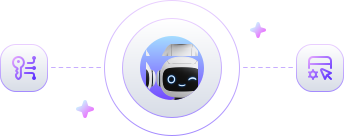

 Loads documentation
 Suggests task parameters
 Creates tasks
 Returns the result
 Checks the balance and User-Agent
 Interacts with the page
 Detects the CAPTCHA type
 Gets dynamic parameters
 Applies the result
 Checks that the logic works





 Without MCP


 Via MCP