How to Solve ReCaptcha v3 in Python Using Selenium & CapMonster Cloud
To solve this type of captcha, create a “.env” file with the following values:
CAPMONSTER_API_KEY=YOUR_API_KEY
WEBSITE_KEY=6Le0xVgUAAAAAIt20XEB4rVhYOODgTl00d8juDob
WEBSITE_URL=https://lessons.zennolab.com/captchas/recaptcha/v3.php?level=beta
Install all the necessary dependencies via pip install (see Python ReCaptcha v.2), import them into your project and submit the captcha task to the CapMonster Cloud server:
import asyncio
import os
from dotenv import load_dotenv
from selenium import webdriver
from capmonstercloudclient import CapMonsterClient, ClientOptions
from capmonstercloudclient.requests import RecaptchaV3ProxylessRequest
from selenium.webdriver.common.by import By

load_dotenv()

CAPMONSTER_API_KEY = os.getenv('CAPMONSTER_API_KEY')
WEBSITE_KEY = os.getenv('WEBSITE_KEY')
WEBSITE_URL = os.getenv('WEBSITE_URL')

async def solve_recaptcha():
    # Initializing the CapMonster client
    client_options = ClientOptions(api_key=CAPMONSTER_API_KEY)
    cap_monster_client = CapMonsterClient(options=client_options)

    # Initializing Selenium WebDriver
    options = webdriver.ChromeOptions()
    options.headless = False
    browser = webdriver.Chrome(options=options)
    print('Browser initialized!')

    try:
        # Going to the specified page
        browser.get(WEBSITE_URL)
        print('Browser switched to the page with captcha!')

        # Creating a request for solving a reCAPTCHA V3 Proxyless type
        recaptcha_request = RecaptchaV3ProxylessRequest(
            websiteUrl=WEBSITE_URL,
            websiteKey=WEBSITE_KEY,
            action='verify',
            min_score=0.7,
        )

        # reCAPTCHA solving using CapMonster
        task_result = await cap_monster_client.solve_captcha(recaptcha_request)
        print('reCAPTCHA V3 solved:', task_result)

        # Installing the user agent (optional)
        user_agent = 'Mozilla/5.0 (Windows NT 10.0; Win64; x64) AppleWebKit/537.36 (KHTML, like Gecko) Chrome/120.0.0.0 Safari/537.36'
        browser.execute_cdp_cmd('Network.setUserAgentOverride', {"userAgent": user_agent})

        # Inserting the result onto the page
        script = f'document.querySelector(\'#g-recaptcha-response-100000\').style.display = "block";'
        script += f'document.querySelector(\'#g-recaptcha-response-100000\').style.visibility = "visible";'
        script += f'document.querySelector(\'#g-recaptcha-response-100000\').value = "{task_result}";'
        browser.execute_script(script)
        print('The result is inserted into the page!')

        # Click on the button to check
        submit_button = browser.find_element(By.ID, 'v3_submit')
        submit_button.click()
        print('"Check" button is pressed!')

        # Pause for 10 seconds
        await asyncio.sleep(10)

    finally:
        # Closing the browser
        browser.quit()

# Running an asynchronous function to solve reCAPTCHA
asyncio.run(solve_recaptcha())
Code Explanation:
Loading environment variables: load_dotenv(). Loading environment variables: load_dotenv(): This function loads the values of environment variables from the .env file and makes them available to the program.
Initializing variables from the environment: CAPMONSTER_API_KEY = os.getenv('CAPMONSTER_API_KEY'). Here we get the value of the CAPMONSTER_API_KEY variable from the environment variables.
WEBSITE_KEY = os.getenv('WEBSITE_KEY'): similarly, we get the value of the WEBSITE_KEY variable.
WEBSITE_URL = os.getenv('WEBSITE_URL'): we get the value of the WEBSITE_URL variable.
async def solve_recaptcha(): declarIng the asynchronous function solve_recaptcha.
Initializing CapMonster client and Selenium WebDriver: client_options = ClientOptions(api_key=CAPMONSTER_API_KEY). Creating an object with options for initializing the CapMonster client.
cap_monster_client = CapMonsterClient(options=client_options): initializing the CapMonster client using options.
options = webdriver.ChromeOptions(): creating an options object to configure the Chrome web driver.
options.headless = False: setting the browser visibility mode (False - visible, True - invisible).
browser = webdriver.Chrome(options=options): initializing the Chrome web driver using options.
Working with a web page: browser.get(WEBSITE_URL). Going to the specified web page.
recaptcha_request = RecaptchaV3ProxylessRequest(...): creating a request object for the reCAPTCHA V3 Proxyless solution.
task_result = await cap_monster_client.solve_captcha(recaptcha_request): reCAPTCHA solving using CapMonster.
user_agent = '...': Setting the user agent (a string that identifies the browser and platform).
browser.execute_cdp_cmd('Network.setUserAgentOverride', {"userAgent": user_agent}): Installing a user agent using the Chrome DevTools Protocol.
script = '...': Creating a JavaScript string that inserts the solution into the page.
browser.execute_script(script): executing JavaScript code in the context of the current browser page.
submit_button = browser.find_element(By.ID, 'v3_submit'): searching for an HTML element by its ID on the page.
submit_button.click(): simulation of a click on a found button.
Completion of work: await asyncio.sleep(10). Asynchronous pause for 10 seconds.
browser.quit(): closing the web driver and browser windows.
Running an asynchronous function: asyncio.run(solve_recaptcha()). Running the asynchronous solve_recaptcha function in an asynchronous environment.
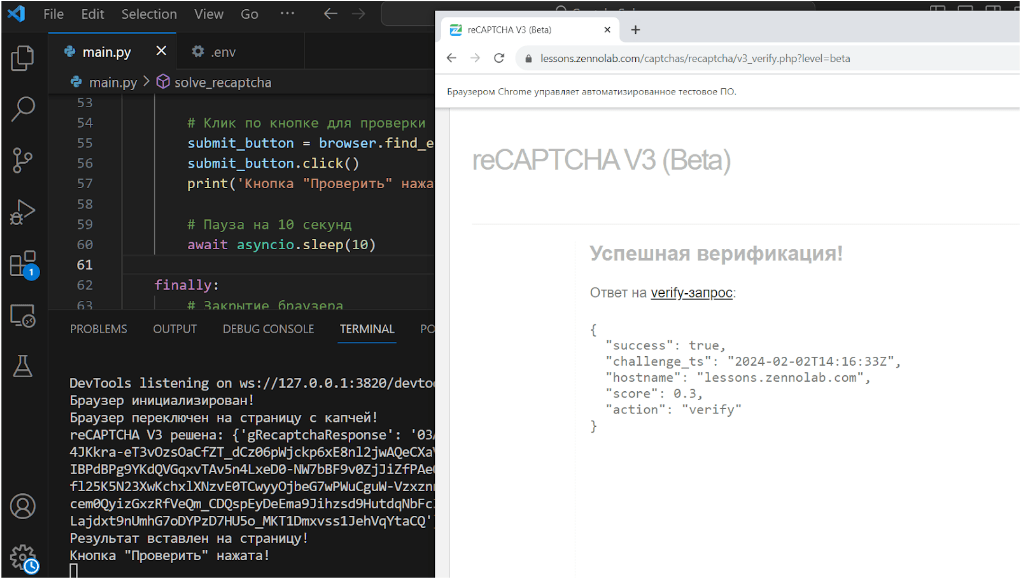
Running the script and successful execution:
Note: We'd like to remind you that the product is used to automate testing on your own websites and on websites to which you have legal access.