CapMonster Cloud Is Now Available in n8n!
Friends!
We are pleased to introduce the official CapMonster Cloud node for n8n — the popular open-source workflow automation platform.
Solving CAPTCHAs directly within a workflow is now easier. The node automatically sends task parameters to CapMonster Cloud, receives the completed solution, and passes it to the next steps in the workflow without requiring a separate API integration.
Integration Features
The CapMonster Cloud node allows you to:
- solve reCAPTCHA v2, reCAPTCHA Enterprise, Cloudflare Turnstile, DataDome, FunCaptcha, GeeTest, and other supported CAPTCHA types;
- connect to CapMonster Cloud directly from a workflow;
- securely store your API key using n8n Credentials;
- receive a token or another solution result in a structured format;
- pass the result to HTTP Request, Webhook, Code, and other built-in n8n nodes.
What the Workflow Looks Like
A typical workflow may look like this:
| Trigger → HTTP Request → CapMonster Cloud → HTTP Request → result processing |
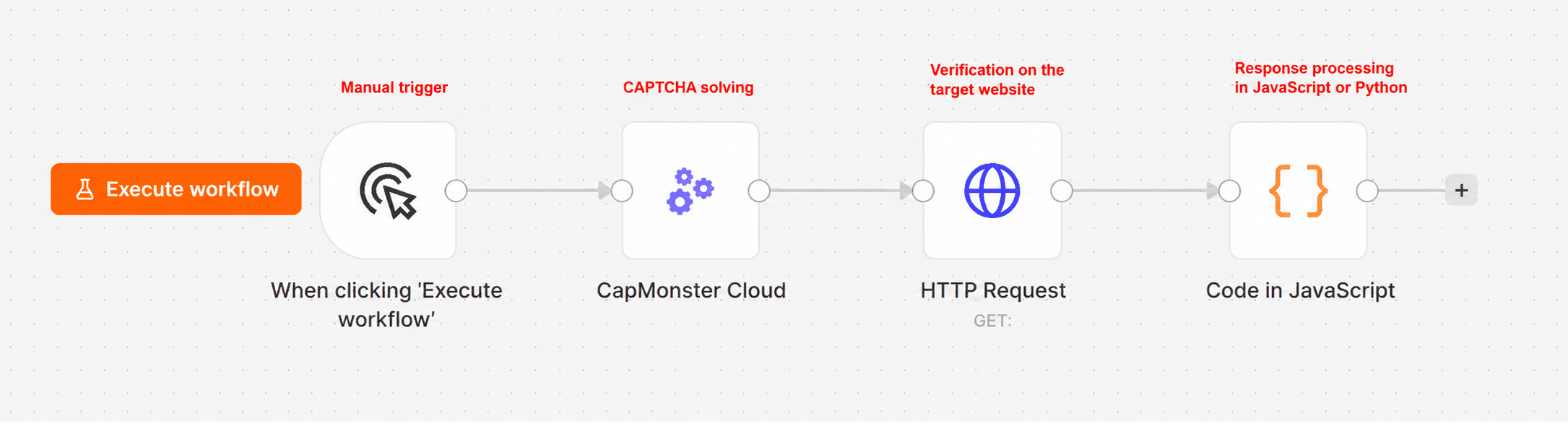
For example, a workflow can open a target page, retrieve the CAPTCHA parameters, send them to CapMonster Cloud, use the received token in the next HTTP request, and verify the website or API response.
Installing the Node
The node can be installed in two ways:
- directly from the n8n interface;
- via npm for self-hosted n8n instances.
After installation, create Credentials, add your CapMonster Cloud API key, select the CAPTCHA type, and fill in the required task parameters.
Documentation and Detailed Guide
Step-by-step documentation for installing and using the node is available here:
Installing and Using CapMonster Cloud in n8n
It covers package installation, Credentials configuration, passing the result to an HTTP Request node, verifying the website response, and resolving common errors.
A practical example of a complete workflow for solving reCAPTCHA v2 is available on the blog:
How to Solve reCAPTCHA v2 in n8n with CapMonster Cloud
The guide explains in detail how to configure the node, obtain a reCAPTCHA v2 token, send it to the target website, and verify the request result.
Who Can Benefit from the Integration
The node is suitable for developers and automation specialists who use n8n for:
- testing;
- working with web forms and APIs;
- collecting and processing publicly available data;
- browser automation;
- batch processing pages and tasks;
- creating workflows whose execution depends on a CAPTCHA result.
Get Started with CapMonster Cloud in n8n
Add CAPTCHA solving to your workflows without developing a separate API integration. Install the CapMonster Cloud node, connect your API key, and continue automating without unnecessary steps!
Useful Links
- CapMonster Cloud in the n8n integrations directory – the official node page with an overview of the integration features.
- Installing and Using CapMonster Cloud in n8n – step-by-step documentation on installing the node, configuring Credentials, and working with the result.
- How to Solve reCAPTCHA v2 in n8n with CapMonster Cloud – a detailed guide with a practical workflow example.
- CapMonster Cloud package for n8n on npm – node installation via npm for self-hosted n8n instances.
- CapMonster Cloud Documentation – descriptions of supported CAPTCHA types, task parameters, and API methods.
- Official CapMonster Cloud Website – registration, API key management, and balance top-up.