How to Solve ReCaptcha v3 in C# Using Selenium&CapMonster Cloud
To write the code that solves this type of captcha and execute it successfully, you need to install all the necessary components via NuGet (see C# ReCaptcha v.2). After that, we move directly to writing the code.
Import all previously installed components:
using OpenQA.Selenium;
using OpenQA.Selenium.Chrome;
using Zennolab.CapMonsterCloud;
using Zennolab.CapMonsterCloud.Requests;
Set the values of the variables and create a request object:
namespace CaptchaSolver
{
    class Program
    {
        static async Task Main(string[] args)
        {
            string API_KEY = "ВАШ_YOUR_API";
            string WEBSITE_URL = "https://lessons.zennolab.com/captchas/recaptcha/v3.php?level=beta";
            string SITE_KEY = "6Le0xVgUAAAAAIt20XEB4rVhYOODgTl00d8juDob";

            var task = new RecaptchaV3ProxylessRequest
            {
                WebsiteUrl = WEBSITE_URL,
                WebsiteKey = SITE_KEY,
                MinScore = 0.9,
                PageAction = "verify",
            };
Create a request to solve the captcha, send it to CapMonster Cloud, receive the answer, send it to the page and click on the “Check” button:
            await SolveCaptcha(API_KEY, task);

            Console.WriteLine("Press any key to exit...");
            Console.ReadKey();
        }

        static async Task SolveCaptcha(string API_KEY, RecaptchaV3ProxylessRequest task)
        {
            var clientOptions = new ClientOptions
            {
                ClientKey = API_KEY
            };

            var cmCloudClient = CapMonsterCloudClientFactory.Create(clientOptions);

            var options = new ChromeOptions();
            options.AddArgument("--no-sandbox");
            options.AddArgument("--disable-dev-shm-usage");

            using (var driver = new ChromeDriver(options))
            {
                try
                {
                    driver.Navigate().GoToUrl(task.WebsiteUrl);
                    Console.WriteLine("The page is open, reCAPTCHA solving...");

                    var result = await cmCloudClient.SolveAsync(task);

                    Console.WriteLine("Captcha solved! Solution: " + result.Solution.Value);

                    // Clicking the button with ID 'v3_submit' after solving the captcha
                    var button = driver.FindElement(By.Id("v3_submit"));
                    ((IJavaScriptExecutor)driver).ExecuteScript("arguments[0].click();", button);
                    Console.WriteLine("Button is pressed!");

                    await Task.Delay(10000);
                }
                catch (Exception ex)
                {
                    Console.WriteLine($"Error: {ex.Message}");
                }

                driver.Quit();
            }
        }
    }
}
Full code:
using OpenQA.Selenium;
using OpenQA.Selenium.Chrome;
using Zennolab.CapMonsterCloud;
using Zennolab.CapMonsterCloud.Requests;

namespace CaptchaSolver
{
    class Program
    {
        static async Task Main(string[] args)
        {
            string API_KEY = "YOUR_YOUR_API";
            string WEBSITE_URL = "https://lessons.zennolab.com/captchas/recaptcha/v3.php?level=beta";
            string SITE_KEY = "6Le0xVgUAAAAAIt20XEB4rVhYOODgTl00d8juDob";

            var task = new RecaptchaV3ProxylessRequest
            {
                WebsiteUrl = WEBSITE_URL,
                WebsiteKey = SITE_KEY,
                MinScore = 0.9,
                PageAction = "verify",
            };
            await SolveCaptcha(API_KEY, task);

            Console.WriteLine("Press any key to exit...");
            Console.ReadKey();
        }

        static async Task SolveCaptcha(string API_KEY, RecaptchaV3ProxylessRequest task)
        {
            var clientOptions = new ClientOptions
            {
                ClientKey = API_KEY
            };

            var cmCloudClient = CapMonsterCloudClientFactory.Create(clientOptions);

            var options = new ChromeOptions();
            options.AddArgument("--no-sandbox");
            options.AddArgument("--disable-dev-shm-usage");

            using (var driver = new ChromeDriver(options))
            {
                try
                {
                    driver.Navigate().GoToUrl(task.WebsiteUrl);
                    Console.WriteLine("The page is open, solving reCAPTCHA...");

                    var result = await cmCloudClient.SolveAsync(task);

                    Console.WriteLine("Captcha is solved! Solution: " + result.Solution.Value);

                    // Clicking the button with ID 'v3_submit' after solving the captcha
                    var button = driver.FindElement(By.Id("v3_submit"));
                    ((IJavaScriptExecutor)driver).ExecuteScript("arguments[0].click();", button);
                    Console.WriteLine("Button is pressed!");

                    await Task.Delay(10000);
                }
                catch (Exception ex)
                {
                    Console.WriteLine($"Error: {ex.Message}");
                }

                driver.Quit();
            }
        }
    }
}
Code Explanation:
await SolveCaptcha(API_KEY, task);: This is a call to the SolveCaptcha method, which solves the captcha using the CapMonster Cloud API.
API_KEY - key to access the API of the CapMonster service.
task - the object of the captcha solving request prepared earlier
SolveCaptcha метод:
Receives an API key and a captcha solving request object of type Recaptcha V3.
Creates a CapMonster Cloud client with the specified parameters.
Configures options for the Chrome web driver, including disabling some security options.
Initializes the Chrome web driver.
Goes to a page on the specified website.
Solves captcha using CapMonster Cloud API and waits for the result.
Clicks on a button or element on the page using JavaScript after receiving a solution.
Waits 10 seconds before finishing.
Console.WriteLine("Press any key to exit..."); and Console.ReadKey();: – wait for user input to terminate program execution after all operations have been completed.
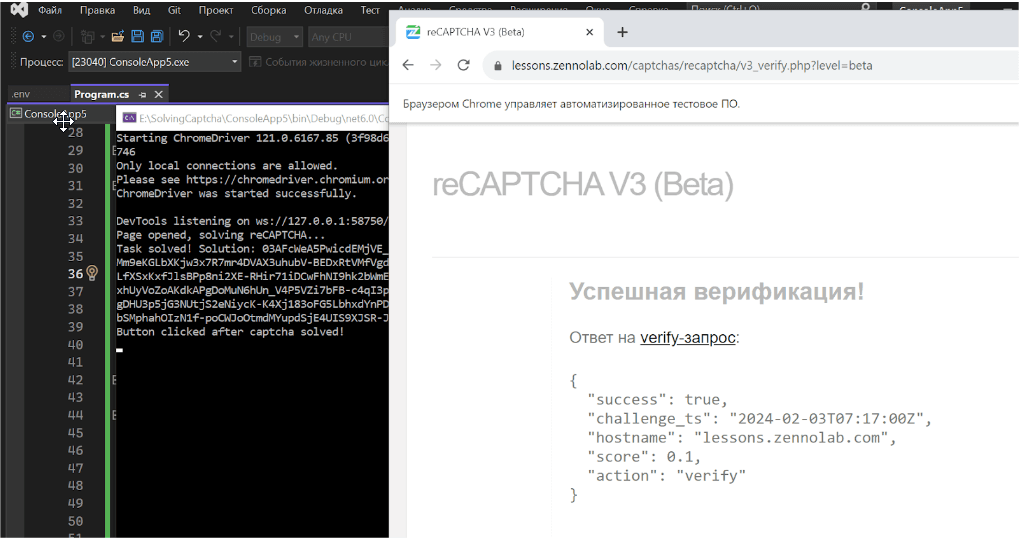
The result of the script execution:
Note: We'd like to remind you that the product is used to automate testing on your own websites and on websites to which you have legal access.