Web Crawling with Python: The Ultimate Guide
Web crawling is a helpful way to collect data from the internet, often used for indexing websites, tracking changes, or gathering large amounts of information. In this article, we’ll break down the basics of web crawling, introduce you to useful tools and libraries in Python, and walk you through simple examples to help you get started!
Web crawling is the process of automatically navigating the internet to gather information from websites. It involves exploring multiple pages on a single site (or even across many sites) to collect vast amounts of data. Large-scale crawlers are used by search engines and other companies to index websites and gather data for various purposes.
For example: Googlebot visits billions of pages every day, following links between pages and websites to keep Google’s search results up-to-date. Googlebot starts by visiting a few key URLs and then follows the links on those pages to discover new ones. It uses smart algorithms to decide which pages to crawl and how often, so it can provide the most relevant search results for users.
Python is a great choice for web crawling because it’s simple to learn and has many helpful libraries. Tools like Scrapy, BeautifulSoup, and Selenium make it easy to crawl websites and collect data, no matter how simple or complex the task is.
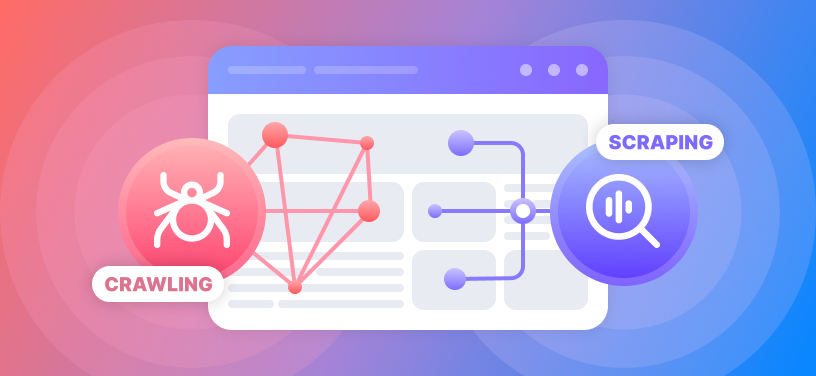
Web crawling and web scraping are closely related, but they’re not the same thing.
Web Crawling is like a spider that moves from page to page across a website (or even multiple websites) to collect data. It’s more about exploring and indexing large amounts of information, usually by following links between pages.
Web Scraping, on the other hand, focuses on extracting specific pieces of data from a webpage. It’s like zooming in on the details — such as gathering product prices, contact info, or text from a single page or a set of pages.
So, crawling is the process of discovering and collecting data across many pages, while scraping is the act of pulling out specific information from those pages.
Let’s walk through an example of how a basic web crawler gathers information from a website.
- Starting with Seed URLs
Imagine you want to collect information about blog posts on a website. Your seed URL could be the homepage of the blog, such as https://example.com.
- Requesting the Web Page
The crawler sends an HTTP request to https://example.com, asking the server to send back the HTML content of the homepage. The server responds with the HTML of the page.
- Parsing the HTML Content
The crawler then parses the HTML of the homepage. It looks for specific elements, such as links to blog posts (which are usually contained in <a> tags) and other useful information like page titles or metadata.
- Extracting Links
From the homepage, the crawler finds links to other pages—let's say it finds the following links:
https://example.com/blog/post1
https://example.com/blog/post2
https://example.com/about
The crawler adds these links to its list of pages to visit.
- Following Links
The crawler now requests the first blog post, https://example.com/blog/post1. It sends another HTTP request and retrieves the HTML content for that page.
- Parsing the Blog Post
On the blog post page, the crawler looks for additional links (e.g., links to other blog posts, categories, or tags) and data (e.g., the blog post title, author, and publication date). The data is extracted and stored.
- Extracting More Links
From https://example.com/blog/post1, the crawler finds links to other posts:
https://example.com/blog/post3
https://example.com/blog/post4
These new links are added to the list of URLs to crawl.
- Storing Data
The crawler collects the blog post title, author, date, and content from https://example.com/blog/post1 and stores it in a structured format, like a database or CSV file.
- Avoiding Redundancy
The crawler keeps track of URLs it has already visited. If it encounters https://example.com/blog/post1 again, it will skip it to avoid crawling the same page multiple times.
Before starting the crawl, the crawler checks the robots.txt file at https://example.com/robots.txt to ensure it’s allowed to crawl the site. If the file disallows crawling certain sections of the website (like an admin panel), the crawler will avoid those areas.
The crawler continues this process, visiting pages, extracting links, and collecting data until it has crawled all the pages or reached its limit.
This basic workflow allows the crawler to gather large amounts of data from across a website, following links and gathering the desired content in an automated manner.