Web Scraping with Python in 2026: Efficient Data Collection Automation
Web scraping is a method of collecting data from websites. It allows you to extract the necessary information for analysis, price monitoring, news tracking, and various other purposes. Web scrapers or parsers are tools used for web scraping. The most convenient and popular language for writing web scrapers is Python, although almost any programming language can be used for this purpose. Users choose Python for several reasons: simple syntax, a large number of convenient parsing libraries, as well as constant support and updates.
In this guide, we will review the main tools for web scraping and provide a Python implementation example. With the help of step-by-step instructions, you will be able to understand the basics of web scraping and parsing, write a simple script for data collection, and also learn about methods for bypassing various obstacles during the process.

Tools for Work and Their Characteristics
Choosing a Development Environment
A development environment is required for work. Choosing the right environment for web scraping depends on several factors, such as ease of use, support for the necessary tools, personal preferences, and project requirements. Among the most popular tools that work well for Python web scraping are PyCharm and Visual Studio Code.
PyCharm
Pros:
A full-featured IDE with many functions.
Support for debugging, code autocompletion, and project management.
Support for virtual environments and Git integration.
Cons:
Can be overloaded for small projects.
Requires more system resources compared to text editors.
Visual Studio Code (VS Code)
Pros:
A lightweight and customizable environment.
A wide range of extensions for Python and web scraping.
Support for debugging, Git, and terminal integration.
Cons:
May require additional configuration for полноценной работы with Python.
Performance issues may occur when using a large number of extensions.
Installing Python
Python must also be installed on your computer. Installation instructions for your operating system:
macOS
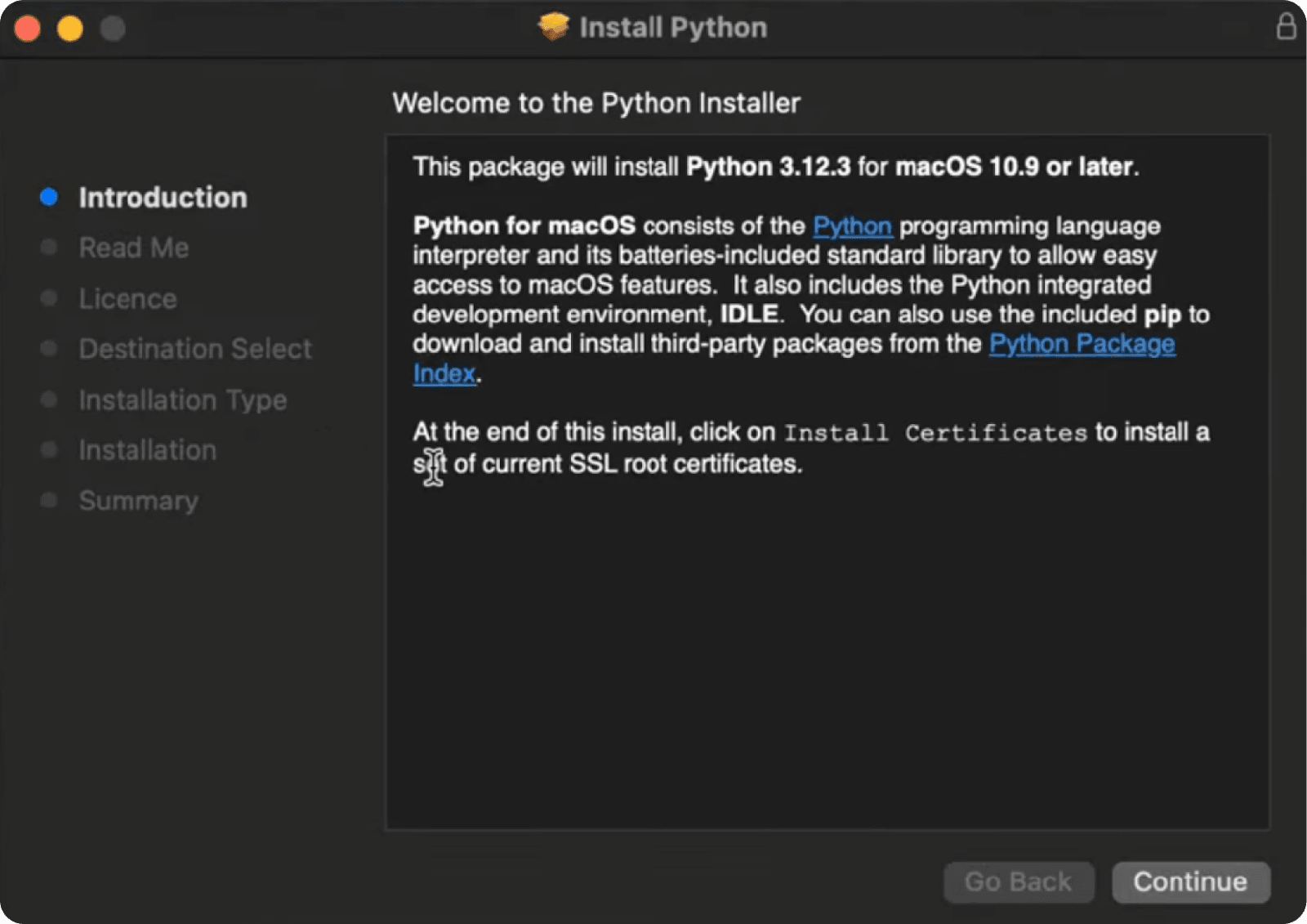
To install the latest version of Python, go to the official download page , download the installer, and follow the setup instructions:
Linux
In some Linux distributions (for example, Ubuntu), Python is already preinstalled. To check the installed Python version, run the following command in the terminal:
python --versionThe installed Python version may be outdated. In that case, you can install the latest available version using the following command (example for Debian-based distributions):
sudo apt-get update && sudo apt-get install python3Windows
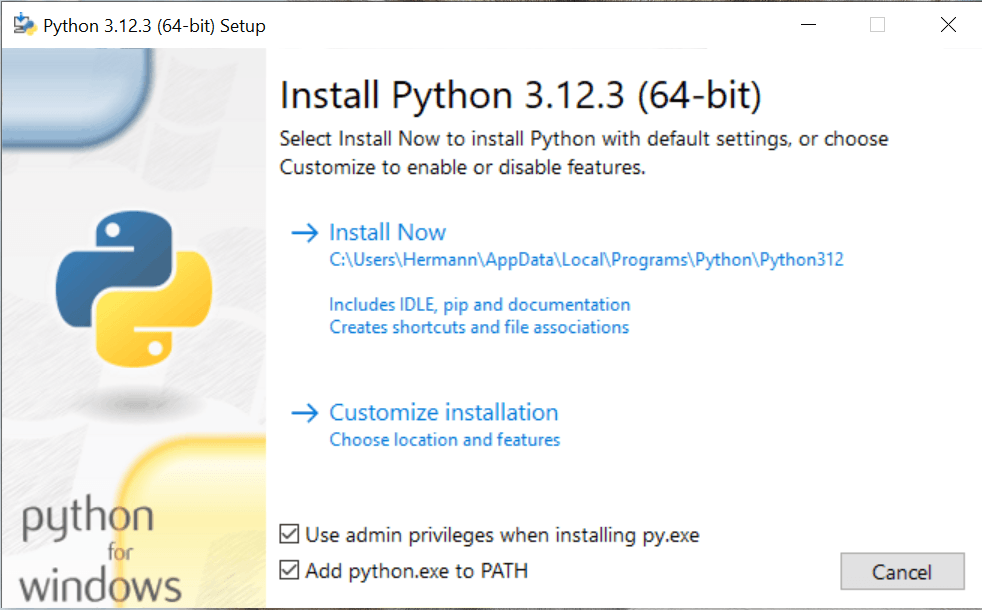
Go to the Python download page and download the appropriate version. Make sure to check the “Add python.exe to PATH” option. This will add Python to the system PATH and make it easier to use from the command line.
Python Libraries and Tools for Web Scraping
Now it is time to pay attention to the libraries and tools that can make writing scripts for your parser much more convenient. Let’s highlight some of the best options and review their characteristics in order to choose the right solution for your tasks.
requests
Requests is a simple library for sending HTTP requests and receiving page HTML. It is suitable for basic web scraping and small projects without high load requirements.
aiohttp
A library for asynchronous HTTP requests. Suitable for tasks with a large number of simultaneous requests and high-speed data processing.
lxml
A fast library for XML and HTML processing. Supports XPath and XSLT and is commonly used for complex parsing of structured data.
BeautifulSoup
A library for parsing HTML and XML. Convenient for extracting data and working with malformed markup. Supports different parsers such as html.parser, lxml, and html5lib.
Scrapy
A web scraping framework that allows you to build full-scale data collection projects. Supports asynchronous requests and high performance.
Selenium
A browser automation tool. Allows you to simulate user actions and work with dynamic websites.
Pyppeteer
A Python version of Puppeteer for controlling Chromium. Suitable for automation tasks and working with dynamic pages.
Playwright
A modern browser automation tool with support for multiple languages and browser engines (Chromium, Firefox, WebKit). Known for its stability and high speed.
Examples of Web Scrapers for Static and Dynamic Websites
What is HTML
Before starting to write any scraper, it is important to understand the basics of HTML and be able to analyze website markup and navigate elements without getting lost. HTML (HyperText Markup Language) is a standard markup language used to create and structure web pages. It describes the structure of a document, including text, images, links, and other elements displayed in the browser.
Basic HTML Elements
Tags
An HTML document consists of various tags that define its structure and content. For example:
- <html>: the root element of an HTML document.
- <head>: contains metadata such as the page title (<title>) and links to styles.
- <body>: the main part of the document containing the visible content of the page.
Elements
Elements can exist inside tags:
- <h1>…<h6>: headings of different levels.
- <p>: paragraph text.
- <a>: link.
- <img>: image.
- <div>, <span>: containers for grouping other elements.
Attributes
Tags can have attributes that provide additional information about an element. For example:
- <a href="https://example.com">: the href attribute specifies the URL of the link.
- <img src="image.jpg" alt="image description">: the src attribute specifies the image path, and alt provides alternative text.
Choosing a Website
Before choosing the appropriate tools for writing a scraper, you need to analyze the target website and determine whether it contains dynamic content. To check this, load the page, open the Network tab in Developer Tools, and see whether any Fetch/XHR requests are being made (technologies that allow web pages to dynamically update content based on data received from the server):
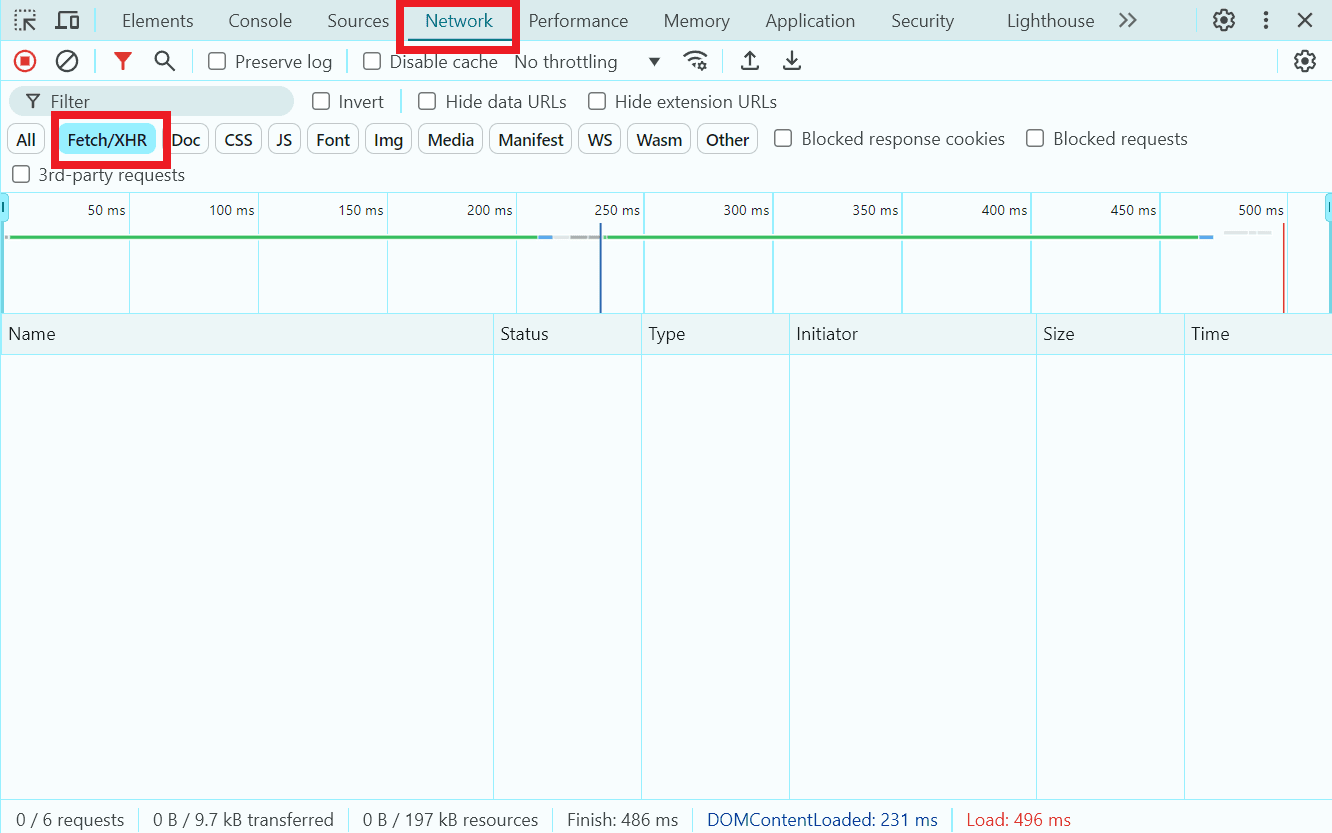
No Fetch/XHR requests are being made
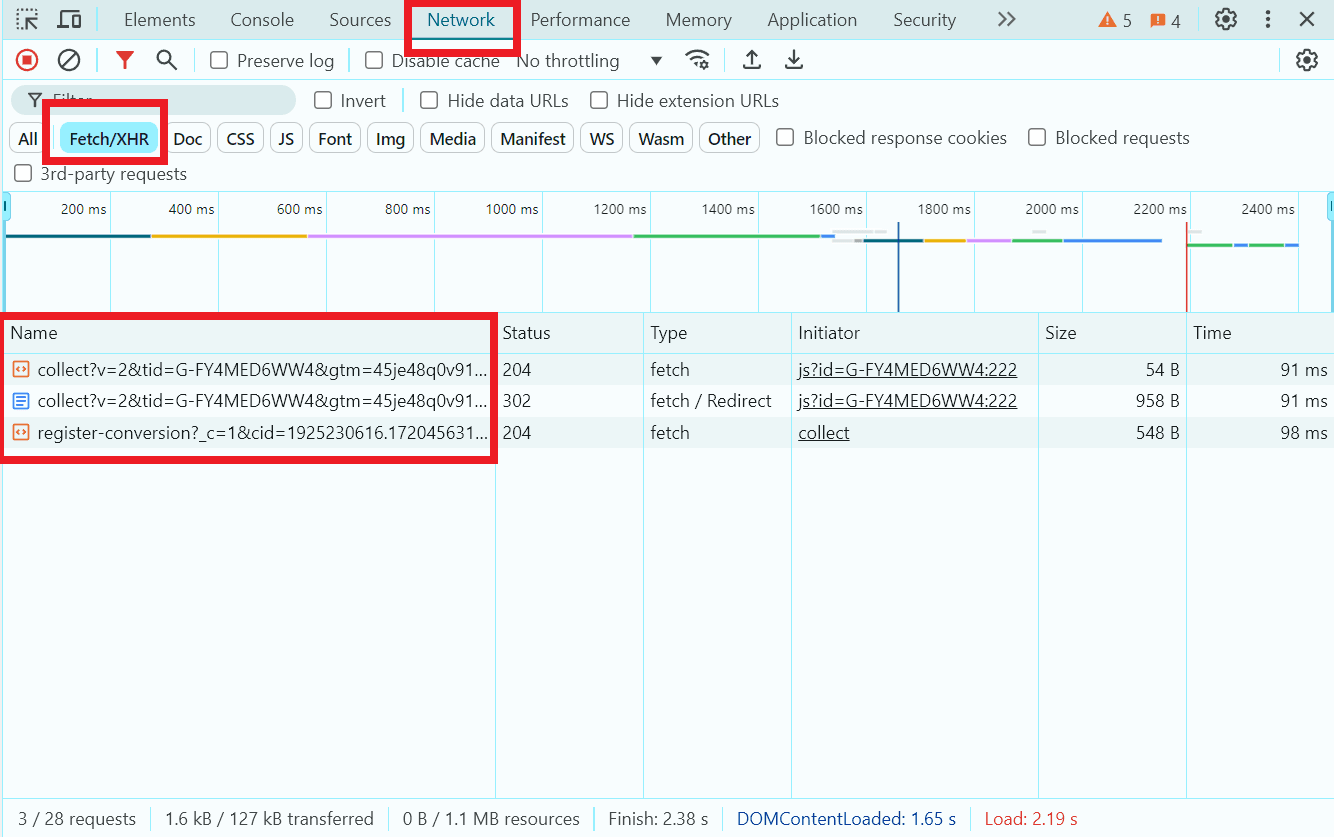
Dynamic data loading via JavaScript
If the website does not contain dynamic content, you can use the BeautifulSoup and requests libraries. Otherwise, you should use web page automation tools such as Selenium or Playwright.
As a test static page for extracting some data, we will use https://quotes.toscrape.com/ . Let’s write a simple scraper to extract the first three quotes and their authors.
Choosing tools for writing a scraper, installation
For our purpose, the libraries BeautifulSoup and requests are perfectly suitable. Let’s create a new file in an editor/IDE and install the libraries into the project using the command:
pip install beautifulsoup4 requests
BeautifulSoup performs searching and data extraction:
By tags:
title_tag = soup.title
print(title_tag)  # <title>Page Title</title>
By text. To extract text from a tag, use the method .get_text():
header_text = soup.h1.get_text()
print(header_text)  # Header
By classes, identifiers, and attributes:
elements = soup.find_all(class_='my-class')
element = soup.find(id='my-id')
links = soup.find_all('a', href=True)
For more complex queries, you can use CSS selectors with the .select() method:
headers = soup.select('h1')
Finding elements on a page, writing a scraper
Let’s return to the target page, find the required elements, and start writing code.
Open the newly created file and import the previously installed libraries:
import requests
from bs4 import BeautifulSoup
Define the URL of the target page, set the User-Agent header to simulate a browser, and send a GET request to the page:
url = 'https://quotes.toscrape.com/'
        headers = {
            'User-Agent': 'Mozilla/5.0 (Windows NT 10.0; Win64; x64) AppleWebKit/537.36 (KHTML, like Gecko) Chrome/147.0.0.0 Safari/537.36'
        }
        response = requests.get(url, headers=headers)
Check that the request was successful:
if response.status_code == 200:
            # Create a BeautifulSoup object for parsing HTML
            soup = BeautifulSoup(response.text, 'html.parser')
In a separate browser window opened on the target page, locate all quote blocks, iterate through the first three quote blocks, and extract the quote text in our code:
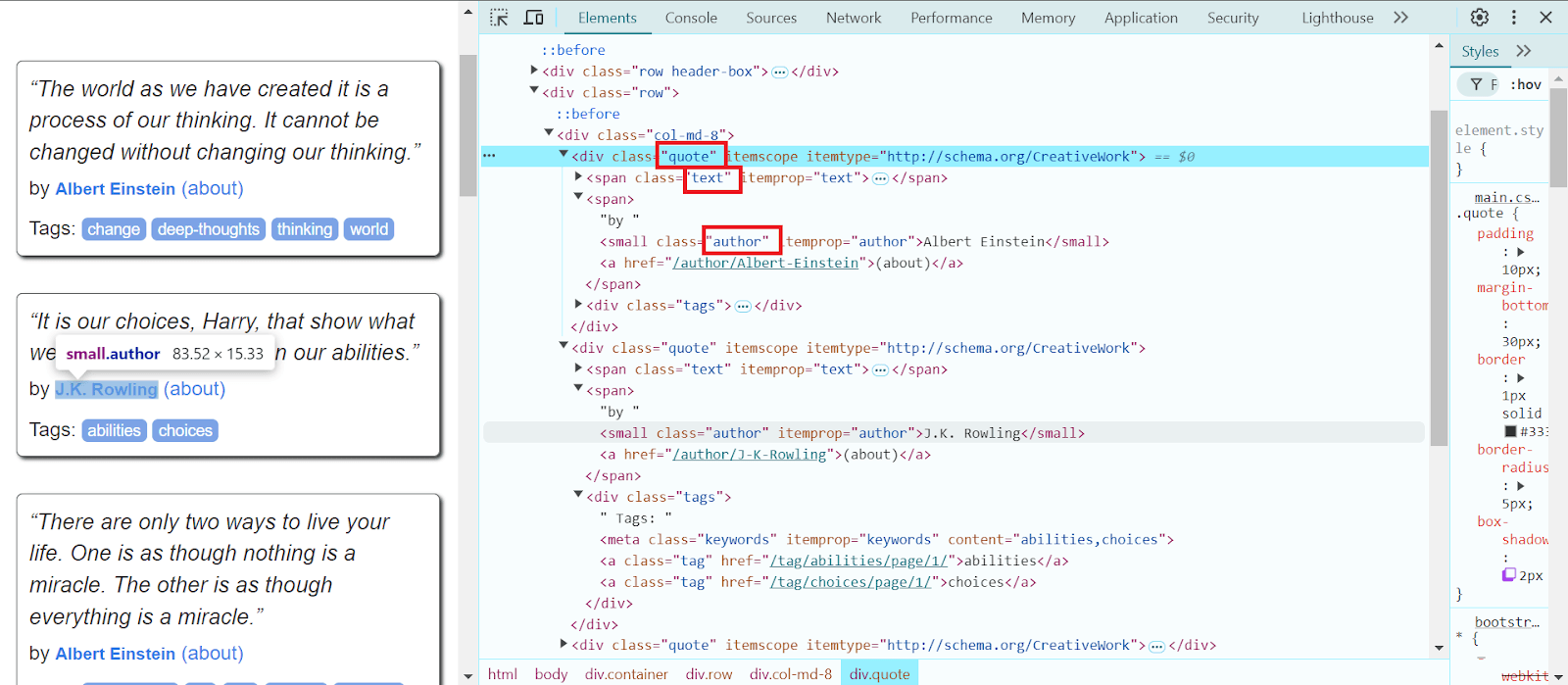
    quotes = soup.select('.quote')

    for quote in quotes[:3]:
        text = quote.select_one('.text').get_text(strip=True)
Extract the author name and print it to the console:
        author = quote.select_one('.author').get_text(strip=True)

        print(f'Quote: {text}\nAuthor: {author}\n')
else:
    print(f'Failed to retrieve page. Status code: {response.status_code}')
Final code with explanations:
import requests
from bs4 import BeautifulSoup

# URL of the page to be scraped
url = 'https://quotes.toscrape.com/'

headers = {
    'User-Agent': 'Mozilla/5.0 (Windows NT 10.0; Win64; x64) AppleWebKit/537.36 (KHTML, like Gecko) Chrome/147.0.0.0 Safari/537.36'
}

# Send a GET request to the page with a user-agent header
response = requests.get(url, headers=headers)

# Check that the request was successful
if response.status_code == 200:
    # Create a BeautifulSoup object for HTML parsing
    soup = BeautifulSoup(response.text, 'html.parser')

    # Find all quote blocks
    quotes = soup.select('.quote')

    for quote in quotes[:3]:
        # Extract quote text
        text = quote.select_one('.text').get_text(strip=True)

        # Extract author name
        author = quote.select_one('.author').get_text(strip=True)

        # Output information
        print(f'Quote: {text}\nAuthor: {author}\n')
else:
    print(f'Failed to retrieve page. Status code: {response.status_code}')
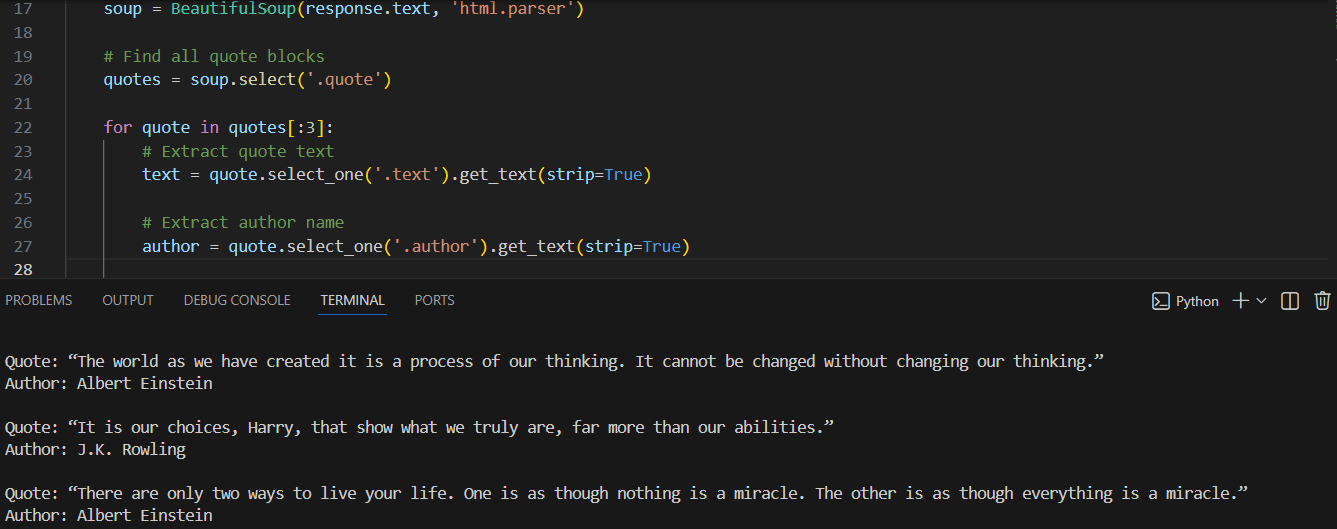
Run the code, and our scraper will output the required information – the first three quotes and their authors:
Example of a scraper for a dynamic website
As an example of a dynamic website, we will use https://parsemachine.com. In particular, we will choose the test page https://parsemachine.com/sandbox/catalog/, which contains cards with 12 products. We will try to extract the name of each product and its link. Since the site is dynamic, we will use Playwright. This browser automation tool finds and extracts elements on web pages using CSS and XPath selectors, text and ARIA selectors, and also supports combining selectors for precise targeting.
Create a new project, install Playwright and the Chromium browser using the commands:
pip install playwright
playwright install chromium
Find the elements we need using the Developer Tools:
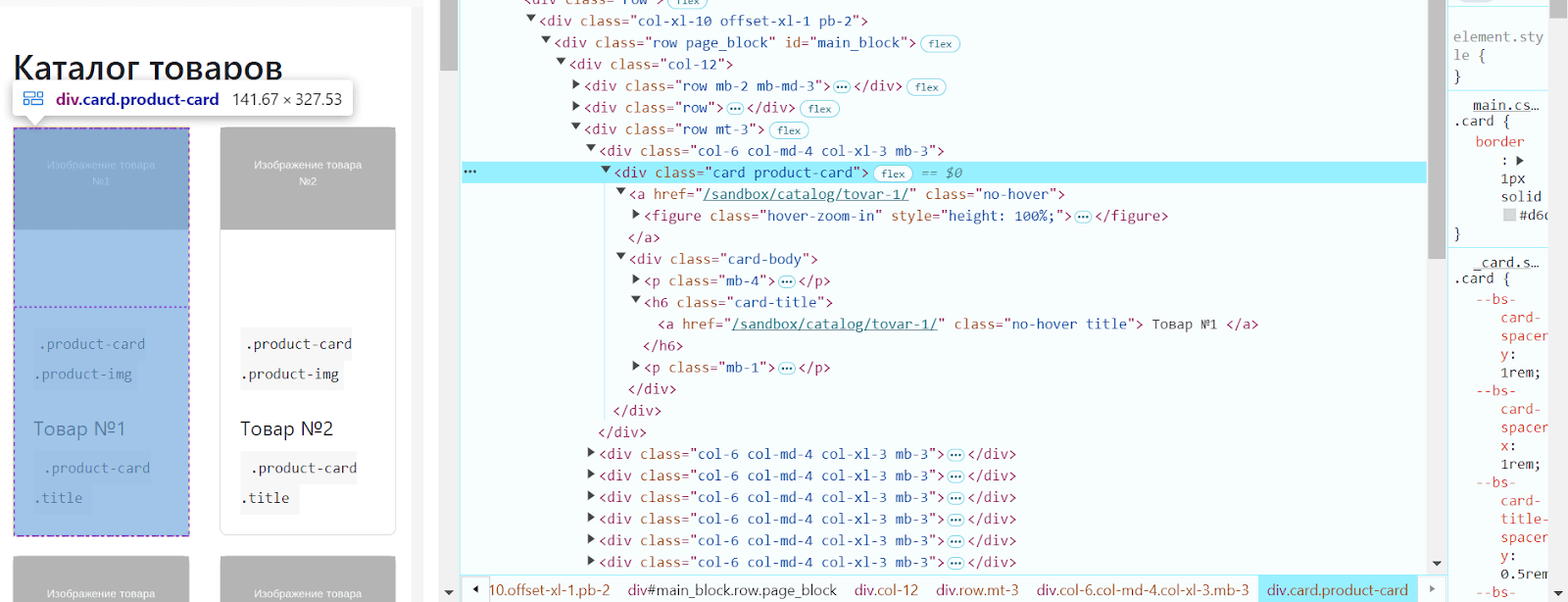
Import Playwright, launch the browser and navigate to the target page:
from playwright.sync_api import sync_playwright
url = 'https://parsemachine.com/sandbox/catalog/'

def scrape_with_playwright():
    with sync_playwright() as p:
        browser = p.chromium.launch(headless=False)
        page = browser.new_page()

        page.goto(url)
Find all product cards, iterate through each one, and extract the product page link:
        product_cards = page.query_selector_all('.card.product-card')

        for card in product_cards:
            title_tag = card.query_selector('.card-title .title')
            title = title_tag.inner_text() if title_tag else 'No title'
Product page link:
product_link = title_tag.get_attribute('href') if title_tag else 'No link'If the link is relative, add the base URL:
if product_link and not product_link.startswith('http'):
    product_link = f'https://parsemachine.com{product_link}'
Close the browser and define the function call:
browser.close()
scrape_with_playwright()
Full final code:
from playwright.sync_api import sync_playwright

# URL of the page to scrape
url = 'https://parsemachine.com/sandbox/catalog/'

def scrape_with_playwright():
    with sync_playwright() as p:
        # Launch Chromium browser
        browser = p.chromium.launch(headless=False) # Set to True if headless mode is needed
        # Open a new tab
        page = browser.new_page()

        # Navigate to target page
        page.goto(url)

        # Find all product cards
        product_cards = page.query_selector_all('.card.product-card')

        for card in product_cards:
            # Extract link to product page
            title_tag = card.query_selector('.card-title .title')
            title = title_tag.inner_text() if title_tag else 'No title'

            # Link to product page
            product_link = title_tag.get_attribute('href') if title_tag else 'No link'

            # If the link is relative, add base URL
            if product_link and not product_link.startswith('http'):
                product_link = f'https://parsemachine.com{product_link}'

            # Print product information
            print(f'Title: {title}, Link: {product_link}')

        browser.close()

scrape_with_playwright()
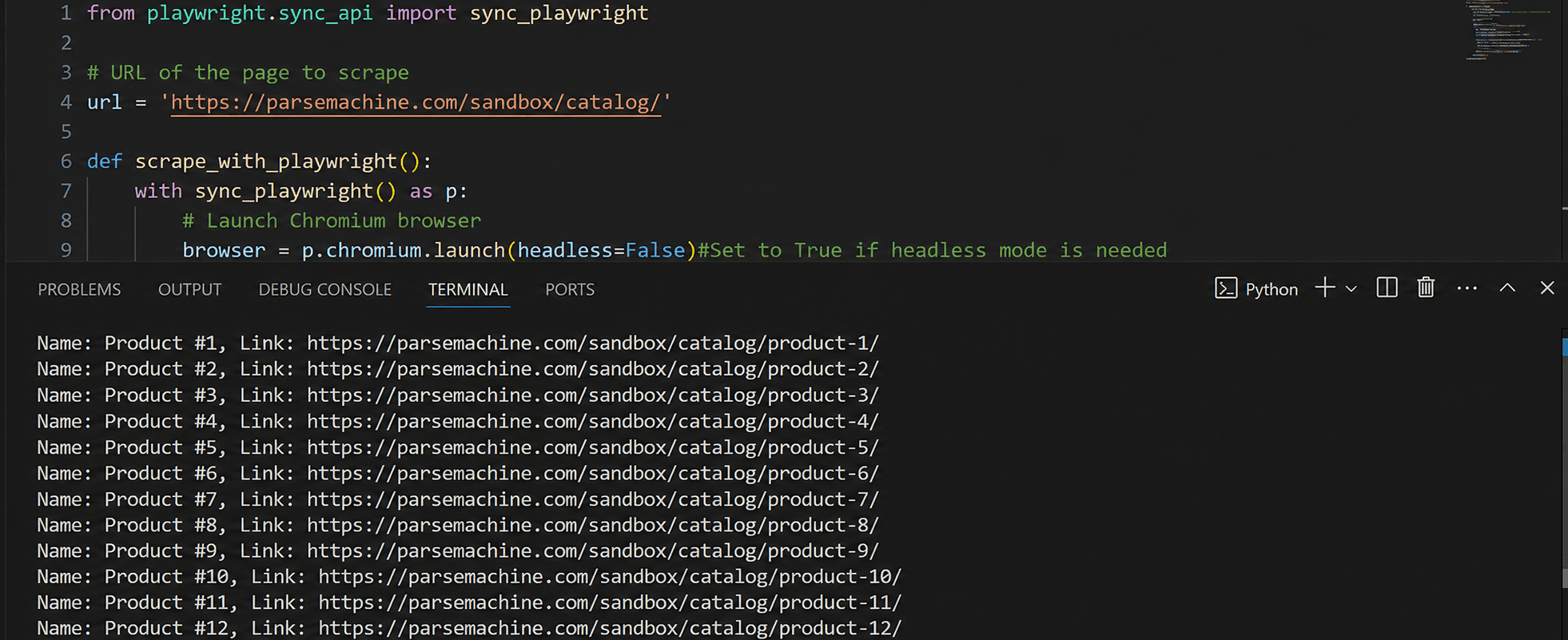
Run the script. It will output all product names and their links from the page:
How to save extracted information?
To save extracted information, you need to understand a few data storage formats:
CSV – one of the most popular formats for storing tabular data. It is a text file where each row corresponds to a record and values are separated by commas. Advantages of this format: supported by most data processing programs, including Excel; easy to read and edit with text editors. Disadvantages: limited capabilities for storing complex structures (e.g., nested data); issues with escaping commas and special characters.
JSON – a text-based data exchange format used to represent structured data. It is widely used in web development. Pros: supports nested and hierarchical data structures; well supported by most programming languages; easy for both humans and machines to read. JSON is suitable for storing data that may need to be transferred via APIs. Cons: JSON files can be larger compared to CSV; slower to process compared to CSV due to its more complex structure.
XLS – used for Excel spreadsheets where cell data, formatting, and formulas are stored. It is often used for storing databases. To work with XLS in Python, external libraries are required, such as pandas. This format allows data to be stored in a readable and presentable form. The main disadvantage is the need for additional libraries, which increases server load and processing time.
XML – a markup language used for storing and transferring data. It supports nested structures and attributes. Pros: structured format, allows complex data storage, widely supported by various standards and systems. Cons: XML files can be bulky and difficult to process; processing XML can be slow due to its structure.
Databases are used to store large volumes of structured data. Examples include MySQL, PostgreSQL, MongoDB, SQLite. Pros: support for large data volumes and fast access; easy to organize and link data; support for transactions and data recovery. Cons: requires additional setup and maintenance effort.
For our scrapers, we will choose the CSV format because the extracted data is tabular in nature (quote text and author, product names and links) and the data volume is relatively small, without nested structures. Additional information about reading and writing this format can be found here. Let’s add CSV import to our code with quotes, create a writer object, and write the quote data (quotes themselves and their authors):
    with open('quotes.csv', 'w', newline='', encoding='utf-8') as csvfile:
           csvwriter = csv.writer(csvfile)

           csvwriter.writerow(['Quote', 'Author'])

           for quote in quotes[:3]:
               text = quote.select_one('.text').get_text(strip=True)

               author = quote.select_one('.author').get_text(strip=True)

               csvwriter.writerow([text, author])
We also add additional console outputs and error handling:
    print("Data successfully written to quotes.csv")

except requests.RequestException as e:
       print(f'Request error: {e}')
except Exception as e:
       print(f'An error occurred: {e}')
Full code:
import requests
from bs4 import BeautifulSoup
import csv

# Target page URL
url = 'https://quotes.toscrape.com/'
headers = {
    'User-Agent': 'Mozilla/5.0 (Windows NT 10.0; Win64; x64)'
}

try:
    # Send GET request with user-agent
    response = requests.get(url, headers=headers)
    response.raise_for_status()  # Check for HTTP errors

    # Create BeautifulSoup object for parsing HTML
    soup = BeautifulSoup(response.text, 'html.parser')

    # Find all quote blocks
    quotes = soup.select('.quote')

    # Open CSV file for writing
    with open('quotes.csv', 'w', newline='', encoding='utf-8') as csvfile:
        # Create writer object
        csvwriter = csv.writer(csvfile)

        # Write headers
        csvwriter.writerow(['Quote', 'Author'])

        # Write quote data
        for quote in quotes[:3]:
            # Extract quote text
            text = quote.select_one('.text').get_text(strip=True)

            # Extract author name
            author = quote.select_one('.author').get_text(strip=True)

            # Write to CSV file
            csvwriter.writerow([text, author])

    print("Data successfully written to quotes.csv")

except requests.RequestException as e:
    print(f'Request error: {e}')
except Exception as e:
    print(f'An error occurred: {e}')
The same steps will be applied to the second scraper:
from playwright.sync_api import sync_playwright
import csv

# Target page URL
url = 'https://parsemachine.com/sandbox/catalog/'

def scrape_with_playwright():
    try:
        with sync_playwright() as p:
            # Launch Chromium browser
            browser = p.chromium.launch(headless=False)  # Set to True if you need headless mode

            try:
                # Open a new tab
                page = browser.new_page()

                # Navigate to target page
                page.goto(url)

                # Find all product cards
                product_cards = page.query_selector_all('.card.product-card')

                # Open CSV file for writing
                with open('products.csv', 'w', newline='', encoding='utf-8') as csvfile:
                    # Create writer object
                    csvwriter = csv.writer(csvfile)

                    # Write headers
                    csvwriter.writerow(['Title', 'Link'])

                    # Extract data from product cards and write to CSV
                    for card in product_cards:
                        # Extract product title
                        title_tag = card.query_selector('.card-title .title')
                        title = title_tag.inner_text() if title_tag else 'No title'

                        # Product link
                        product_link = title_tag.get_attribute('href') if title_tag else 'No link'

                        # If the link is relative, add base URL
                        if product_link and not product_link.startswith('http'):
                            product_link = f'https://parsemachine.com{product_link}'

                        # Write data to CSV file
                        csvwriter.writerow([title, product_link])

                        # Print product information
                        print(f'Title: {title}, Link: {product_link}')

                print("Data successfully written to products.csv")

            except Exception as e:
                print(f'Error while working with Playwright: {e}')

            finally:
                # Close browser
                browser.close()
                print("Browser closed.")

    except Exception as e:
        print(f'Error starting Playwright: {e}')

scrape_with_playwright()
Obstacles in Web Scraping
Changing, more complex website structure: one of the most common obstacles in web scraping is changes in website structure and code obfuscation. Even small changes in HTML markup or page structure can cause scraping scripts to stop working. This may require frequent code updates to adapt to new changes.
Request limits: many websites have limits on the number of requests that can be sent within a certain period of time. If your requests exceed the allowed limits, your IP address may be temporarily blocked.
IP blocking: websites may block IP addresses they consider suspicious or overly active, which can be a serious obstacle for scraping. In this case, using high-quality proxy servers is required to bypass such blocks.
CAPTCHA: many web resources implement protective measures such as CAPTCHAs to prevent automated actions. CAPTCHA requires manual input or the use of specialized services to bypass it.
One of the best services available today is CapMonster Cloud – its API makes it easy to integrate into code to bypass CAPTCHAs and continue scraper operations. It is easy to connect, provides fast solving of different CAPTCHA types with minimal errors – supporting reCAPTCHA, DataDome, Amazon CAPTCHA and others. CapMonster Cloud can be considered an optimal auxiliary tool and an important component of the web scraping process.
Ready-made library for quick integration into Python code
Recommendations for Successful Scraping
Use proxy and User-Agent rotation to avoid IP bans and bypass request limits; this helps simulate traffic from different devices and browsers.
Add error handling and retries: a web page may be temporarily unavailable or a request may fail. Retry mechanisms and error handling help ensure your script remains stable and prevents scraping from being interrupted.
Before starting scraping, always check the website’s robots.txt file. This file contains guidelines for bots on which parts of the site can and cannot be crawled. Following these rules helps avoid legal issues and conflicts with website owners.
Add random delays between requests to avoid suspicious activity and reduce the likelihood of being blocked.
These recommendations help your script mimic real user behavior and thus reduce the likelihood of detection.
Conclusion
Web scraping with Python is one of the most popular ways to efficiently collect data from various websites. We discussed how to choose suitable web scraping tools, reviewed the process of installing Python and required libraries, and covered writing code for data extraction and saving results in convenient formats. With the step-by-step approach described in this article, even a beginner developer can master the basic web scraping techniques and create their first scraper scripts. Web scraping opens up great opportunities for data analysis, information collection, market monitoring, and many other tasks. It is important to continue learning new tools and methods to stay relevant in this constantly evolving field.
Using tools and libraries such as BeautifulSoup, requests, Selenium, Playwright and others mentioned in this guide, you can extract information from both static and dynamic websites. When working with web scraping, it is important to consider legal and ethical aspects, as well as be prepared to handle obstacles such as CAPTCHAs or dynamically loaded content.
Each of the tools and approaches discussed has its own advantages and limitations. The choice of the appropriate tool depends on the specifics of the task, the complexity of web pages, and the volume of data. For effective web scraping, it is important to understand the characteristics of the web pages you are working with.
We hope that the instructions above help you better understand the web scraping process and provide the basic knowledge needed to build your own scrapers. Good luck with your projects in data automation and information analysis!
NB: Please note that this product is intended for automated testing exclusively of your own websites and resources to which you have legal access rights.