Loading...
Pricing of TenDI (Tencent) solution


Inherited a site with a captcha or another protection layer but no access to the source code? In that case you naturally ask: which solution is installed, is it configured correctly, and how can the workflow be tested?
In this article, we have tried to answer all the key questions. The first step in solving the task is to determine which protection system is being used. To do this, you can refer to the list of popular captchas and anti-bot protection systems, where you will find visual examples and key indicators that help you quickly understand what you are dealing with.
If you discover that your site uses TenDI (Tencent), the next step is to study its properties and operation in more detail. In this article, you can also review the instructions on how to integrate TenDI (Tencent) so that you fully understand how it functions on your site. This will help you not only understand the current protection, but also properly plan its maintenance.

What is TenDI CAPTCHA
TenDI (Tencent) CAPTCHA is a multi-layer bot protection system. Using behavioral analysis and specialized mechanisms, it determines whether a website visitor is a real human. It is used to protect registrations, logins, marketing campaigns, prevent spam, and data theft.

Examples of TenDI (Tencent)

Non-perception CAPTCHA
Verification is performed automatically without user interaction. Ideal for scenarios where usability is critical.

Slider CAPTCHA
Fast and simple verification by dragging a slider. Suitable for most use cases.
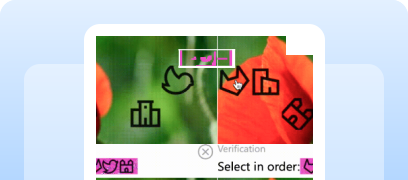
Graphic CAPTCHA
The user clicks sequentially on elements within an image. Used in high-security scenarios.

Audio CAPTCHA
Verification via audio recording. Optimal for users with disabilities.
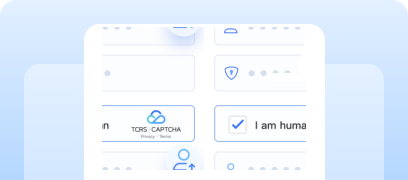
Smart Verification
The system evaluates user behavior: trusted users pass immediately, suspicious ones are checked additionally.

How to solve Tencent CAPTCHA using CapMonster Cloud
When testing forms with Tencent CAPTCHA, it is often necessary to verify that the captcha works correctly and is properly integrated.
You can manually test the captcha integrated into your website:
- Open the page with the form and make sure the captcha is displayed.
- Try submitting the form without solving the captcha — the server should return an error.
- After successfully solving the captcha, the form should be submitted without errors.
For automatic captcha recognition, you can use specialized services such as CapMonster Cloud — a tool that accepts captcha parameters, processes them on its servers, and returns a ready-to-use token. This token can be injected into the form to pass verification without user interaction.
Working with CapMonster Cloud via API typically involves the following steps:
 Creating a task
At this stage, you provide your API key, captcha type, and its parameters. The service returns a unique taskId that can later be used to retrieve the result.
 Sending an API request
To solve Tencent CAPTCHA, the following parameters must be specified in the request:
type - CustomTask
class - TenDI
websiteURL - the address of the page where the captcha is being solved.
websiteKey - captchaAppId. For example, "websiteKey": "189123456" — a unique parameter for your website.
captchaUrl (inside metadata) - a link to the captcha script. Usually ends with TCaptcha.js or TCaptcha-global.js;
websiteURL - the address of the page where the captcha is being solved;
userAgent (optional) - Browser User-Agent. Pass only a real and up-to-date UA from Windows OS.
Solving TenDI (Tencent) CAPTCHA using ready-made libraries
CapMonster Cloud provides ready-to-use libraries for convenient integration in Python, JavaScript (Node.js), and C#.
Python
JavaScript
C#
How to integrate TenDI (Tencent) CAPTCHA into your website
To confidently understand how captcha works on your website, grasp the verification logic, re-integrate or reconfigure it, we recommend reviewing this section. It describes the full integration process and helps you quickly understand all details.
- 1. Log in to your account or create a new one in the Captcha Console.
- 2. Open the Verification Management section.
- 3. Create a new captcha (if it does not already exist).
You will receive two parameters: CaptchaAppId and AppSecretKey. These are used on the frontend and server side.
 Frontend integration example
When clicked, the captcha appears, and after completion the result is logged to the console.
<!DOCTYPE html>
<html lang="en">
<head>
    <meta charset="UTF-8" />
    <title>Captcha Example</title>

    // Required loading of the captcha JavaScript
    <script src="https://ca.turing.captcha.qcloud.com/TJNCaptcha-global.js"></script>
</head>

<body>
    <div id="cap_iframe"></div>
    <button id="CaptchaId">Verification</button>

    <script>
        // Processing the result
        function callback(res) {
            console.log("callback:", res);

            if (res.ret === 0) {
                // Successful verification
                const text = `[randstr] ${res.randstr} | [ticket] ${res.ticket}`;

                const input = document.createElement("input");
                input.value = text;
                document.body.appendChild(input);
                input.select();
                document.execCommand("Copy");
                document.body.removeChild(input);

                alert("Ticket and randstr have been copied to the clipboard.");
            }
        }

        // Handling captcha script loading errors
        function loadErrorCallback() {
            const appid = "CaptchaAppId";
            const ticket = `trerror_1001_${appid}_1780975146`;

            callback({
                ret: 0,
                randstr: "@" + Math.random().toString(36).slice(2),
                ticket,
                errorCode: 1001,
                errorMessage: "jsload_error",
            });
        }

        window.onload = function () {
            document.getElementById("CaptchaId").onclick = function () {
                try {
                    const captcha = new TencentCaptcha(
                        document.getElementById("cap_iframe"),
                        "Your CaptchaAppId",
                        callback,
                        {}
                    );

                    captcha.show();
                } catch (e) {
                    loadErrorCallback();
                }
            };
        };
    </script>
</body>
</html>
Possible errors and debugging

Captcha does not load
(Errors 1001, 1002, or an invalid signature message) — the cause may be incorrect request parameters. Make sure that CaptchaAppId, AppSecretKey, and all request parameters are specified correctly.
Invalid or empty ticket/randstr
Make sure the client correctly passes both parameters.
Solution timeout
Increase the timeout on the server side.
Protection resilience checks
After integration, it is important to ensure that the protection actually works correctly.

Try sending a request without ticket and randstr — server-side validation must return an error and reject the request.
Perform load testing (e.g., using k6 or JMeter) at 100–200+ requests per second — the captcha should continue to initialize correctly and your backend should handle validations reliably.
Test with an expired ticket — the server must return a validation error and reject the request.
Test reuse of a ticket — expected result: verification is rejected.
Security and optimization tips

Store the AppSecretKey only on the server, never expose it to the browser or include it in JavaScript code.

Log full Tencent CAPTCHA responses, including error codes, request timing, and validation parameters — this will help diagnose issues faster.

Use HTTPS when transmitting all parameters (ticket, randstr) to prevent tampering.

Place correct links to the Privacy Policy and Tencent Terms of Service on the page, as required by the license.
Supported captchas
 reCAPTCHA v2
 GeeTest
 Cloudflare Turnstile
 DataDome
Conclusion
If you’ve taken over a website that already has a captcha or another protection system installed, but you don’t have access to the code, don’t worry! It’s quite easy to identify which technology is being used. To verify that everything works correctly, you can use the CapMonster Cloud recognition service in an isolated test environment to make sure that the token processing mechanism and the validation logic are functioning properly.
In the case of TenDI (Tencent), it’s enough to detect the system, observe its behavior, and confirm that the protection is working correctly. In this article, we showed how to identify TenDI (Tencent) and where to find instructions on how to integrate or reconfigure it, so you can confidently maintain the protection and keep its operation under control.


 Amazon Waf
 Faucet Pay
 Imperva (Incapsula)
 Prosopo
 Text CAPTCHA
 Yidun
Yidun MTCaptcha
 Altcha
 Funcaptcha
 TSPD
TSPD Hunt
Hunt Alibaba
 Friendly