Loading...
Pricing of Cloudflare Challenge solution


Inherited a site with a captcha or another protection layer but no access to the source code? In that case you naturally ask: which solution is installed, is it configured correctly, and how can the workflow be tested?
In this article, we have tried to answer all the key questions. The first step in solving the task is to determine which protection system is being used. To do this, you can refer to the list of popular captchas and anti-bot protection systems, where you will find visual examples and key indicators that help you quickly understand what you are dealing with.
If you discover that your site uses Cloudflare Challenge, the next step is to study its properties and operation in more detail. In this article, you can also review the instructions on how to integrate Cloudflare Challenge so that you fully understand how it functions on your site. This will help you not only understand the current protection, but also properly plan its maintenance.

What is Cloudflare Challenge
Cloudflare Challenge (or Interstitial Challenge Pages) is a verification system by Cloudflare designed to protect websites from bots, spam, and malicious traffic.
When Cloudflare suspects that a request is not from a real visitor (for example, due to a suspicious IP or missing JavaScript), it presents a Challenge — a 'test' that must be passed to confirm you are human. This type of verification differs from Turnstile because users first see an interstitial page with the message “Just a moment…” and “Verifying you are human. This may take a few seconds.”
How to Solve Cloudflare Challenge with CapMonster Cloud
When testing protection with the Cloudflare Challenge, it is important to ensure that the verification works correctly and properly filters out suspicious traffic.
You can manually test the challenge installed on your page:
- Open the page in incognito mode where the Challenge is expected and ensure that the captcha is displayed.
- Try inserting incorrect cf_clearance cookies in the browser (see details below) — the server should return an error.
- After successfully solving the captcha, the actual website page should open without verification.
For automated testing and captcha recognition, you can use specialized services such as CapMonster Cloud — a tool that takes captcha parameters, processes them on its servers, and returns a ready-made solution. This solution (token or cookie) can be inserted into a form or browser to pass the verification without user interaction.
Working with CapMonster Cloud via API typically involves the following steps:
 Creating a task
At this stage, you pass your API key, captcha type, and its parameters. The service returns a unique taskId, which can be used later to get the result.
 Sending an API request
The following parameters must be specified in the request to solve the Cloudflare Challenge:
type - TurnstileTask
websiteURL - URL of the page where the captcha is being solved
websiteKey - Turnstile key (any string can be passed)
cloudflareTaskType - cf_clearance
htmlPageBase64 - The Base64-encoded “Just a moment” HTML page that is returned with a 403 status code when accessing a site protected by this mechanism.
userAgent - Browser User-Agent. Pass only the current UA from Windows OS.
Recognizing Cloudflare Challenge Using Ready-Made Libraries
CapMonster Cloud provides ready-made libraries for Python, JavaScript (Node.js), and C#.
Python
JavaScript
C#
How to Connect Cloudflare Challenge to Your Website
To confidently understand captcha on your site, its verification logic, and to reconnect or reconfigure, we recommend this section. It explains the protection setup process — helping you quickly grasp all nuances.
1. Register or log in and connect your domain to Cloudflare.
2. Enable Challenge via WAF Rule.
Navigate to: Security → Custom Rules → Create rule
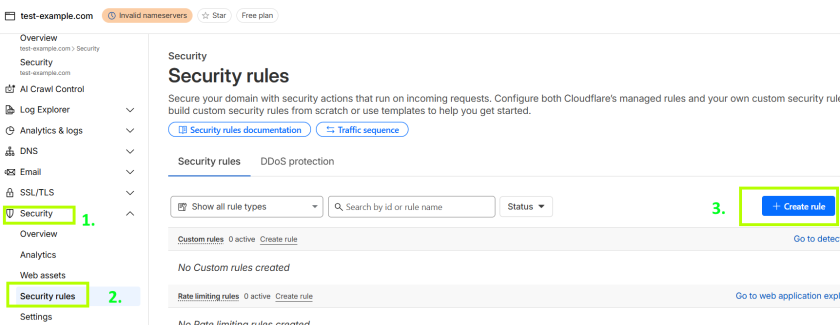

More information is available here.
Example condition (check the entire login page):
http.request.uri.path contains "/login"3. Choose an action:
Managed Challenge (recommended) — the system decides automatically whether to show a challenge and which type.
You can also choose Interactive Challenge, Skip, Block, or JavaScript Challenge. Learn more about the verification types in the documentation and decide which type is most convenient for you.
Set other required options and click Deploy.
After verification, the user receives a cf_clearance cookie allowing repeated access from the same device/browser without a Challenge.

Possible errors and debugging

Incorrect domain or rule configuration
Challenge is not displayed. Check that the WAF rule is assigned to the correct URI, path, or host.
Page or challenge load timeout
Browser or client did not wait for Cloudflare’s response. Increase timeouts in tests and monitoring.
Repeated check or expired cf_clearance
If a visitor uses an expired cf_clearance, the system will show the Challenge again.
Another verification follows the Challenge
Simultaneous use of Challenge + custom rules may lead to looped verifications. Follow Cloudflare recommendations to resolve.
Protection resilience checks

Try requesting the page without cf_clearance — the Challenge should trigger.
Test repeated access with an already set cf_clearance — the visitor should bypass additional checks at the same or lower level.
Conduct load testing (e.g., with k6 or JMeter) at high request rates — the Challenge should display correctly and WAF remain stable.
Check server response for expired or incorrect cookies. Expected: a repeated Challenge.
Security and optimization tips

Configure WAF rules and Managed/JS/Interactive Challenge according to risk level.

Log security events and challenge passing status to understand block reasons and identify false positives.

For transparency and compliance, add links to Privacy Policy and Terms of Use of Cloudflare/site on pages with Challenge.
Supported captchas
 reCAPTCHA v2
 GeeTest
 DataDome
Conclusion
If you’ve taken over a website that already has a captcha or another protection system installed, but you don’t have access to the code, don’t worry! It’s quite easy to identify which technology is being used. To verify that everything works correctly, you can use the CapMonster Cloud recognition service in an isolated test environment to make sure that the token processing mechanism and the validation logic are functioning properly.
In the case of Cloudflare Challenge, it’s enough to detect the system, observe its behavior, and confirm that the protection is working correctly. In this article, we showed how to identify Cloudflare Challenge and where to find instructions on how to integrate or reconfigure it, so you can confidently maintain the protection and keep its operation under control.



 Amazon Waf
 Faucet Pay
 Imperva (Incapsula)
 Prosopo
 Text CAPTCHA
 Yidun
Yidun MTCaptcha
 Altcha
 Funcaptcha
 TSPD
TSPD Hunt
Hunt Alibaba
 Friendly