What is Cloudflare CAPTCHA and How to Easily Solve It With CapMonster Cloud
Cloudflare captcha plays an important role in securing various websites. While it is not a hassle for a normal user, it can be difficult when using scripts, which is its purpose. In this article, we will look at effective strategies for solving Cloudflare captcha, focusing on the capabilities of CapMonster Cloud - one of the leading services for automatically solving various types of captchas.

Cloudflare captcha is a system of protection against automated requests, which prevents misuse of site resources. For most real visitors, this captcha does not create any inconvenience, because it does not require the performance of certain tasks - the verification most often occurs in the background (otherwise, the maximum you need to do is to click on the window with the inscription "Confirm that you are a human").
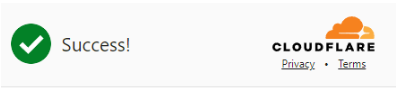
When you’ve successfully passed the Cloudflare captcha:
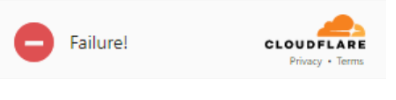
This message may appear if the system detects signs of automatic requests:
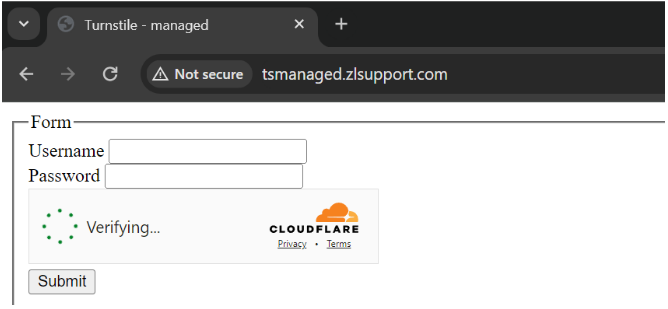
Cloudflare Turnstile is located on the site itself (the widget can be seen, for example, below the registration form), and Cloudflare Challenge first brings up a separate "Just a moment" page with a five-second check, and then, if it passes successfully, opens the site itself.
An example of what a regular CF Turnstile looks like:
Calling up the CF Challenge page:
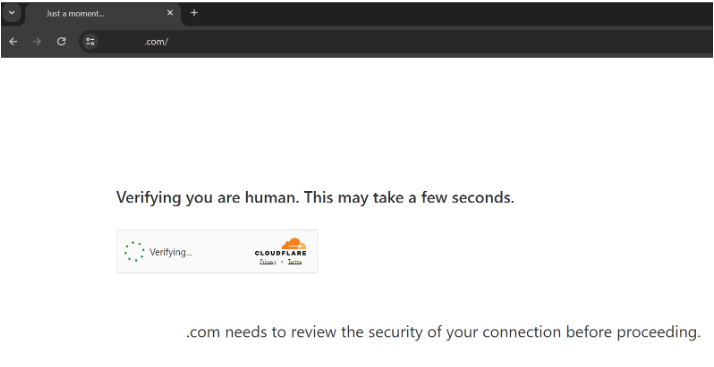
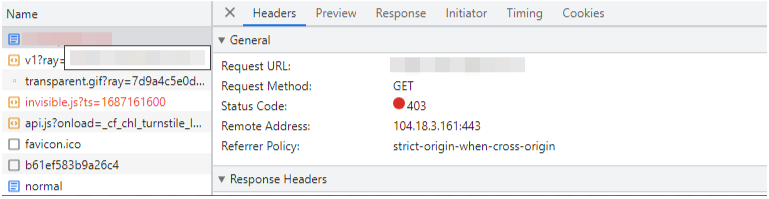
To make sure of the Cloudflare Challenge, when you open a page with a captcha, you can examine its code in Developer Tools, look at the traffic in the Network tab and see the characteristic signs:
The first request to the site returns a 403 code:
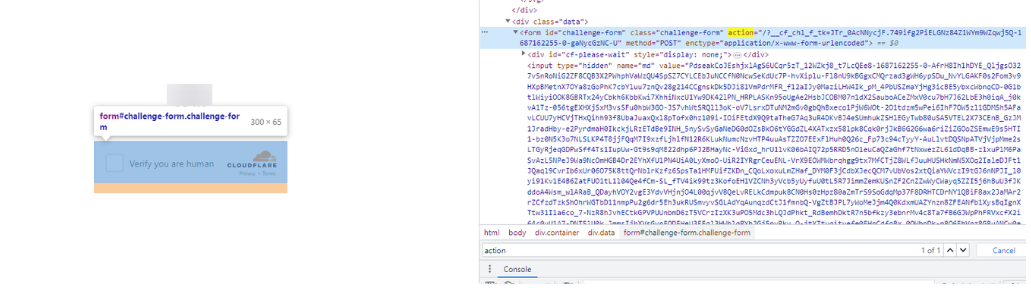
The form with id challenge-form has an action attribute (not to be mistaken for action from the parameters for turnstile captcha) containing the __cf_chl_f_tk= parameter:
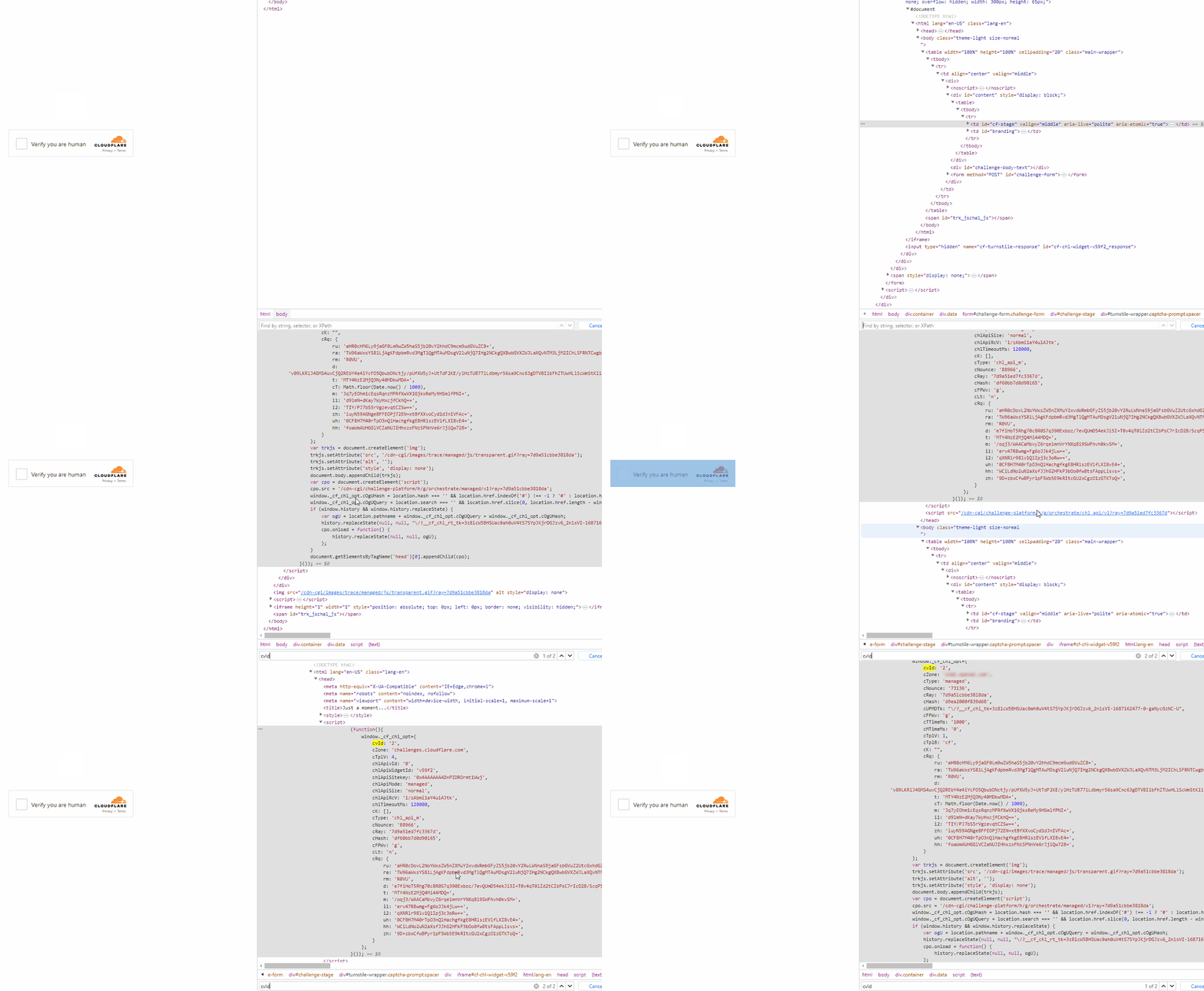
- There are two similar <script> tags on the page that create a new value in the window object:
Parsing requires efficiency and continuity in data retrieval, but sometimes the process is complicated by obstacles such as Cloudflare captcha. Such checks lead to delays and interruptions. Therefore, there is a need to find ways to overcome them and adapt their parsing methods to solve Cloudflare CAPTCHA while maintaining the required level of accuracy and reliability of the data.
Developers and practitioners of data parsing are exploring various approaches, among which it is worth mentioning an effective tool for implementing automatic captcha solving - CapMonster Cloud. The cloud service facilitates solving blocking on websites, which saves users' time and simplifies automated tasks.
CapMonster Cloud provides an API for solving captchas on various websites. To use it, you need to register, get an API key and use it in your code or program. Although Cloudflare CAPTCHA is quite a serious obstacle, it is not difficult to solve it if you correctly compose the task to be sent to the server and receive the result.
The following instructions will help you avoid possible mistakes when using the service and solving Cloudflare CAPTCHA.
To solve the captcha, you need to pass some mandatory parameters in the request to the Capmonster.cloud server. For CF Turnstile such parameter is websiteKey - captcha key, it has approximately the following format: 0x4AAAAAAAAAAABUYP0XeMJJF0xoy. You can find it in the page code, for example, in the Network tab:
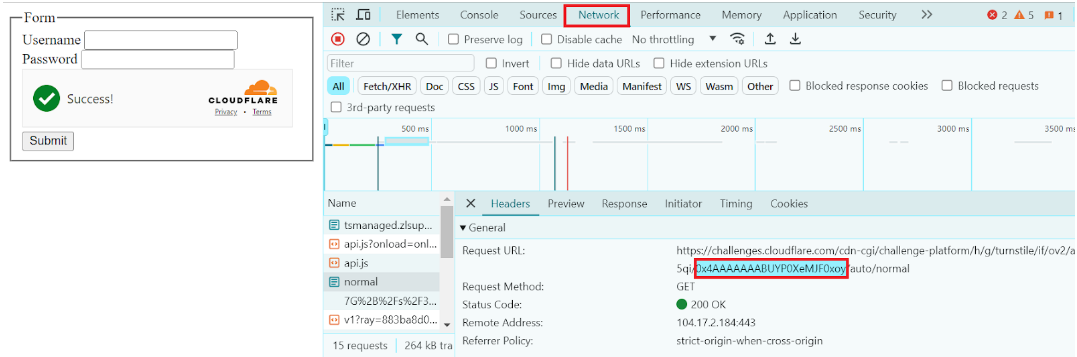
To solve the Cloudflare Challenge, you need to pass additional parameters on top of this (if you are working through a browser, you will need to get a captcha token):
- pageAction
- data
- pageData
- userAgent
All these parameters don't need to be searched manually, they can be captured using Javascript code before the page is loaded:
window.turnstile = new Proxy(window.turnstile, {
        get(target, prop) {
          if (prop === 'render') {
            return function(a, b) {
              let p = {
                type: "TurnstileTaskProxyless",
                websiteKey: b.sitekey,
                websiteURL: window.location.href,
                data: b.cData,
                pagedata: b.chlPageData,
                action: b.action,
                userAgent: navigator.userAgent
              };

              console.log(JSON.stringify(p));
              window.params = p;
              window.turnstileCallback = b.callback;
              return target.render.apply(this, arguments);
            }
          }
          return target[prop];
        }
      });
The received data is then used to create and send the task to the Capmonster.cloud server (an example of a complete script for solving this type of captcha will be described below).
If you work with requests and you need cf_clearance cookies, you also need to specify the parameters of your proxies and htmlPageBase64 - base64 encoded html page "Just a moment" which is given with code 403 when accessing a site with this protection.
Sample code to get the htmlPageBase64 string: var htmlContent = document.documentElement.outerHTML; var htmlBase64 = btoa(unescape(encodeURIComponent(htmlContent))); console.log(htmlBase64); |
Turnstile:
Example request:
https://api.capmonster.cloud/createTask

{
    "clientKey":"dce6bcbb1a728ea8d871de6d169a2057",
    "task":
    {
        "type":"TurnstileTaskProxyless",
        "websiteURL":"http://tsmanaged.zlsupport.com",
        "websiteKey":"0x4AAAAAAABUYP0XeMJF0xoy"
    }
}
Example response:
{
  "errorId":0,
  "taskId":407533072
}
Challenge (to get the token):
Example request:
https://api.capmonster.cloud/createTask

{
	"clientKey": "dce6bcbb1a728ea8d871de6d169a2057",
	"task": {
		"type": "TurnstileTask",
		"websiteURL": "https://site.com",
		"websiteKey": "0x4AAAAAAADnPIDROrmt1Wwj",
		"cloudflareTaskType": "token",
		"userAgent":"Mozilla/5.0 (Windows NT 10.0; Win64; x64) AppleWebKit/537.36 (KHTML, like Gecko) Chrome/124.0.0.0 Safari/537.36",
		"pageAction": "managed",
		"pageData": "HUHDWUHuhuwfiweh32..uh2uhuhyugYUG=",
		"data": "874291f4retD1366"
	}
}
Challenge (handling requests when cf_clearance cookies are required):
Example request:
https://api.capmonster.cloud/createTask

  {
  "clientKey":"dce6bcbb1a728ea8d871de6d169a2057",
  "task": {
    "type":"TurnstileTask",
    "websiteURL":"https://nowsecure.nl",
    "websiteKey":"xxxxxxxxxx",
    "cloudflareTaskType": "cf_clearance",
    "htmlPageBase64": "PCFET0NUWVBFIGh0...vYm9keT48L2h0bWw+",
    "userAgent": "Mozilla/5.0 (Windows NT 10.0; Win64; x64) AppleWebKit/537.36 (KHTML, like Gecko) Chrome/124.0.0.0 Safari/537.36",
    "proxyType":"http",
    "proxyAddress":"8.8.8.8",
    "proxyPort":8080,
    "proxyLogin":"proxyLoginHere",
    "proxyPassword":"proxyPasswordHere"
  }
}
Getting the result:
Use the getTaskResult method to get the captcha solution. Depending on the system load, you will get a response after a time ranging from 5 to 20 s.
// First of all, importing all the necessary add-ons:

const { Builder } = require('selenium-webdriver');
const chrome = require('selenium-webdriver/chrome');

(async function example() {

  // Creating an instance of Chrome browser driver using Selenium WebDriver

  const options = new chrome.Options();
  options.addArguments('--auto-open-devtools-for-tabs');


  const driver = await new Builder()
    .forBrowser('chrome')
    .setChromeOptions(options)
    .build();

  try {

    // Navigating to the page where you need to solve the Cloudflare Challenge

 await driver.get('https://your_site_with_captcha.com');

    // Implementing JavaScript to configure the Proxy object window.turnstile

await driver.executeScript(`
      window.turnstile = new Proxy(window.turnstile, {
        get(target, prop) {
          if (prop === 'render') {
            return function(a, b) {

// Getting parameters for the TurnstileTaskProxyless task

              let p = {
                type: "TurnstileTaskProxyless",
                websiteKey: b.sitekey,
                websiteURL: window.location.href,
                data: b.cData,
                pagedata: b.chlPageData,
                action: b.action,
                userAgent: navigator.userAgent
              };

              // Exporting the parameters to the console

              console.log(JSON.stringify(p));
              window.params = p;
              window.turnstileCallback = b.callback;
              return target.render.apply(this, arguments);
            }
          }
          return target[prop];
        }
      });
    `);

    // Executing JavaScript with expectation of termination after 5 seconds

    const params = await driver.executeAsyncScript(`
      const callback = arguments[arguments.length - 1];
      setTimeout(() => {
        callback(window.params);
      }, 5000);
    `);

    // Exporting the obtained parameters to the console

    console.log('Params:', params);

    if (params) {

      // Generating data for task creation in CapMonster service

      const data = {
        clientKey: 'your_API',
        task: {
          type: 'TurnstileTaskProxyless',
          websiteURL: params.websiteURL,
          websiteKey: params.websiteKey,
          data: params.data,
          action: params.action,
          cloudflareTaskType: "token",
          pageAction: "managed",
          pageData: params.pagedata
        }
      };

      // Exporting data for task creation to the console

      console.log('Data:', data);

      // Sending a request to create a task in CapMonster.cloud

      const createResult = await fetch('https://api.capmonster.cloud/createTask', {
        method: 'post',
        body: JSON.stringify(data)
      });

      // Getting the results of task creation

      const createTaskResult = await createResult.json();
      console.log('Create Task Result:', createTaskResult);

      if (createTaskResult.taskId) {
        const asyncDelay = (timeout) =>
          new Promise(resolve => {
              setTimeout(() => {
                  resolve();
              }, timeout);
          });

        // A function for obtaining the result of a task with pending completion

        const getTaskResult = async (taskId) => {
          const taskResult = await fetch('https://api.capmonster.cloud/getTaskResult', {
            method: 'post',
            body: JSON.stringify({
              "clientKey":"your_API",
              "taskId": taskId
            })
          });
          const taskResponse = await taskResult.json();
          console.log('Task Response:', taskResponse);
          if (taskResponse.status === 'processing') {
            await asyncDelay(5000);
            return await getTaskResult(taskId);
          }
          return taskResponse;
        };

        // Getting the result of the task execution from the CapMonster.cloud service

        const taskRes = await getTaskResult(createTaskResult.taskId);
        console.log('Task Result:', taskRes);

        if (taskRes.solution) {

          // Exporting the solution token in the console

          console.log('Solution Token:', taskRes.solution.token);

          // Creating a callback function to pass the solution token

          await driver.executeScript(`
            window.turnstileCallback('${taskRes.solution.token}');
          `);
        }
      }
    }
  } finally {
    await driver.quit();
  }
})();
Sometimes capturing the parameters for some reasons cannot be done immediately, in that case you can try to add reloading the captcha page until the parameters are retrieved:
const { Builder } = require('selenium-webdriver');
const chrome = require('selenium-webdriver/chrome');

(async function example() {
  const options = new chrome.Options();
  options.addArguments('--auto-open-devtools-for-tabs');

  const driver = await new Builder()
    .forBrowser('chrome')
    .setChromeOptions(options)
    .build();

  let params = null;

  try {
    while (!params) {
      await driver.get('https://your_site_with_captcha.com/');

      await driver.executeScript(`
        window.turnstile = new Proxy(window.turnstile, {
          get(target, prop) {
            if (prop === 'render') {
              return function(a, b) {
                let p = {
                  type: "TurnstileTaskProxyless",
                  websiteKey: b.sitekey,
                  websiteURL: window.location.href,
                  data: b.cData,
                  pagedata: b.chlPageData,
                  action: b.action,
                  userAgent: navigator.userAgent
                };

                console.log(JSON.stringify(p));
                window.params = p;
                window.turnstileCallback = b.callback;
                return target.render.apply(this, arguments);
              }
            }
            return target[prop];
          }
        });
      `);

      params = await driver.executeAsyncScript(`
        const callback = arguments[arguments.length - 1];
        setTimeout(() => {
          callback(window.params);
        }, 5000);
      `);

      if (!params) {
        console.log('Params not obtained, reloading page...');
        await driver.sleep(3000);
      }
    }

    console.log('Params:', params);

    const data = {
      clientKey: 'your_API_key',
      task: {
        type: 'TurnstileTaskProxyless',
        websiteURL: params.websiteURL,
        websiteKey: params.websiteKey,
        data: params.data,
        action: params.action,
        cloudflareTaskType: "token",
        pageAction: "managed",
        pageData: params.pagedata
      }
    };

    console.log('Data:', data);

    const createResult = await fetch('https://api.capmonster.cloud/createTask', {
      method: 'post',
      body: JSON.stringify(data)
    });

    const createTaskResult = await createResult.json();
    console.log('Create Task Result:', createTaskResult);

    if (createTaskResult.taskId) {
      const asyncDelay = (timeout) =>
        new Promise(resolve => {
            setTimeout(() => {
                resolve();
            }, timeout);
        });

      const getTaskResult = async (taskId) => {
        const taskResult = await fetch('https://api.capmonster.cloud/getTaskResult', {
          method: 'post',
          body: JSON.stringify({
            "clientKey":"your_API_key",
            "taskId": taskId
          })
        });
        const taskResponse = await taskResult.json();
        console.log('Task Response:', taskResponse);
        if (taskResponse.status === 'processing') {
          await asyncDelay(5000);
          return await getTaskResult(taskId);
        }
        return taskResponse;
      };

      const taskRes = await getTaskResult(createTaskResult.taskId);
      console.log('Task Result:', taskRes);

      if (taskRes.solution) {
        console.log('Solution Token:', taskRes.solution.token);
        await driver.executeScript(`
          window.turnstileCallback('${taskRes.solution.token}');
        `);
      }
    }

  } finally {
    await driver.quit();
  }
})();
Captcha, developed by Cloudflare, is a sophisticated and robust technology that protects websites from various types of malicious activity, including spam, DDoS attacks, and other forms of automated attacks. However, for some tasks, it may be necessary to solve this protection, such as when automating processes or integrating with other applications.
CapMonster Cloud service provides a solution for such situations, allowing you to easily solve captcha. To do this, you need to familiarize yourself with the process of forming a request to solve the captcha, sending it to the service server and receiving the result.
The detailed instructions and examples given in this article can be a useful resource for learning how to solve captcha and optimize it in your project. Understanding the basics and practical aspects of this process will help you to successfully cope with the task of captcha traversal, minimizing possible difficulties and errors in implementation.
Note: We'd like to remind you that the product is used to automate testing on your own websites and on websites to which you have legal access.