2026 年 Python 网络爬虫:高效的数据采集自动化
网络爬虫是一种从网站收集数据的方法。它可以提取所需信息,用于数据分析、价格监控、新闻跟踪以及其他各种用途。用于执行网页爬取的工具被称为爬虫或解析器。最常用于编写网页爬虫的语言是 Python,尽管几乎任何编程语言都可以实现这一目的。用户选择 Python 有多个原因:语法简单、拥有大量便捷的解析库、持续的社区支持和定期更新。
在本指南中,我们将介绍网页爬虫的主要工具,并提供一个基于 Python 的实现示例。通过逐步说明,你将了解网页爬虫和数据解析的基础知识,学会编写一个简单的数据采集脚本,并了解在实际过程中如何应对各种障碍与限制。

工作工具及其特点
开发环境的选择
进行开发需要一个开发环境。选择合适的网页爬虫开发环境取决于多个因素,例如使用便利性、对所需工具的支持、个人偏好以及项目需求。在众多适合 Python 网页爬虫开发的工具中,常见且受欢迎的有 PyCharm 和 Visual Studio Code。
PyCharm
优点:
功能完善的集成开发环境(IDE)。
支持调试、代码自动补全和项目管理。
支持虚拟环境并集成 Git。
缺点:
对于小型项目可能过于臃肿。
相比文本编辑器占用更多资源。
Visual Studio Code (VS Code)
优点:
轻量且可自定义的开发环境。
拥有丰富的 Python 及网页爬虫扩展插件。
支持调试、Git 和终端。
缺点:
为了完整支持 Python 可能需要额外配置。
当安装大量扩展时可能出现性能问题。
安装 Python
您的电脑上还需要安装 Python。不同操作系统的安装说明如下:
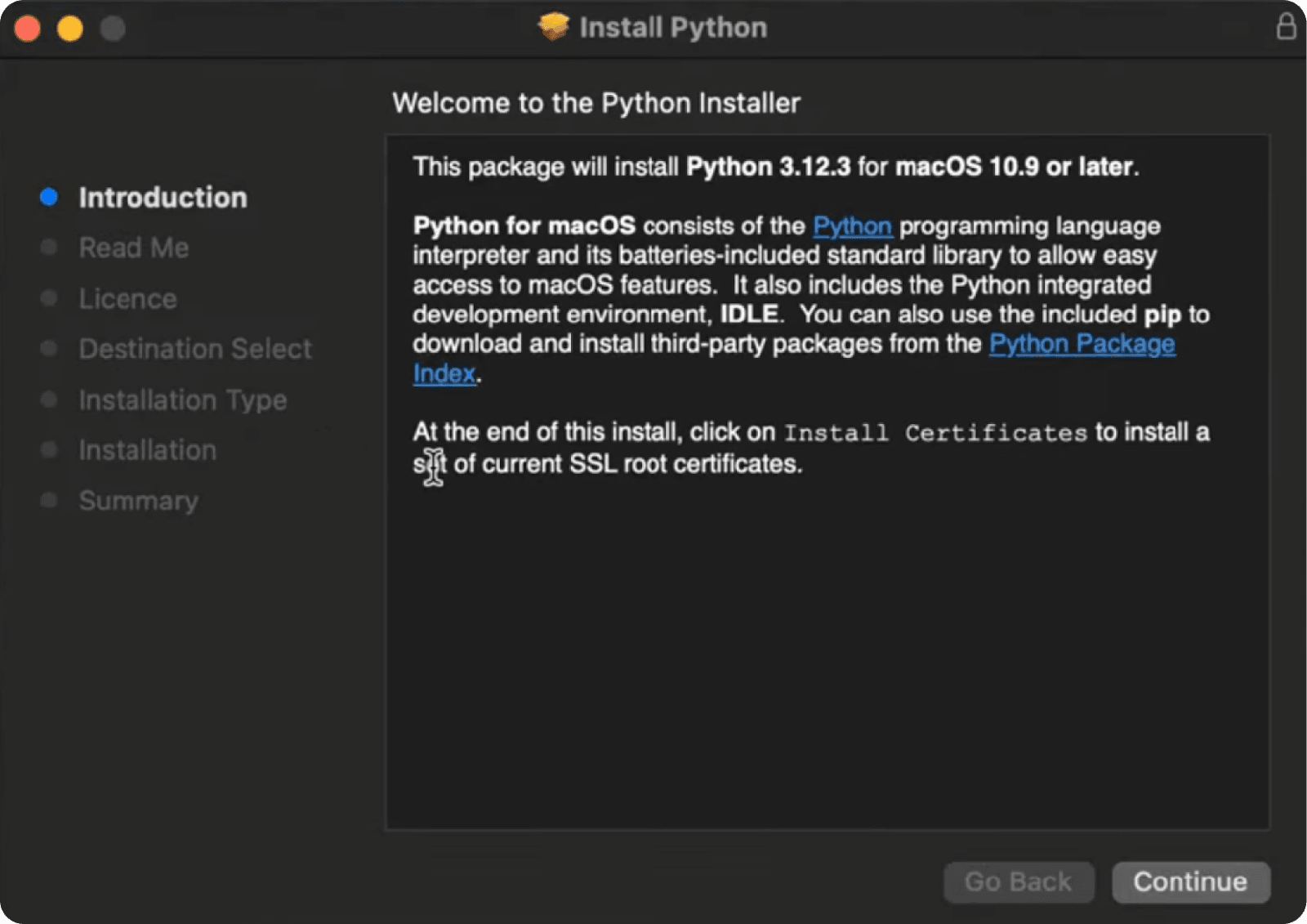
Linux
在某些 Linux 发行版(例如 Ubuntu)中,Python 已经预装。要检查 Python 版本,请在终端中运行以下命令:
python --version 如果 Python 版本较旧,可以使用以下命令安装最新版本(以 Debian 发行版为例):
sudo apt-get update && sudo apt-get install python3 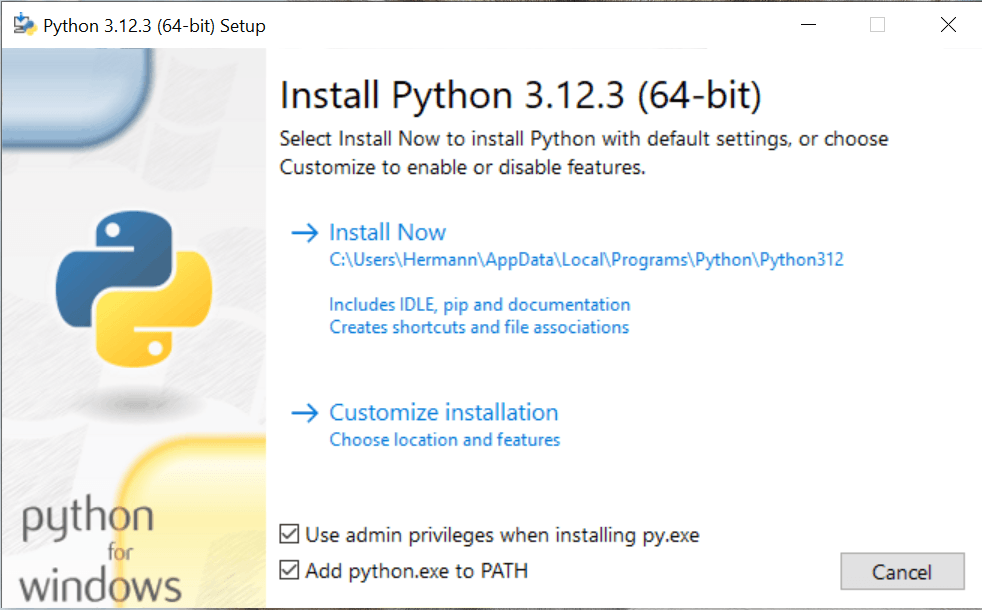
用于 Python 网页爬虫的库与工具
现在可以关注一些库和工具,它们能够让你编写爬虫脚本更加方便。我们来挑选其中最好的,并分析它们的特点,以便为你的任务做出正确选择。
BeautifulSoup
用于 HTML 和 XML 解析的库。适合提取数据以及处理不规范的网页结构。支持多种解析器:html.parser、lxml、html5lib。
静态与动态网站的网页爬虫示例
什么是 HTML
在编写任何爬虫之前,需要理解 HTML 的基础,并能够分析网站的结构,在查找元素时不迷失方向。HTML(超文本标记语言,HyperText Markup Language)是一种用于创建和组织网页内容的标准标记语言。它描述了文档的结构,包括文本、图片、链接以及其他在浏览器中显示的元素。
HTML 的基本元素
标签
HTML 文档由各种标签组成,这些标签定义结构和内容。例如:
- <html>:HTML 文档的根元素。
- <head>:包含元数据,例如页面标题(<title>)以及样式链接。
- <body>:文档主体部分,包含页面的可见内容。
元素
标签内部可以包含各种元素:
- <h1>…<h6>:不同级别的标题。
- <p>:段落文本。
- <a>:链接。
- <img>:图片。
- <div>, <span>:用于分组其他元素的容器。
属性
标签可以包含属性,用于提供关于元素的额外信息。例如:
- <a href="https://example.com">:href 属性指定链接 URL。
- <img src="image.jpg" alt="图片描述">:src 属性指定图片路径,alt 提供替代文本。
选择网站
在选择合适的爬虫工具之前,需要先分析目标网站,并判断其是否包含动态内容。为了确认这一点,可以加载页面,打开开发者工具中的 Network(网络)选项卡,并查看是否存在 Fetch/XHR 请求(这些技术用于让网页基于服务器返回的数据动态更新内容):
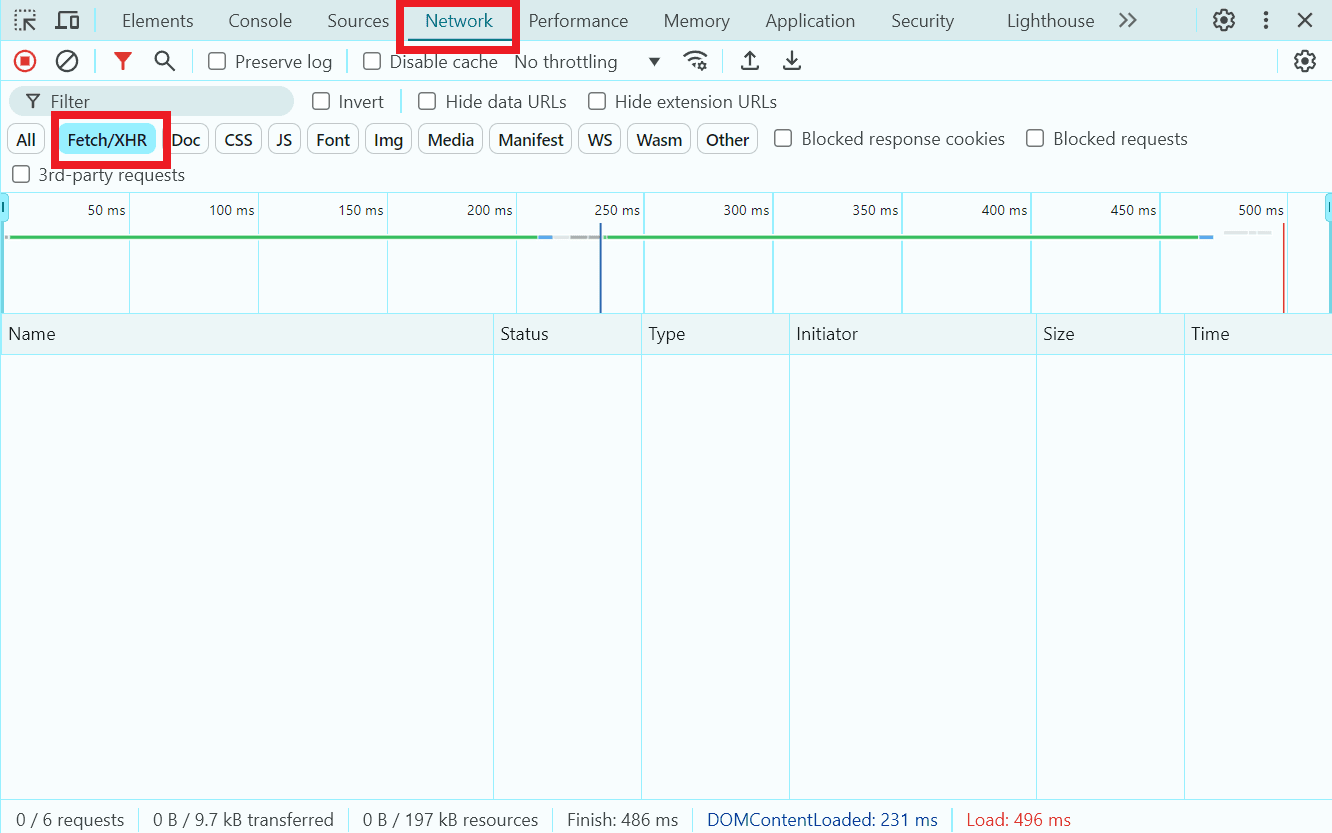
未执行 Fetch/XHR 请求
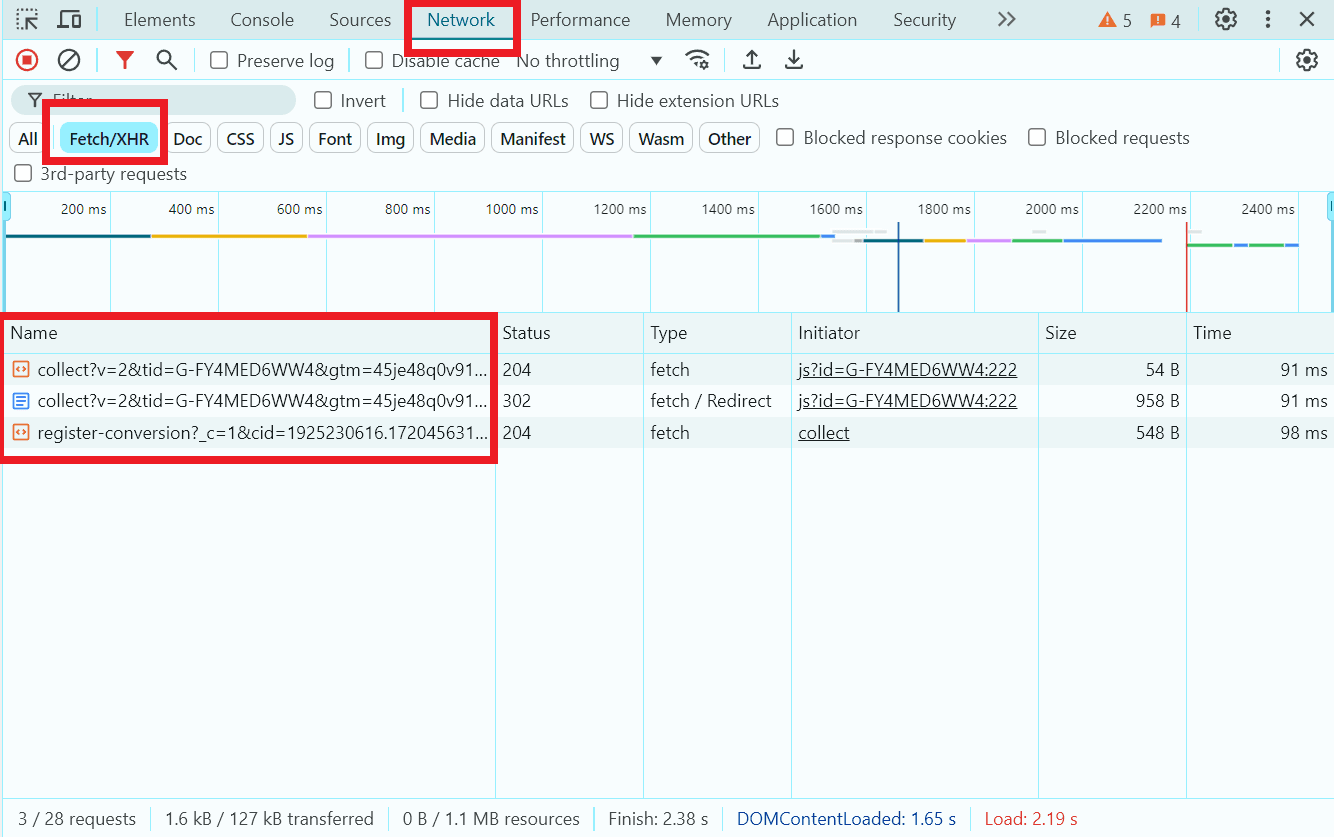
通过 JavaScript 动态加载数据
如果网站不包含动态内容,可以使用 BeautifulSoup 和 requests 等库;如果存在动态加载内容,则应使用 Selenium 或 Playwright 来加载网页。
作为用于提取数据的静态测试页面,我们选择 https://quotes.toscrape.com/ 。接下来我们将编写一个简单的爬虫,用于提取前三条名言及其作者。
用于编写爬虫的工具选择与安装
对于我们的目标,BeautifulSoup 和 requests 这两个库完全足够使用。我们将在编辑器/开发环境中创建一个新文件,并通过以下命令将库添加到项目中:
pip install beautifulsoup4 requests
BeautifulSoup 用于搜索和提取数据:
按标签:
title_tag = soup.title
print(title_tag)  # <title>Page Title</title>
按文本提取。要从标签中获取文本,请使用 .get_text() 方法:
header_text = soup.h1.get_text()
print(header_text)  # Header
按类名、ID 和属性查找:
elements = soup.find_all(class_='my-class')
element = soup.find(id='my-id')
links = soup.find_all('a', href=True)
对于更复杂的查询,可以使用 CSS 选择器方法 .select():
headers = soup.select('h1')
在页面中查找元素并编写爬虫
回到目标页面,找到所需元素并开始编写代码。
打开新创建的文件,导入之前安装的库:
import requests
from bs4 import BeautifulSoup
指定目标页面 URL,设置 User-Agent 头以模拟浏览器访问,并发送 GET 请求:
url = 'https://quotes.toscrape.com/'
headers = {
    'User-Agent': 'Mozilla/5.0 (Windows NT 10.0; Win64; x64) AppleWebKit/537.36 (KHTML, like Gecko) Chrome/147.0.0.0 Safari/537.36'
}
response = requests.get(url, headers=headers)
检查请求是否成功:
if response.status_code == 200:
    # 创建 BeautifulSoup 对象用于解析 HTML
    soup = BeautifulSoup(response.text, 'html.parser')
在另一个打开目标页面的浏览器中查找所有引用块,遍历前三个引用并提取文本:
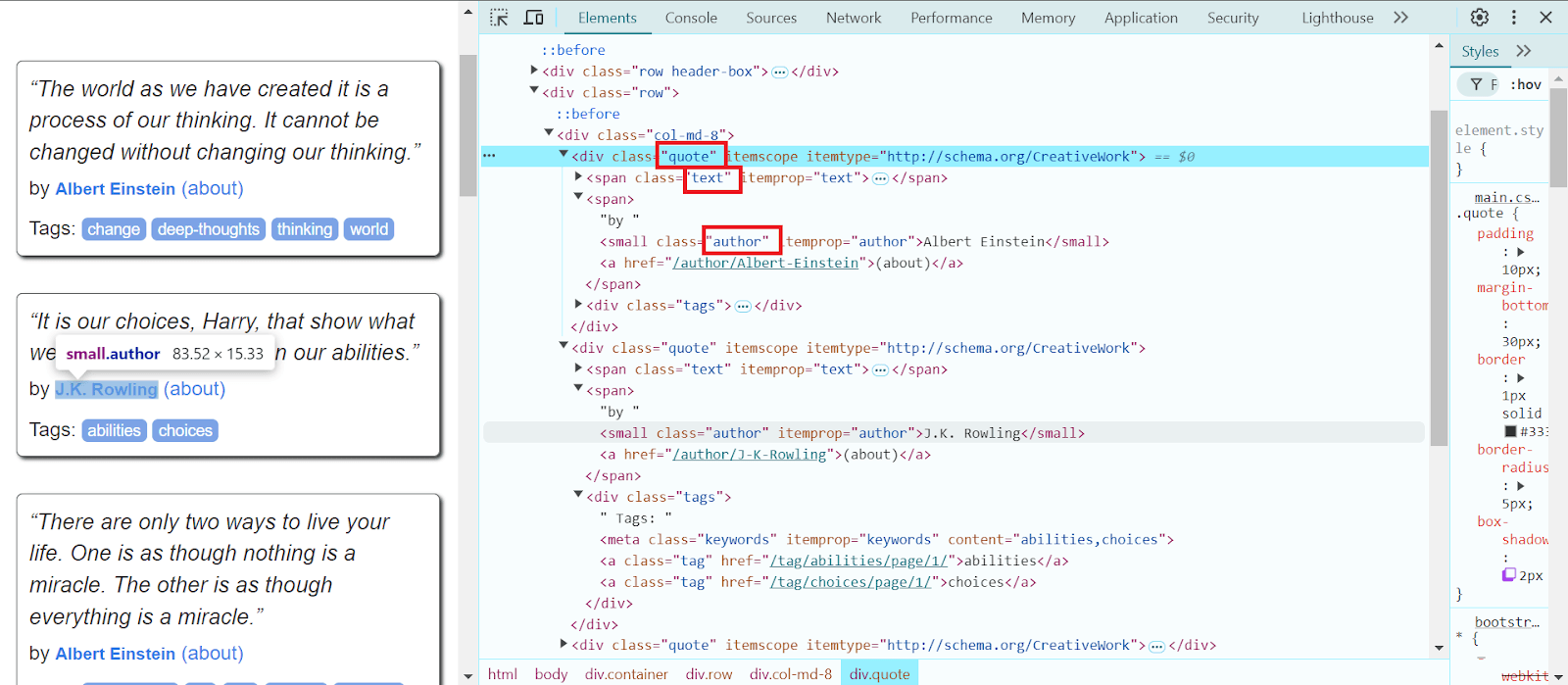
    quotes = soup.select('.quote')

    for quote in quotes[:3]:
        text = quote.select_one('.text').get_text(strip=True)
提取作者名称并输出到控制台:
        author = quote.select_one('.author').get_text(strip=True)
        print(f'引用: {text}\n作者: {author}\n')
else:
    print(f'无法获取页面。状态码: {response.status_code}')
完整代码及说明:
import requests
from bs4 import BeautifulSoup

# 目标页面 URL
url = 'https://quotes.toscrape.com/'

headers = {
    'User-Agent': 'Mozilla/5.0 (Windows NT 10.0; Win64; x64) AppleWebKit/537.36 (KHTML, like Gecko) Chrome/147.0.0.0 Safari/537.36'
}

# 发送 GET 请求
response = requests.get(url, headers=headers)

if response.status_code == 200:
    soup = BeautifulSoup(response.text, 'html.parser')

    quotes = soup.select('.quote')

    for quote in quotes[:3]:
        text = quote.select_one('.text').get_text(strip=True)
        author = quote.select_one('.author').get_text(strip=True)

        print(f'引用: {text}\n作者: {author}\n')
else:
    print(f'无法获取页面。状态码: {response.status_code}')
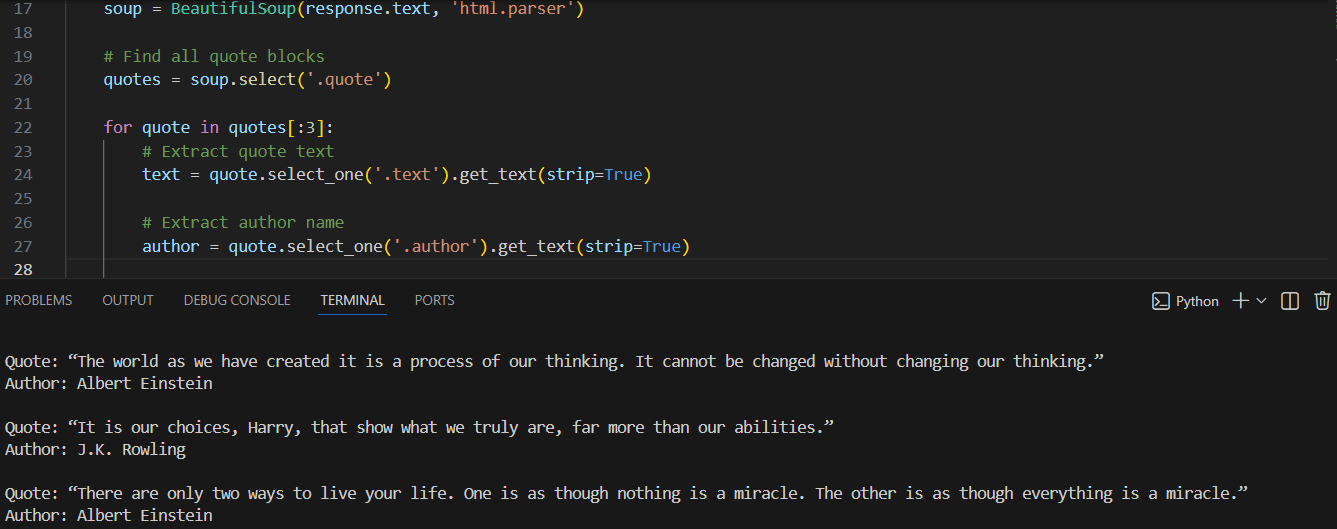
运行代码后,爬虫将输出所需信息——前三条引用及其作者:
动态网站爬虫示例
作为动态网站的示例,我们选择 https://parsemachine.com。具体选择测试页面 https://parsemachine.com/sandbox/catalog/,该页面包含12个商品卡片。我们尝试提取每个商品的名称及其链接。由于该网站是动态加载的,因此我们使用 Playwright。该浏览器自动化工具可以通过 CSS、XPath、文本和 ARIA 选择器查找并提取网页元素,并支持组合选择器以实现更精确的定位。
创建新项目,安装 Playwright 和浏览器 Chromium,执行以下命令:
pip install playwright
playwright install chromium
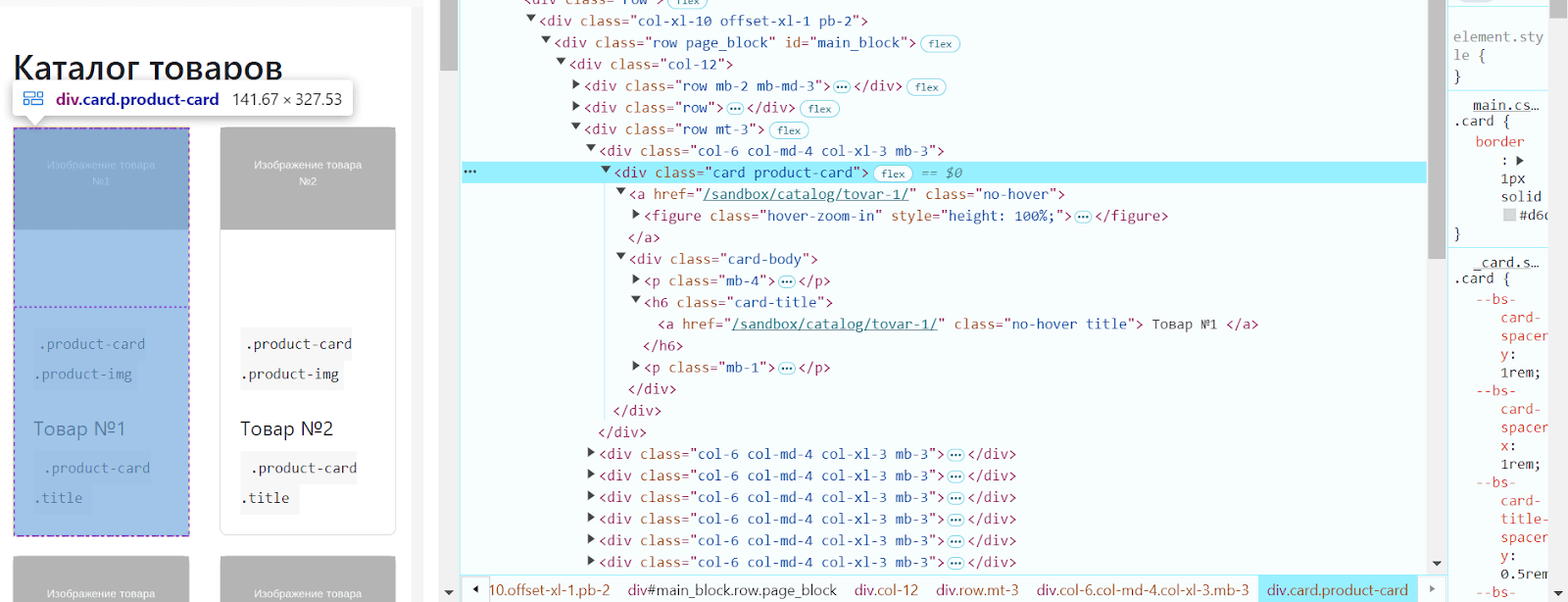
使用 开发者工具查找目标元素:
导入 Playwright,启动浏览器并打开目标页面:
from playwright.sync_api import sync_playwright
url = 'https://parsemachine.com/sandbox/catalog/'
def scrape_with_playwright():
    with sync_playwright() as p:
        browser = p.chromium.launch(headless=False)
        page = browser.new_page()

        page.goto(url)
查找所有商品卡片,遍历每个卡片并提取商品链接:
        product_cards = page.query_selector_all('.card.product-card')

            for card in product_cards:
                title_tag = card.query_selector('.card-title .title')
                title = title_tag.inner_text() if title_tag else '无名称'
商品页面链接:
product_link = title_tag.get_attribute('href') if title_tag else '无链接'
如果链接是相对路径,则补充基础 URL:
  if product_link and not product_link.startswith('http'):
             product_link = f'https://parsemachine.com{product_link}'
关闭浏览器并运行函数:
        browser.close()
    scrape_with_playwright()
完整代码如下:
from playwright.sync_api import sync_playwright
# URL 目标页面
url = 'https://parsemachine.com/sandbox/catalog/'
def scrape_with_playwright():
    with sync_playwright() as p:
        # 启动 Chromium 浏览器
        browser = p.chromium.launch(headless=False) # 设置 True 可无头运行
        # 打开新页面
        page = browser.new_page()

        # 访问目标页面
        page.goto(url)

        # 获取所有商品卡片
        product_cards = page.query_selector_all('.card.product-card')

        for card in product_cards:
            # 提取商品链接
            title_tag = card.query_selector('.card-title .title')
            title = title_tag.inner_text() if title_tag else '无名称'

            # 商品链接
            product_link = title_tag.get_attribute('href') if title_tag else '无链接'

            # 如果是相对路径,补全 URL
            if product_link and not product_link.startswith('http'):
                product_link = f'https://parsemachine.com{product_link}'

            # 输出结果
            print(f'名称: {title}, 链接: {product_link}')

        browser.close()
scrape_with_playwright()
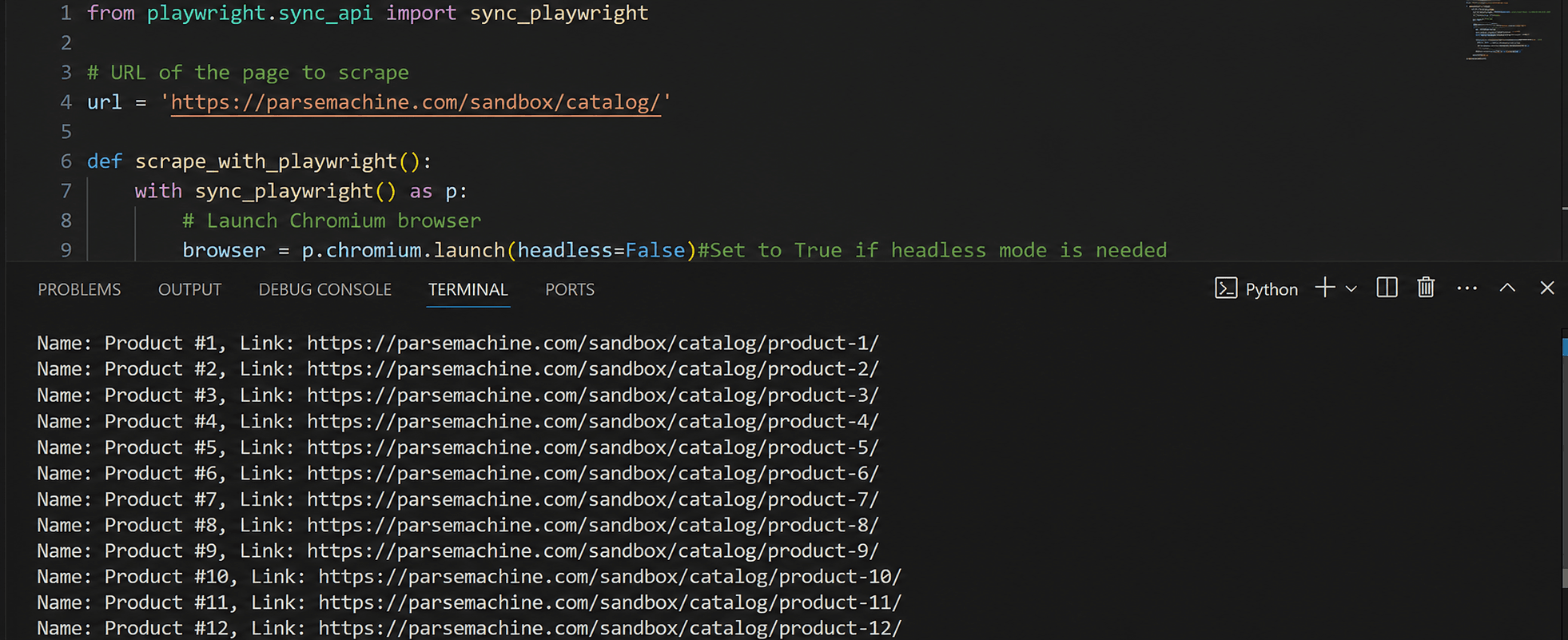
运行脚本后,将输出页面中所有商品的名称及其链接:
如何保存提取的信息?
为了保存提取的信息,需要了解一些结果存储格式:
CSV – 是最常用的表格数据存储格式之一。它是一个文本文件,每一行代表一条记录,字段之间用逗号分隔。优点:被包括 Excel 在内的大多数数据处理软件支持,易于用文本编辑器阅读和修改。缺点:不适合存储复杂结构数据(例如嵌套数据),在处理逗号和特殊字符时需要转义。
JSON – 是一种用于数据交换的文本格式,非常适合表示结构化数据,在 Web 开发中广泛使用。优点:支持嵌套和层级结构;被大多数编程语言良好支持;人和机器都易于阅读。适用于通过 API 传输数据的场景。缺点:相比 CSV 文件体积更大;由于结构更复杂,解析速度可能更慢。
XLS – 用于 Excel 表格,存储单元格数据、格式和公式。常用于数据表格存储。在 Python 中处理 XLS 需要第三方库,例如 pandas。优点:数据展示清晰、适合可视化与报表。缺点:依赖额外库,会增加服务器负担和处理时间。
XML – 是一种用于存储和传输数据的标记语言,支持嵌套结构和属性。优点:结构化强,适合复杂数据;被多种标准和系统支持。缺点:文件较冗长,解析速度较慢。
数据库用于存储大量结构化数据。示例包括 MySQL、PostgreSQL、MongoDB、SQLite。优点:支持大规模数据与快速访问;易于组织与关联数据;支持事务与数据恢复。缺点:需要额外配置与维护。
对于我们的爬虫,我们选择 CSV 格式,因为提取的数据是表格型的(引用文本与作者、商品名称与链接),并且数据量较小,没有复杂嵌套结构。关于如何读写该格式的更多信息,可以查看 这里。在我们的引用代码中添加 CSV 导入,创建 writer 对象,并写入引用数据(引用内容及其作者):
    with open('quotes.csv', 'w', newline='', encoding='utf-8') as csvfile:
        csvwriter = csv.writer(csvfile)

        csvwriter.writerow(['引用', '作者'])

        for quote in quotes[:3]:
            text = quote.select_one('.text').get_text(strip=True)

            author = quote.select_one('.author').get_text(strip=True)

            csvwriter.writerow([text, author])
同时,我们还添加了控制台输出以及对可能错误的处理:
    print("数据已成功写入 quotes.csv")

except requests.RequestException as e:
    print(f'请求页面时发生错误: {e}')
except Exception as e:
    print(f'发生错误: {e}')
完整代码如下:
import requests
from bs4 import BeautifulSoup
import csv

# 目标页面 URL
url = 'https://quotes.toscrape.com/'

headers = {
    'User-Agent': 'Mozilla/5.0 (Windows NT 10.0; Win64; x64) AppleWebKit/537.36 (KHTML, like Gecko) Chrome/147.0.0.0 Safari/537.36'
}

try:
    # 发送带有自定义 User-Agent 的 GET 请求
    response = requests.get(url, headers=headers)
    response.raise_for_status()  # 检查 HTTP 错误

    # 创建 BeautifulSoup 对象用于解析 HTML
    soup = BeautifulSoup(response.text, 'html.parser')

    # 查找所有引用块
    quotes = soup.select('.quote')

    # 打开 CSV 文件进行写入
    with open('quotes.csv', 'w', newline='', encoding='utf-8') as csvfile:
        # 创建 writer 对象
        csvwriter = csv.writer(csvfile)

        # 写入表头
        csvwriter.writerow(['引用', '作者'])

        # 写入引用数据
        for quote in quotes[:3]:
            # 提取引用文本
            text = quote.select_one('.text').get_text(strip=True)

            # 提取作者名称
            author = quote.select_one('.author').get_text(strip=True)

            # 写入 CSV 文件
            csvwriter.writerow([text, author])

    print("数据已成功写入 quotes.csv")

except requests.RequestException as e:
    print(f'请求页面时发生错误: {e}')
except Exception as e:
    print(f'发生错误: {e}')
对第二个爬虫也执行同样的操作:
from playwright.sync_api import sync_playwright
import csv

# 目标页面 URL
url = 'https://parsemachine.com/sandbox/catalog/'

def scrape_with_playwright():
    try:
        with sync_playwright() as p:
            # 启动 Chromium 浏览器
            browser = p.chromium.launch(headless=False)  # 如果需要无头模式,请改为 True

            try:
                # 打开新标签页
                page = browser.new_page()

                # 访问目标页面
                page.goto(url)

                # 查找所有商品卡片
                product_cards = page.query_selector_all('.card.product-card')

                # 打开 CSV 文件进行写入
                with open('products.csv', 'w', newline='', encoding='utf-8') as csvfile:
                    # 创建 writer 对象
                    csvwriter = csv.writer(csvfile)

                    # 写入表头
                    csvwriter.writerow(['商品名称', '链接'])

                    # 从商品卡片中提取数据并写入 CSV
                    for card in product_cards:
                        # 提取商品名称
                        title_tag = card.query_selector('.card-title .title')
                        title = title_tag.inner_text() if title_tag else '无名称'

                        # 商品链接
                        product_link = title_tag.get_attribute('href') if title_tag else '无链接'

                        # 如果是相对链接,添加基础 URL
                        if product_link and not product_link.startswith('http'):
                            product_link = f'https://parsemachine.com{product_link}'

                        # 写入 CSV 文件
                        csvwriter.writerow([title, product_link])

                        # 输出商品信息
                        print(f'名称: {title}, 链接: {product_link}')
                        print("数据已成功写入 products.csv")

            except Exception as e:
                print(f'Playwright 运行时发生错误: {e}')

            finally:
                # 关闭浏览器
                browser.close()
                print("浏览器已关闭。")

    except Exception as e:
        print(f'启动 Playwright 时发生错误: {e}')

scrape_with_playwright()
网页爬虫中的障碍
不断变化且复杂化的网站结构:网页爬虫中最常见的障碍之一是网站结构的变化以及代码混淆。即使是 HTML 标记或页面结构的微小变化,也可能导致爬虫脚本失效。这通常需要频繁更新代码以适应新的变化。
请求限制:许多网站会限制在一定时间内允许发送的请求数量。如果请求超过限制,IP 地址可能会被暂时封禁。
IP 封禁:网站可能会封禁被判定为可疑或过于频繁访问的 IP 地址,这对爬虫来说是一个严重障碍。在这种情况下,需要使用高质量的代理服务器来绕过封锁。
CAPTCHA(验证码):许多网站通过验证码来防止自动化操作。验证码通常需要人工输入,或使用专门的服务来进行解决或绕过。
目前最优秀的服务之一是 CapMonster Cloud —— 其 API 可以轻松集成到代码中,用于绕过验证码并继续运行爬虫。它易于接入,能够快速解决多种类型的验证码,并且错误率极低 —— 支持 reCAPTCHA、DataDome、Amazon CAPTCHA 等多种类型。 CapMonster Cloud 可以被视为网页爬虫流程中一个理想的辅助工具和重要组成部分。
成功进行网页爬虫的建议
使用代理轮换和 User-Agent 轮换,以避免 IP 封禁并绕过请求限制。这有助于模拟来自不同设备和浏览器的请求。
添加错误处理与重试机制:网页可能暂时不可用,或者请求可能失败。重试机制和错误处理可以提高脚本的稳定性,并避免爬取过程被中断。
在开始爬取之前,请务必 阅读网站的 robots.txt 文件。该文件包含网站对爬虫的访问规则,遵守这些规则有助于避免法律问题以及与网站所有者的冲突。
在请求之间添加 随机延迟,以减少可疑行为并降低被封禁的风险。
这些建议可以帮助你的脚本更好地模拟真实用户行为,从而降低被检测的概率。
结论
因此,使用 Python 进行网页爬虫是从各种网站高效收集数据的最流行方法之一。我们讨论了如何选择合适的爬虫工具,介绍了 Python 及相关库的安装过程,并讲解了如何编写代码来提取数据并以合适的格式保存结果。通过本文的分步骤方法,即使是初学者也可以掌握网页爬虫的基本技术并编写自己的爬虫脚本。网页爬虫为数据分析、信息收集、市场监控等任务提供了巨大的可能性。重要的是不断学习新的工具和方法,以适应这个不断发展的领域。
使用如 BeautifulSoup、requests、Selenium、Playwright 等本指南中提到的工具,可以从静态和动态网站中提取信息。在进行网页爬虫时,必须考虑法律与道德因素,并准备应对验证码或动态加载内容等各种障碍。
每种工具和方法都有其优点与局限性。选择合适的工具取决于具体任务、网页复杂度以及数据规模。要实现高效爬虫,理解目标网页的结构非常重要。
希望上述内容能帮助你更好地理解网页爬虫的过程,并为你构建自己的爬虫提供基础知识。祝你在数据自动化与信息分析项目中取得成功!
注:请注意,该内容仅用于对您自己拥有合法访问权限的网站或资源进行自动化测试。