Loading...
Pricing of FunCaptcha solution


Inherited a site with a captcha or another protection layer but no access to the source code? In that case you naturally ask: which solution is installed, is it configured correctly, and how can the workflow be tested?
In this article, we have tried to answer all the key questions. The first step in solving the task is to determine which protection system is being used. To do this, you can refer to the list of popular captchas and anti-bot protection systems, where you will find visual examples and key indicators that help you quickly understand what you are dealing with.
If you discover that your site uses FunCaptcha (Arkose Labs CAPTCHA), the next step is to study its properties and operation in more detail. In this article, you can also review the instructions on how to integrate FunCaptcha (Arkose Labs CAPTCHA) so that you fully understand how it functions on your site. This will help you not only understand the current protection, but also properly plan its maintenance.
What is FunCaptcha
FunCaptcha is an interactive anti-bot protection system developed by Arkose Labs. It verifies whether a user is a real human through game-like and visual challenges that are easy for humans but difficult to automate. FunCaptcha is used to protect registrations, logins, online payments, marketing campaigns, and to prevent fraud, spam, and large-scale automated actions.

Examples of FunCaptcha
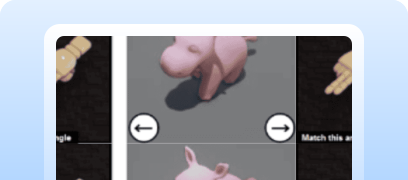
Rotating a 3D object
The user rotates a 3D model or object to place it in the correct position.
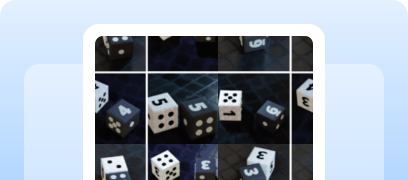
Selecting objects by condition
You need to select images or elements that match a given rule (for example, “select all apples”).
Interactive tasks (drag-and-drop / path following)
The user performs actions with elements, such as dragging them along a specific path.

Audio challenges
The user listens to an audio prompt and selects the correct answer (used less frequently as an alternative to visual challenges).
How to solve FunCaptcha using CapMonster Cloud
When testing forms protected by FunCaptcha, it is often necessary to verify that the captcha works correctly and is properly integrated.
You can manually test the captcha embedded on your website.
- Open the page with the form and make sure the captcha is displayed.
- Try submitting the form without solving the captcha — the server should return an error.
- After successfully solving the captcha, the form should be submitted without errors.
For automatic captcha recognition, you can use specialized services such as CapMonster Cloud — a tool that accepts captcha parameters, processes them on its own servers, and returns a ready-to-use token. This token can be injected into the form to pass the verification without user interaction.
Working with CapMonster Cloud via API typically involves the following steps:
 Creating a task
At this stage, you submit your API key, the captcha type, and its parameters. The service returns a unique taskId that can later be used to retrieve the result.
 Sending an API request
To solve FunCaptcha, the following parameters must be specified in the request:
type - FunCaptchaTask
websiteURL - the URL of the page where the captcha is being solved;
websitePublicKey - the FunCaptcha key (the public key or pk value);
data - an additional parameter, required if data[blob] is used on the website;
funcaptchaApiJSSubdomain - the Arkose Labs subdomain (the surl value). Specify it only if it differs from the default: client-api.arkoselabs.com
userAgent - Browser User-Agent. Pass only a current UA from a Windows operating system.
How to integrate FunCaptcha into your website
To confidently understand how the captcha works on your website, its verification logic, and how to reconnect or reconfigure it, we recommend reviewing this section. It describes the protection integration process and helps you quickly understand all the details.
- Register with Arkose Labs and obtain access to the Arkose Command Center (you can contact them via chat and submit your details in the form, for example here or here).
After gaining access, obtain two keys (Public / Private) in the Settings → Keys section.
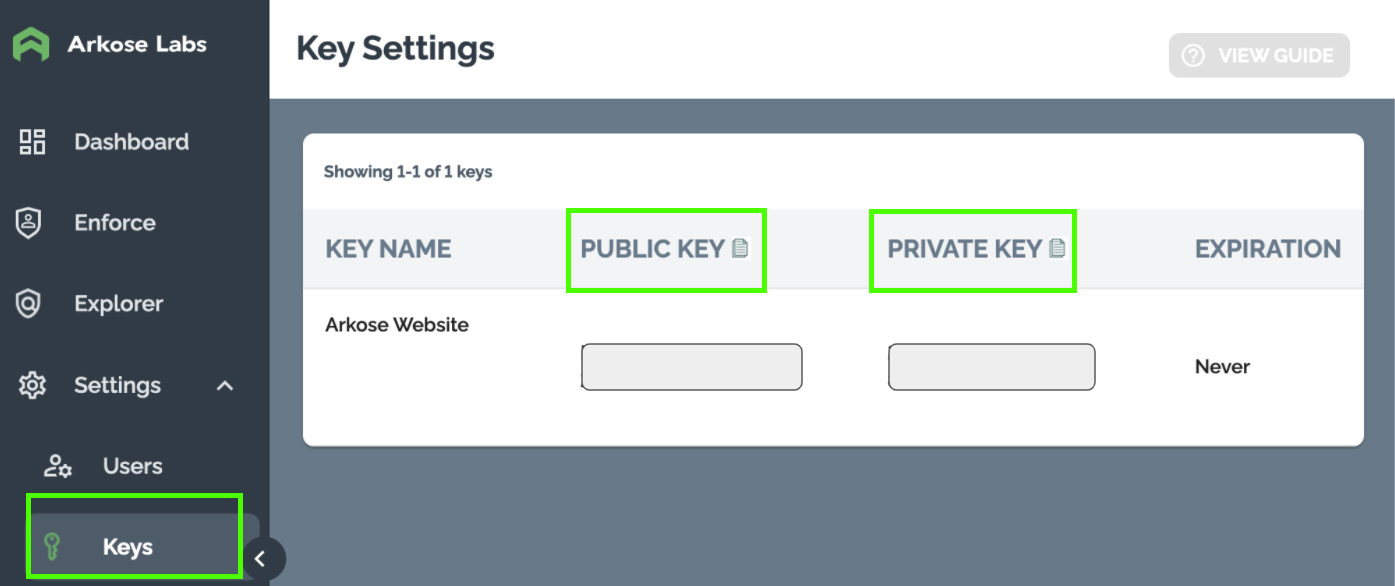
If necessary, contact your Customer Success Manager (CSM) to:
- obtain custom API domains;
- receive Verify API request and response schemas.
Arkose recommendations
- Use a Development Key for testing.
- Use a separate Production Key for each workflow (login, registration, purchase, etc.).
- Use different keys for different websites.
General workflow
- The client collects data and displays a challenge if necessary.
- The client receives a one-time token.
- The server verifies the token via the Arkose Verify API.
Step 1. Client-side integration
On the browser side (Arkose Bot Manager):
- analyzes user behavior;
- displays an Enforcement Challenge if required;
- returns a one-time session token.
Client API:
- For testing, you can use:
Possible errors and debugging

Invalid request parameters
Make sure you correctly specify the Public Key for the client and the Private Key for the server, and that you pass a valid session_token to the Verify API.
Empty or invalid session_token
The server will receive an empty result or a verification error. Check that the client correctly sends the token after solving the captcha.
Solution timeout
If the user does not complete the challenge in time, the Arkose server may return an error or reject the verification. Increase the allowed timeout on the server side.
Protection resilience checks

Try sending a request without a session_token — the server-side verification should return an error and reject the request.
Perform load testing (for example, using k6 or JMeter) at 100–200+ requests per second — the captcha should initialize correctly, and the backend should process verifications stably.
Check behavior with an expired session_token — the server should return an error and reject verification.
Check reuse of the same token — expected result: verification is rejected.
Security and optimization tips

Store the Private Key only on the server and never include it in client-side JavaScript code.
Log full Arkose Verify API responses, including verification status, error codes, and submitted parameters — this helps diagnose issues faster.

Use HTTPS for all requests (client → server → Verify API) to prevent data tampering.

Place links to the Privacy Policy and Arkose Labs Terms of Service on your website, as required by the license.
Supported captchas
 reCAPTCHA v2
 GeeTest
 Cloudflare Turnstile
 DataDome
Conclusion
If you’ve taken over a website that already has a captcha or another protection system installed, but you don’t have access to the code, don’t worry! It’s quite easy to identify which technology is being used. To verify that everything works correctly, you can use the CapMonster Cloud recognition service in an isolated test environment to make sure that the token processing mechanism and the validation logic are functioning properly.
In the case of FunCaptcha, it’s enough to detect the system, observe its behavior, and confirm that the protection is working correctly. In this article, we showed how to identify FunCaptcha and where to find instructions on how to integrate or reconfigure it, so you can confidently maintain the protection and keep its operation under control.


 Amazon Waf
 Faucet Pay
 Imperva (Incapsula)
 Prosopo
 Text CAPTCHA
 Yidun
Yidun MTCaptcha
 Altcha
 TSPD
TSPD Hunt
Hunt Alibaba
 Friendly