Loading...
Pricing of ALTCHA solution


Inherited a site with a captcha or another protection layer but no access to the source code? In that case you naturally ask: which solution is installed, is it configured correctly, and how can the workflow be tested?
In this article, we have tried to answer all the key questions. The first step in solving the task is to determine which protection system is being used. To do this, you can refer to the list of popular captchas and anti-bot protection systems, where you will find visual examples and key indicators that help you quickly understand what you are dealing with.
If you discover that your site uses ALTCHA, the next step is to study its properties and operation in more detail. In this article, you can also review the instructions on how to integrate ALTCHA so that you fully understand how it functions on your site. This will help you not only understand the current protection, but also properly plan its maintenance.
What is ALTCHA
ALTCHA (Alternative CAPTCHA) is a system for protecting a website from bots and spam. It helps distinguish real users from automated programs so that the site remains safe and stable. ALTCHA is a modern alternative to traditional CAPTCHAs: it uses a lightweight cryptographic challenge (proof-of-work) and does not collect cookies or track users.

Examples of ALTCHA
Proof-of-Work (PoW)
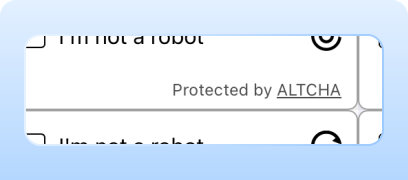
The system uses the Proof-of-Work (PoW) verification method by default, which eliminates visual puzzles and intrusive checks. This approach combines security with user convenience, offering a non-intrusive captcha solution suitable for most visitors.
Code Captcha
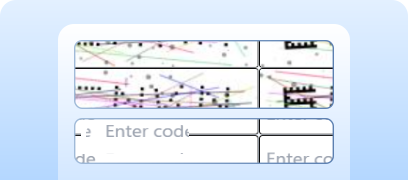
Protection can be strengthened to require a text captcha.

Invisible Captcha
Verification happens without a visible widget and requires no user interaction.
How to solve ALTCHA via CapMonster Cloud
When testing forms that include ALTCHA, you often need to verify that the captcha works and is integrated correctly.
You can verify the captcha embedded on your site manually.
- Open the form page and make sure the captcha renders.
- Try submitting the form without solving it — the server should return an error.
- After a successful solution, the form must be submitted without issues.
For automatic solving you can use tools like CapMonster Cloud, which accepts captcha parameters, processes them on its servers, and returns a ready-to-use token. Insert this token into the form to pass the check without user interaction.
Working with CapMonster Cloud via API typically involves the following steps:
 Creating a task
At this stage you send your API key, captcha type and its parameters. The service returns a unique taskId, which can later be used to obtain the result.
 Sending an API request
Your ALTCHA solving request must include the following parameters:
type - CustomTask
class - altcha
websiteURL - the address of the page where the captcha is solved
websiteKey - for this task it is allowed to send an empty string.
challenge (inside metadata) - a unique challenge identifier obtained from the webpage.
iterations (inside metadata) - the number of iterations or the maximum value for calculations. Important: the iterations parameter corresponds to the maxnumber value!
salt (inside metadata) - the salt obtained from the site, used to generate hashes.
signature (inside metadata) - the digital signature of the request.
Solving, token insertion and form submission
Node.js example for a full captcha-solving cycle on your webpage. Possible approaches: use HTTP requests to obtain HTML and captcha parameters, send the solution and process the result; or use automation tools (e.g., Playwright) — open the page, wait for the captcha, send parameters (for testing you may send correct or incorrect values), get the result via CapMonster Cloud client, insert the token into the form and observe the result.
// npm install playwright
// npx playwright install chromium

const { chromium } = require("playwright");

const API_KEY = "YOUR_API_KEY";
const ALTCHA_PAGE = "https://example.com"; // Your website with ALTCHA

(async () => {
  const browser = await chromium.launch({ headless: false, devtools: true });
  const context = await browser.newContext();
  const page = await context.newPage();

  // Catching all responses from the ALTCHA endpoint
  let challengeResp = null;
  page.on("response", async (response) => {
    try {
      const url = response.url();
      if (url.startsWith("https://captcha.example.com/altcha")) { // ALTCHA endpoint
        challengeResp = await response.json();
        console.log("Captured Altcha response:", challengeResp);
      }
    } catch (err) {
      console.warn("Error parsing Altcha response:", err);
    }
  });

  await page.goto(ALTCHA_PAGE, { waitUntil: "networkidle" });

  // Click the widget if it exists
  const widgetHandle = await page.$("altcha-widget");
  if (widgetHandle) {
    try {
      await widgetHandle.click();
    } catch {}
  }

  // Waiting for challenge to appear
  const start = Date.now();
  while (!challengeResp && Date.now() - start < 60000) { // Timeout increased
    await new Promise((r) => setTimeout(r, 300));
  }

  if (!challengeResp) {
    console.error("Failed to capture Altcha challenge.");
    await browser.close();
    return;
  }

  const { challenge, salt, signature, maxnumbers } = challengeResp;

  // Creating a task on CapMonster Cloud
  const createTaskBody = {
    clientKey: API_KEY,
    task: {
      type: "CustomTask",
      class: "altcha",
      websiteURL: ALTCHA_PAGE,
      websiteKey: "",
      userAgent:"Mozilla/5.0 (Windows NT 10.0; Win64; x64) AppleWebKit/537.36 (KHTML, like Gecko) Chrome/148.0.0.0 Safari/537.36",
      metadata: {
        challenge,
        iterations: maxnumbers || 100000,
        salt,
        signature,
      },
    },
  };

  const taskResp = await fetch("https://api.capmonster.cloud/createTask", {
    method: "POST",
    headers: { "Content-Type": "application/json" },
    body: JSON.stringify(createTaskBody),
  }).then((r) => r.json());

  console.log("CreateTask response:", taskResp);
  if (!taskResp?.taskId) {
    console.error("CreateTask failed:", taskResp);
    await browser.close();
    return;
  }

  const taskId = taskResp.taskId;

  // Getting the solution
  let fullSolution = null;
  const pollStart = Date.now();
  while (Date.now() - pollStart < 120000) {
    const res = await fetch("https://api.capmonster.cloud/getTaskResult", {
      method: "POST",
      headers: { "Content-Type": "application/json" },
      body: JSON.stringify({ clientKey: API_KEY, taskId }),
    }).then((r) => r.json());

    if (res.status === "ready") {
      fullSolution = res.solution;
      console.log("Solution:", fullSolution);
      break;
    }
    await new Promise((r) => setTimeout(r, 3000));
  }

  if (!fullSolution) {
    console.error("No solution received in time.");
    await browser.close();
    return;
  }

  const token = fullSolution?.data?.token || fullSolution?.token || fullSolution?.data;

  if (!token) {
    console.error("Token not found in solution:", fullSolution);
    await browser.close();
    return;
  }

  //Inserting the token
  await page.evaluate((t) => {
    let input = document.querySelector("#captchaParaValidar");
    if (!input) {
      input = document.createElement("input");
      input.type = "hidden";
      input.id = "captchaParaValidar";
      input.name = "captchaParaValidar";
      (document.querySelector("form") || document.body).appendChild(input);
    }
    input.value = t;

    let alt = document.querySelector('input[name="altcha"]');
    if (!alt) {
      alt = document.createElement("input");
      alt.type = "hidden";
      alt.name = "altcha";
      (document.querySelector("form") || document.body).appendChild(alt);
    }
    alt.value = t;

    const widget = document.querySelector("altcha-widget");
    if (widget) {
      widget.setAttribute("data-state", "verified");
      const checkbox = widget.querySelector("input[type='checkbox']");
      if (checkbox) {
        checkbox.checked = true;
        checkbox.dispatchEvent(new Event("change", { bubbles: true }));
      }
      const label = widget.querySelector(".altcha-label");
      if (label) label.textContent = "Verified";
    }
  }, token);

  console.log("Token injected:", token);
})();
How to integrate ALTCHA into your website
To confidently understand how captcha works on your site, know its validation logic, reconnect or reconfigure it, we recommend reading this section. It describes the integration process — helping you quickly understand all the details.
1. Installing the widget
Option 1 — via CDN (the simplest). Add this to your HTML <head>:
<script async defer src="https://cdn.jsdelivr.net/gh/altcha-org/altcha/dist/altcha.min.js" type="module"></script>Option 2 — via npm:
npm install altchaImport the widget into your JS file:
import "altcha";2. Adding the widget to the form.
Insert the <altcha-widget> component into the form where protection is required:
<form method="POST" action="/submit">
  <altcha-widget challengeurl="/altcha/challenge"></altcha-widget>
  <button type="submit">Send</button>
</form>
challengeurl — your server endpoint for issuing the challenge.
If you use ALTCHA Sentinel (a ready server-side protection system against bots and spam with machine learning and traffic analysis), use its URL instead of your own server:
<altcha-widget
  challengeurl="https://sentinel.example.com/v1/challenge?apiKey=YOUR_API_KEY">
</altcha-widget>
3. Server-side validation.
How validation works:
- 1) The widget generates a payload — Base64-encoded JSON, usually sent as the form field altcha.
- 2) On the server, you validate the payload cryptographically (without additional API requests).
- 3) After successful validation, you can process the form.
Possible errors and debugging

Invalid challengeurl or API Key
The widget does not load or returns an error during validation.
Solution timeout
The server did not have enough time to validate the payload. Increase the waiting time or ensure that the server-side validation works correctly.
Empty payload
Error while transferring the result from the widget to the server.
Verification failed
Payload is expired, reused or tampered with. For diagnostics, enable logging and check the fields verified and verificationData in the server or Sentinel response.
Protection resilience checks
After integration, make sure the system really protects the site from automated actions.

Try making a request without solving the captcha — the server should return success: false.
Perform a load test (e.g., using k6 or JMeter) at a rate above 100 requests per second — the captcha should load correctly and the validation system should remain stable.
Check the server reaction to an expired or reused token — the expected response is 403 Forbidden.
Security and optimization tips

Keep secret keys (HMAC or API Key for Sentinel) only on the server — do not send them to the frontend.
Log errors and verification events (verified: false and verificationData) to understand the reasons for failed checks.

For transparency and user trust, add links to the privacy policy and ALTCHA terms of use if required.
Supported captchas
 reCAPTCHA v2
 GeeTest
 Cloudflare Turnstile
 DataDome
Conclusion
If you’ve taken over a website that already has a captcha or another protection system installed, but you don’t have access to the code, don’t worry! It’s quite easy to identify which technology is being used. To verify that everything works correctly, you can use the CapMonster Cloud recognition service in an isolated test environment to make sure that the token processing mechanism and the validation logic are functioning properly.
In the case of ALTCHA, it’s enough to detect the system, observe its behavior, and confirm that the protection is working correctly. In this article, we showed how to identify ALTCHA and where to find instructions on how to integrate or reconfigure it, so you can confidently maintain the protection and keep its operation under control.
Helpful links


 Amazon Waf
 Faucet Pay
 Imperva (Incapsula)
 Prosopo
 Text CAPTCHA
 Yidun
Yidun MTCaptcha
 Funcaptcha
 TSPD
TSPD Hunt
Hunt Alibaba
 Friendly