CapMonster Cloud API
 Extension for browsers


In this article, we have tried to answer all the key questions. The first step in solving the task is to determine which protection system is being used. To do this, you can refer to the list of popular captchas and anti-bot protection systems, where you will find visual examples and key indicators that help you quickly understand what you are dealing with.
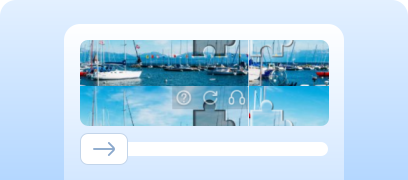
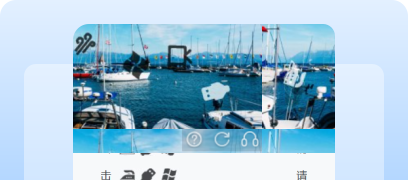
If you discover that your site uses Yidun (NECaptcha), the next step is to study its properties and operation in more detail. In this article, you can also review the instructions on how to integrate Yidun (NECaptcha) so that you fully understand how it functions on your site. This will help you not only understand the current protection, but also properly plan its maintenance.


Working with CapMonster Cloud via API typically involves the following steps:
 Creating a task
 Sending an API request
type - YidunTask
websiteURL - the full URL of your page with the captcha;
websiteKey - the value of the siteKey;
userAgent - Browser User-Agent. Pass only an up-to-date Windows UA.

https://api.capmonster.cloud/createTask
{
  "clientKey": "API_KEY",
  "task": {
    "type": "YidunTask",
    "websiteURL": "https://www.example.com",
    "websiteKey": "6cw0f0485d5d46auacf9b735d20218a5",
    "userAgent": "Mozilla/5.0 (Windows NT 10.0; Win64; x64) AppleWebKit/537.36 (KHTML, like Gecko) Chrome/146.0.0.0 Safari/537.36"
  }
}
{
"errorId":0,
"taskId":407533072
} Receiving the result
https://api.capmonster.cloud/getTaskResult{
"clientKey":"API_KEY",
"taskId": 407533072
}
{
  "errorId": 0,
  "errorCode": null,
  "errorDescription": null,
  "solution": {
    "token": "CN31_9AwsPmaYcJameP_09rA0vkVMQsPij...RXTlFJFc3"
  },
  "status": "ready"
}
 Placing the token on the page
// npm install playwright @zennolab_com/capmonstercloud-client
// npx playwright install chromium
import { chromium } from "playwright";
import { CapMonsterCloudClientFactory, ClientOptions, YidunRequest } from "@zennolab_com/capmonstercloud-client";

(async () => {
  //  Settings
  const TARGET_URL = "https://example.com/";
  const WEBSITE_KEY = "6cw0f0485d5d46auacf9b735d20218a5";   // your Yidun siteKey
  const CMC_API_KEY = "YOUR_API_KEY"; // your CapMonster Cloud API key

  // 1) Launching the browser
  const browser = await chromium.launch({ headless: false });
  const page = await browser.newPage();
  await page.goto(TARGET_URL, { waitUntil: "domcontentloaded" });

  const cmc = CapMonsterCloudClientFactory.Create(
    new ClientOptions({ clientKey: CMC_API_KEY })
  );

  // 2) Sending a request to solve Yidun captcha
  const solution = await cmc.Solve(
    new YidunRequest({
      websiteURL: TARGET_URL,
      websiteKey: WEBSITE_KEY,
      userAgent: "Mozilla/5.0 (Windows NT 10.0; Win64; x64) AppleWebKit/537.36 (KHTML, like Gecko) Chrome/146.0.0.0 Safari/537.36"
    })
  );

  const token = solution.solution.token; // Receiving the Yidun token
  console.log("Yidun token:", token);

  // 3) Inserting the token into a hidden field and submitting the form
  await page.evaluate((t) => {
    // Finding the hidden input for the token (replace with your value)
    const input = document.querySelector('input[name="NECaptchaValidate"]');
    if (input) input.value = t;

    // Submitting the form, if present on the page
    const form = document.querySelector("form");
    if (form) form.submit();
  }, token);

  console.log("Yidun captcha solved, token inserted, form submitted!");
})();
1. Go to the dashboard: create an account (using phone or email).
2. In the dashboard select: 产品与服务 → 验证码服务 (Captcha Service).
3. Create a new project (应用).
4. As a result, you will receive:
5. Example of Yidun frontend integration
<!-- Connecting the Yidun script -->
<script src="https://cstaticdun.126.net/load.min.js"></script>

<!-- Container for the captcha -->
<div id="captcha"></div>

<script>
// Initializing the captcha
initNECaptcha({
    captchaId: "YOUR_CAPTCHA_ID", // your captchaId from the Yidun dashboard
    element: "#captcha",          // where to insert the captcha widget

    // Triggered after successful completion
    onVerify: (err, data) => {
        if (!err) {
            // data.validate -- captcha token
            // Save it in a hidden form field
            document.querySelector("#validate").value = data.validate;
        }
    }
});
</script>

<!-- Form that sends validate to your server -->
<form method="POST" action="/verify">
    <!-- The captcha will write the token here -->
    <input type="hidden" id="validate" name="NECaptchaValidate">

    <button>Submit</button>
</form>
6. Server-side Yidun validation (PHP example)
<?php

// Data from the Yidun dashboard
$CAPTCHA_ID = "YOUR_CAPTCHA_ID";
$SECRET_ID  = "YOUR_SECRET_ID";

// Receiving the token from the frontend
$validate = $_POST["NECaptchaValidate"] ?? null;

// If no token — return error
if (!$validate) {
    echo "Captcha not passed";
    exit;
}

// Preparing the POST request
$url = "https://c.dun.163yun.com/api/v2/verify";

$postData = http_build_query([
    "captchaId" => $CAPTCHA_ID,
    "secretId"  => $SECRET_ID,
    "validate"  => $validate
]);

// Sending the request to Yidun
$opts = [
    "http" => [
        "method"  => "POST",
        "header"  => "Content-Type: application/x-www-form-urlencoded",
        "content" => $postData
    ]
];

$context  = stream_context_create($opts);
$result   = file_get_contents($url, false, $context);

// Decoding JSON
$data = json_decode($result, true);

// Checking the result
if ($data["result"] === true) {
    echo "Captcha passed successfully";
} else {
    echo "Verification error: " . json_encode($data, JSON_UNESCAPED_UNICODE | JSON_PRETTY_PRINT);
}





If you’ve taken over a website that already has a captcha or another protection system installed, but you don’t have access to the code, don’t worry! It’s quite easy to identify which technology is being used. To verify that everything works correctly, you can use the CapMonster Cloud recognition service in an isolated test environment to make sure that the token processing mechanism and the validation logic are functioning properly.
In the case of Yidun (NECaptcha), it’s enough to detect the system, observe its behavior, and confirm that the protection is working correctly. In this article, we showed how to identify Yidun (NECaptcha) and where to find instructions on how to integrate or reconfigure it, so you can confidently maintain the protection and keep its operation under control.