How to Solve ReCaptcha v2 in C# Using Selenium&CapMonster Cloud
In this example, we will use the Visual Studio development environment to write code in C#; you can work in VS Code or any other editor/development environment convenient for you.
- Open Visual Studio, create a new project, select “Console application (Microsoft)” with C# support:
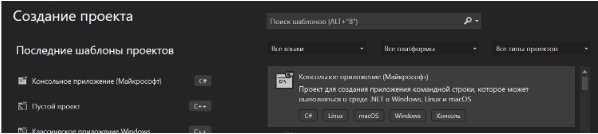
Click Next, name our project and select a location for it, create a project.
Go to Solution Explorer, right-click on the project name and go to “Manage NuGet Packages”.
In the NuGet that opens, select the “Browse” tab, here we will need to install the necessary libraries: Selenium.Webdriver, Selenium.Webdriver.ChromeDriver (...) and Zennolab.CapmonsterClout.Client. Also install dotenv if you want to use data loading from the “.env” file. After installing all components, go to the “Installed” tab to check the list of required packages:
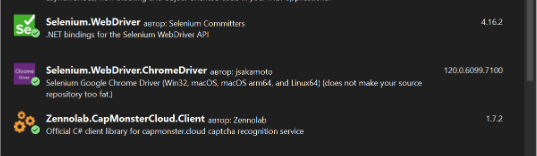
- Now you can start writing code. Let's start by importing the necessary components:
using OpenQA.Selenium;
using OpenQA.Selenium.Chrome;
using Zennolab.CapMonsterCloud;
using Zennolab.CapMonsterCloud.Requests;

namespace CaptchaSolver
Now let's create and send a request to the CapMonster Cloud server, get the captcha solution and return the result to our page using the Selenium and CapMonster Cloud libraries:
   class Program
{
    static async Task Main(string[] args)
    {
        string API_KEY = "YOUR_API_KEY";
        string SITE_KEY = "6Le-wvkSAAAAAPBMRTvw0Q4Muexq9bi0DJwx_mJ-";
        string WEBSITE_URL = "https://www.google.com/recaptcha/api2/demo";

        await SolveCaptcha(API_KEY, SITE_KEY, WEBSITE_URL);

        Console.WriteLine("Press any key to exit...");
        Console.ReadKey();
    }

    static async Task SolveCaptcha(string API_KEY, string SITE_KEY, string WEBSITE_URL)
    {
        var clientOptions = new ClientOptions
        {
            ClientKey = API_KEY
        };

        var cmCloudClient = CapMonsterCloudClientFactory.Create(clientOptions);

        var options = new ChromeOptions();
        options.AddArgument("--no-sandbox");
        options.AddArgument("--disable-dev-shm-usage");

        using (var driver = new ChromeDriver(options))
        {
            try
            {
                driver.Navigate().GoToUrl(WEBSITE_URL);
                Console.WriteLine("Page open, reCAPTCHA solving...");

                var task = new RecaptchaV2ProxylessRequest
                {
                    WebsiteUrl = WEBSITE_URL,
                    WebsiteKey = SITE_KEY
                };

                var result = await cmCloudClient.SolveAsync(task);
                Console.WriteLine("Task is solved!");

                ((IJavaScriptExecutor)driver).ExecuteScript("var element = document.getElementById('g-recaptcha-response');" +
                    $"element.textContent = '{result.Solution.Value}';");

                driver.FindElement(By.Id("recaptcha-demo-submit")).Click();
                Console.WriteLine("Verification completed!");
            }
            catch (Exception ex)
            {
                Console.WriteLine($"Ошибка: {ex.Message}");
            }

            await Task.Delay(5000);

            driver.Quit();
        }
    }
}
Full code:
using OpenQA.Selenium;
using OpenQA.Selenium.Chrome;
using Zennolab.CapMonsterCloud;
using Zennolab.CapMonsterCloud.Requests;

namespace CaptchaSolver
{
    class Program
    {
        static async Task Main(string[] args)
        {
            string API_KEY = "YOUR_API_KEY";
            string SITE_KEY = "6Le-wvkSAAAAAPBMRTvw0Q4Muexq9bi0DJwx_mJ-";
            string WEBSITE_URL = "https://www.google.com/recaptcha/api2/demo";

            await SolveCaptcha(API_KEY, SITE_KEY, WEBSITE_URL);

            Console.WriteLine("Press any key to exit...");
            Console.ReadKey();
        }

        static async Task SolveCaptcha(string API_KEY, string SITE_KEY, string WEBSITE_URL)
        {
            var clientOptions = new ClientOptions
            {
                ClientKey = API_KEY
            };

            var cmCloudClient = CapMonsterCloudClientFactory.Create(clientOptions);

            var options = new ChromeOptions();
            options.AddArgument("--no-sandbox");
            options.AddArgument("--disable-dev-shm-usage");

            using (var driver = new ChromeDriver(options))
            {
                try
                {
                    driver.Navigate().GoToUrl(WEBSITE_URL);
                    Console.WriteLine("Page open, reCAPTCHA solving...");

                    var task = new RecaptchaV2ProxylessRequest
                    {
                        WebsiteUrl = WEBSITE_URL,
                        WebsiteKey = SITE_KEY
                    };

                    var result = await cmCloudClient.SolveAsync(task);
                    Console.WriteLine("Task is solved!");

                    ((IJavaScriptExecutor)driver).ExecuteScript("var element = document.getElementById('g-recaptcha-response');" +
                        $"element.textContent = '{result.Solution.Value}';");

                    driver.FindElement(By.Id("recaptcha-demo-submit")).Click();
                    Console.WriteLine("Verification completed!");
                }
                catch (Exception ex)
                {
                    Console.WriteLine($"Error: {ex.Message}");
                }

                await Task.Delay(5000);

                driver.Quit();
            }
        }
    }
}
Code explanation:
class Program: Declaring the Program class.
static async Task Main(string[] args): The Main method of the application, which will be executed when the program starts. This method is asynchronous and uses Task to perform asynchronous operations.
string API_KEY = "YOUR_API_KEY";: Defining an API_KEY variable containing the API key for CapMonster Cloud.
string SITE_KEY = "6Le-wvkSAAAAAPBMRTvw0Q4Muexq9bi0DJwx_mJ-";: Defining the SITE_KEY variable containing the site key for reCAPTCHA.
string WEBSITE_URL = "https://www.google.com/recaptcha/api2/demo";: Defining a WEBSITE_URL variable containing the URL of the reCAPTCHA web page.
await SolveCaptcha(API_KEY, SITE_KEY, WEBSITE_URL);: Calling the SolveCaptcha method, passing the keys and URL as arguments.
Console.WriteLine("Press any key to exit...");: Printing a message to the console.
Console.ReadKey();: Waiting for the user to press a key before ending the program.
SolveCaptcha function performs a reCAPTCHA solution on the specified web page.
var clientOptions = new ClientOptions { ClientKey = API_KEY };: Creating a ClientOptions object specifying the API key.
var cmCloudClient = CapMonsterCloudClientFactory.Create(clientOptions);: Creating a CapMonster Cloud API client with the specified options.
var options = new ChromeOptions();: Creating a ChromeOptions object to configure the Chrome browser.
options.AddArgument("--no-sandbox"); and options.AddArgument("--disable-dev-shm-usage");: Adding Chrome Browser launch arguments to improve security and reduce memory usage.
using (var driver = new ChromeDriver(options)): Creating a ChromeDriver instance to control the Chrome Browser.
driver.Navigate().GoToUrl(WEBSITE_URL);: Going to the specified URL in the browser.
var task = new RecaptchaV2ProxylessRequest { WebsiteUrl = WEBSITE_URL, WebsiteKey = SITE_KEY };: Creating a task object to solve reCAPTCHA.
var result = await cmCloudClient.SolveAsync(task);: reCAPTCHA solving using CapMonster Cloud API.
((IJavaScriptExecutor)driver).ExecuteScript("var element = document.getElementById('g-recaptcha-response');" + $"element.textContent = '{result.Solution.Value}';");: Executing JavaScript code to insert a reCAPTCHA solution into a page.
driver.FindElement(By.Id("recaptcha-demo-submit")).Click();: Finding the button element and clicking on it to complete verification.
Console.WriteLine("Verification completed!");: Displays a message about verification completion.
catch (Exception ex) { Console.WriteLine($"Error: {ex.Message}"); }: Handling possible exceptions and displaying an error message.
await Task.Delay(5000);: Waiting 5 seconds.
driver.Quit();: Closing the browser.
Let's run our script. If you did everything correctly, the result will be the successful execution of the program:
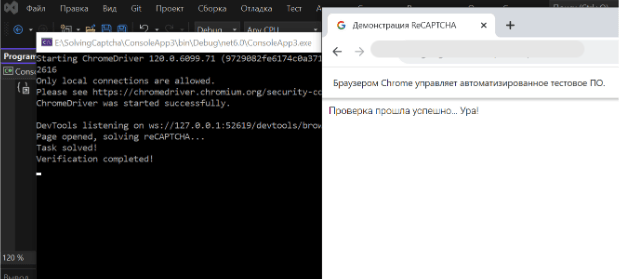
Note: We'd like to remind you that the product is used to automate testing on your own websites and on websites to which you have legal access.