Header Order for CapMonster Cloud: How to Reproduce Browser Headers and Bypass Anti-Bot Protection

When testing protection systems on their own websites and working with the CapMonster Cloud service, many developers encounter the following situation: the CAPTCHA is solved successfully, the token is obtained — but the server still rejects the request.
When you implement CAPTCHA or anti-bot mechanisms, you need to understand exactly how the server makes its decision — and which signals it uses to identify automation. The reason often lies not in the CAPTCHA itself, but in how the HTTP request is sent.
One of the key factors here is header order. In this article, you will learn why the order matters, how to reproduce it correctly, and how to integrate this with CapMonster Cloud.

What Header Order Is
An HTTP request consists not only of a URL and a body, but also of a set of headers:
User-Agent
Accept
Accept-Language
Cookie
...
The server reads not only the header contents — it also sees their order.
Why This Matters for Anti-Bot Protection
Modern protection systems (Cloudflare, DataDome, Imperva, and others) analyze:
- TLS fingerprint (JA3/JA3S)
- HTTP/2 SETTINGS fingerprint (Akamai H2 fingerprint)
- User-Agent
- IP reputation (ASN, data center IP, or residential IP)
- JavaScript fingerprint
- header order
- client behavior
Real browsers (Chrome, Firefox, and others) send headers:
- in a strictly defined order
- consistently on every request
But common HTTP libraries — requests (Python) and axios (Node.js) — may add default headers (User-Agent, Accept-Encoding, Connection) on top of user-defined ones, sort headers, or send them in a random order, which breaks the expected sequence and reveals automation.
How This Relates to CapMonster Cloud
CapMonster Cloud only solves CAPTCHA and does not make your request “look like a browser.”
That is:
- You received a valid token
- Added it to the request
- But the server still responds with an error
Why? Because your request looks like a bot.
How the Browser Sends Headers (Chrome 146*)
This order is repeated in a real browser almost every time:
* At the time of writing, Chrome version 146 is current.
HTTP/2 Pseudo-Headers
:method
:authority
:scheme
:path
Regular Headers (Chrome Example)
sec-ch-ua
sec-ch-ua-mobile
sec-ch-ua-platform
upgrade-insecure-requests
user-agent
accept
sec-fetch-site
sec-fetch-mode
sec-fetch-user
sec-fetch-dest
accept-encoding
accept-language
priority
A Common Mistake — Copying from DevTools
Many developers do this:
- Open Chrome DevTools
- Copy the headers
- Paste them into the code
The problem:
- DevTools does not always show the real order and may sort headers
- As a result, the order in the code differs from the browser
How to Get the Correct Order
Use tools that show real requests:
- Charles Proxy
- mitmproxy
- powhttp
They show headers exactly as the server sees them.
For example (captured with Charles Proxy):
:method: GET
:authority: example
:scheme: https
:path: /assets/js/example.js
sec-ch-ua-full-version-list: "Chromium";v="146.0.7680.178", "Not-A.Brand";v="24.0.0.0", "Google Chrome";v="146.0.7680.178"
sec-ch-ua-platform: "Windows"
sec-ch-ua: "Chromium";v="146", "Not-A.Brand";v="24", "Google Chrome";v="146"
sec-ch-ua-bitness: "64"
sec-ch-ua-model: ""
sec-ch-ua-mobile: ?0
sec-ch-ua-arch: "x86"
sec-ch-ua-full-version: "146.0.7680.178"
user-agent: Mozilla/5.0 (Windows NT 10.0; Win64; x64) AppleWebKit/537.36 (KHTML, like Gecko) Chrome/146.0.0.0 Safari/537.36
sec-ch-ua-platform-version: "19.0.0"
accept: */*
sec-fetch-site: same-origin
sec-fetch-mode: no-cors
sec-fetch-dest: script
referer: https://example.com/
accept-encoding: gzip, deflate, br, zstd
accept-language: en-US,en;q=0.9,ru;q=0.8
priority u=0, i
How to Reproduce Header Order in Code
Once you have obtained the real header order, the next task is to reproduce it correctly in your HTTP client.
The key problem is that most standard libraries do not guarantee header order.
To accurately reproduce browser behavior, it is recommended to use specialized solutions:
- tls-client (Go / Python) — implements header order control through header_order + pseudo_header_order at the Go binding level bogdanfinn/tls-client, passing the parameters directly to the native library
- custom HTTP/2 clients
- browser automation (for example, Playwright) — if the overhead is acceptable
Configuration Example (Python + tls-client)
Below is an example demonstrating a basic approach to reproducing a Chrome-like header order.
Important: chrome_146 is a valid profile in the Go library bogdanfinn/tls-client, documented as “Latest.” However, the standard Python package FlorianREGAZ/Python-Tls-Client (pip install tls-client) is abandoned and contains profiles only up to chrome_120. A reader who installs the standard package will get an error. Use the current bogdanfinn/tls-client fork or a compatible Python binding with chrome_146 support.
import tls_client

session = tls_client.Session(
    client_identifier="chrome_146",
    random_tls_extension_order=True
)

session.pseudo_header_order = [
    ":method",
    ":authority",
    ":scheme",
    ":path",
]

session.header_order = [
    "sec-ch-ua",
    "sec-ch-ua-mobile",
    "sec-ch-ua-platform",
    "upgrade-insecure-requests",
    "user-agent",
    "accept",
    "sec-fetch-site",
    "sec-fetch-mode",
    "sec-fetch-user",
    "sec-fetch-dest",
    "accept-encoding",
    "accept-language",
    "cookie",
    "priority",
]

headers = {
    "sec-ch-ua": '"Chromium";v="146", "Not-A.Brand";v="24", "Google Chrome";v="146"',
    "sec-ch-ua-mobile": "?0",
    "sec-ch-ua-platform": '"Windows"',
    "upgrade-insecure-requests": "1",
    "user-agent": "Mozilla/5.0 (Windows NT 10.0; Win64; x64) AppleWebKit/537.36 Chrome/146.0.0.0 Safari/537.36",
    "accept": "*/*",
    "sec-fetch-site": "same-origin",
    "sec-fetch-mode": "no-cors",
    "sec-fetch-dest": "script",
    "accept-encoding": "gzip, deflate, br, zstd",
    "accept-language": "en-US,en;q=0.9",
    "priority": "u=0, i",
}

response = session.get("https://example.com", headers=headers)
print(response.status_code)
The order in session.header_order must match the one you obtained from a real browser. Any deviations may affect the result.
HTTP/2 SETTINGS Fingerprint
Anti-bot systems analyze not only headers — they check the HTTP/2 SETTINGS fingerprint even before parsing the headers. Cloudflare and DataDome use the so-called Akamai H2 fingerprint, which encodes parameters into a string in the following format:
SETTINGS|WINDOW_UPDATE|PRIORITY|PSEUDO_HEADER_ORDER
This signal makes it possible to instantly detect curl, requests, and axios — without analyzing the request contents. tls-client solves this problem automatically through client_identifier: it applies the correct H2 SETTINGS profile for the selected browser. That is why the parameter client_identifier="chrome_146" is not just a “Chrome version,” but a full profile of the entire network stack.
The Role of Cookies After CAPTCHA Solving
After successfully passing a CAPTCHA, servers often set additional cookies. Depending on the protection system in use, these may include:
- cf_clearance (Cloudflare)
- datadome (DataDome)
- visid_incap (Imperva)
These cookies become part of the subsequent session and must be sent in later requests.
The cookie header must appear in the correct position within the Header Order. If it:
- is missing from the header order list
- or is automatically appended at the end
this may break the expected request structure and lead to rejection.
Example of passing cookies via session in tls-client:
import tls_client

session = tls_client.Session(
    client_identifier="chrome_146",
    random_tls_extension_order=True,
)

# After receiving cf_clearance from CapMonster Cloud / manually — pass it into the session
session.cookies.set(
    "cf_clearance",
    "received_value",
    domain=".example.com",
)

# All subsequent requests will automatically include the cookie in the correct position
response = session.get(
    "https://example.com/protected-page",
    headers=headers,
)

print(response.status_code)
Additional Errors That Affect the Result
Header Inconsistency Between Requests
Real browsers use a stable set of headers. If your script:
- sends different headers at different stages
- changes their order
- adds or removes headers without logic
this is perceived as an anomaly.
Incorrect Referer
The referer header plays an important role in navigation context. Its absence or mismatch may look suspicious.
For example, if you request a resource that is usually loaded from a page but do not specify a referer, this may trigger an additional check.
Mismatch in sec-fetch Headers
The Sec-Fetch-Site, Sec-Fetch-Mode, and Sec-Fetch-Dest headers must match the real request context. Sec-Fetch-Site shows the relationship between the initiator and the target resource, Sec-Fetch-Mode indicates the request mode, and Sec-Fetch-Dest indicates the destination of the loaded resource.
Incorrect or inconsistent values may contradict the rest of the HTTP request data and be used by the server as a signal to reject the request. Errors are especially common when none is used for a normal link click or when cross-origin is confused with cross-site.
Table of correct values depending on the request type:
Using HTTP/1.1 Instead of HTTP/2
Modern browsers, including Chrome, use HTTP/2 by default.
If your client works over HTTP/1.1, this already creates a noticeable difference. In combination with other factors, this may affect the anti-bot system’s decision.
Hardcoded sec-ch-ua-full-version-list
The sec-ch-ua-full-version-list header appears only in response to Accept-CH from the server (Client Hints API) — not automatically in every request. It should not be present at all in “cold” requests.
Hardcoding this header in code may lead to a mismatch between User-Agent, sec-ch-ua, and the real TLS profile. As a result, the request looks inconsistent and may be rejected by the anti-bot system.
In some cases (for example, when working with DataDome), it is safer either to obtain it from real traffic or not to set it manually unless necessary.
Duplicate Cookies
Another common mistake is sending multiple cookies with the same name but different values. For example:
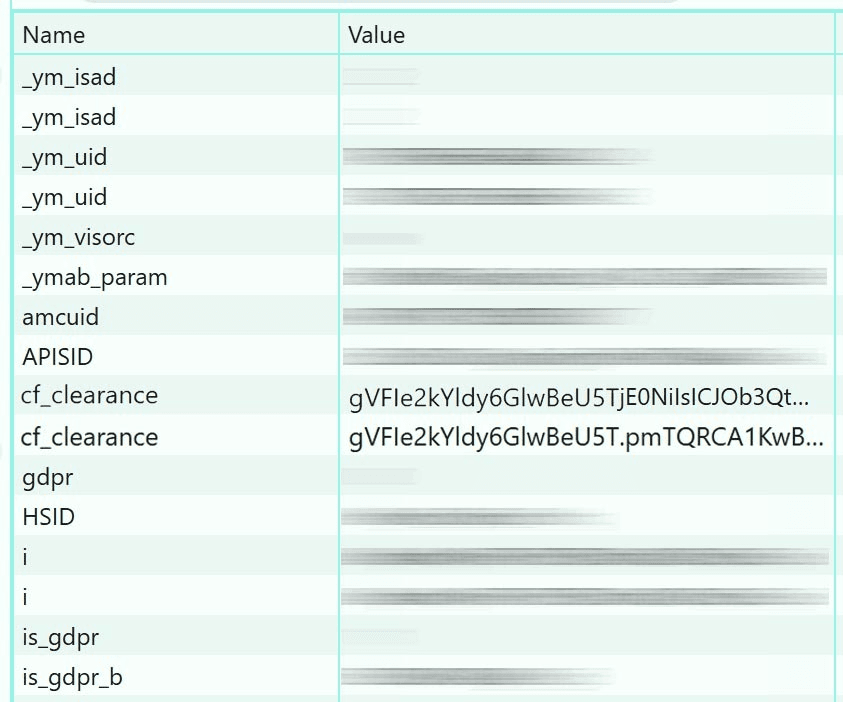
This situation may occur if:
- cookies are managed manually without using a cookie jar
- the library merges cookies incorrectly
- values are set repeatedly
The correct approach:
- use built-in cookie management mechanisms (cookie jar)
- check the final cookie header before sending
- avoid duplicate names
A Practical Debugging Approach
The most reliable way to diagnose issues is to compare a real browser request with your own.
Recommended process:
- Capture the request from the browser using tools like Charles Proxy or mitmproxy
- Execute the same request from your code
- Compare them line by line
Special attention should be paid to:
- header order
- the presence or absence of specific headers
- header values
- cookies
Even small differences may matter.
Conclusion
The CapMonster Cloud service helps obtain a correct CAPTCHA solution, but the further processing and use of that solution in your application remain your responsibility.
For example, Cloudflare Bot Management checks TLS, H2 SETTINGS, and headers simultaneously — failing on one layer is enough to trigger a block. To interact successfully with protected systems, you need to:
- reproduce browser behavior at the HTTP level
- maintain the exact header order
- use the correct TLS profile and H2 SETTINGS through client_identifier
- keep requests consistent
- handle cookies correctly through a cookie jar
Only the combination of these factors makes it possible to achieve stable results when testing and working with anti-bot protections.